
Making ASP.NET Core APIs Production Ready: Reduce Failures Before Release
Introduction
Making ASP.NET Core APIs production ready takes more than confirming that an endpoint returns the right response. An API can work on a developer’s machine yet fail under traffic, expose private data, or leave the team guessing during an outage.
A dependable release needs secure settings, clear error responses, useful monitoring, and tested deployment steps. It also needs sensible limits and a plan for handling slow or failed dependencies.
Use this checklist to find gaps before customers do. Framework behavior can change between releases, so confirm version-specific details in the Microsoft ASP.NET Core documentation for your hosting platform.
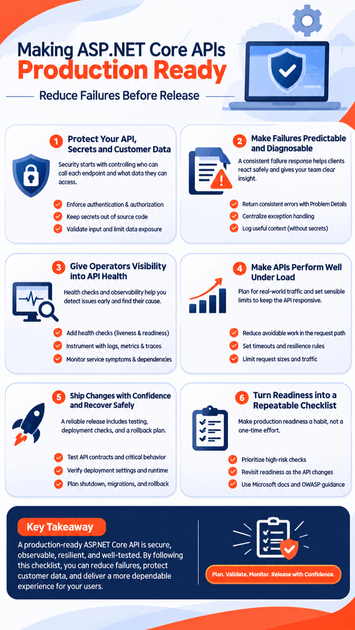
Protect ASP.NET Core APIs, secrets, and customer data
Security starts with controlling who can call each endpoint and what data they can access. Review authentication, authorization, configuration, and response content before release.
Enforce authentication and authorization at the right level
Authentication confirms who a caller is; authorization decides what that caller may do. ASP.NET Core supports schemes such as cookies and bearer tokens, but each API should use the scheme that fits its clients and hosting setup.
Apply authorization policies to routes or endpoints that need protection, and check access to specific records where needed. A signed-in user should not gain access to another customer’s data by changing an ID in a request. Follow the Microsoft ASP.NET Core authentication and authorization documentation for your framework version.
Keep secrets and environment settings out of source code
Use configuration providers to separate settings from application code. Keep development, test, and production values distinct, and use a secret store suited to the host, such as a cloud provider’s vault or a managed platform setting.
Before release, check that passwords, API keys, and signing keys are absent from source control and build logs. Also review application logs for sensitive values. A secret can leak through a debug message just as easily as through a checked-in file.
Validate input and limit data exposure
Validate request data at the API boundary, including required fields, value ranges, and allowed formats. Use request and response models rather than returning database entities, which may contain internal fields or data the caller should not see. This also helps prevent over-posting, where a client submits fields it should not control.
Test malformed, oversized, and unauthorized requests. The OWASP API Security guidance is a useful source for common API risks and review areas.
Make failures predictable and diagnosable
A consistent failure response helps clients react safely and gives support teams a useful starting point. Define how the API handles expected errors and unexpected faults before production traffic arrives.
Return consistent errors with Problem Details
ASP.NET Core supports Problem Details responses through its built-in services. Use a stable format for errors so clients can identify the status and understand what action they can take without parsing a custom message for every endpoint.
Choose status codes that match the failure, such as 400 for invalid input, 401 for missing or invalid credentials, and 404 for a missing resource. Keep stack traces, database details, and internal paths out of client responses. Those details belong in protected server logs.
Centralize exception handling and define failure behavior
Handle unexpected exceptions in one place rather than writing separate error logic in each controller or route. Central exception handling can return a safe response while recording the exception and request context for the team.
Decide how the API responds when a dependency fails or a request cannot be completed. Clients need a clear result, not a timeout with no explanation. Avoid exposing raw exception text, which can reveal implementation details.
Log useful context without recording secrets
Structured logs make it easier to filter events by route, status code, or trace identifier. Include enough context to link related events, but exclude access tokens, passwords, and sensitive personal data.
During an incident, look for repeated failures on one route, rising server errors, or failures that share a dependency. Correlation and trace identifiers help connect an API request to logs from other services. Set log retention and access rules to match your data and security needs.
Give operators visibility into API health
A running process does not prove that an API can serve requests. Health checks, metrics, logs, and traces help teams detect trouble and find its source.
Add health checks that reflect service readiness
A liveness check answers whether the process should keep running. A readiness check answers whether it can accept traffic, which may depend on a database or another required service.
ASP.NET Core health checks can report these states to a load balancer or orchestration platform. Check only dependencies that affect the service’s ability to handle requests. If every optional service marks the API unready, a minor outage may remove healthy instances from traffic.
Instrument requests with logs, metrics, and traces
Logs describe individual events, metrics show trends, and traces follow work across service boundaries. Together, they help answer what failed, how often it happens, and where a slow request spent its time.
OpenTelemetry can collect and export these signals, but the setup depends on the telemetry backend in use. Follow the Microsoft ASP.NET Core observability guidance and verify that requests, dependencies, and errors appear in the chosen monitoring system before launch.
Monitor service symptoms and dependency failures
Track request volume, latency, error rates, and the health of key dependencies. A rise in slow database calls may explain increased API latency, while a sudden drop in traffic could point to routing or readiness problems.
Set alerts based on service objectives and normal traffic patterns. A threshold that works for one API may create noise for another, so review alert quality after real releases and incidents.
Make ASP.NET Core APIs production ready under load
Production traffic can expose slow queries, resource limits, and weak failure behavior. Measure the service under realistic conditions, then improve the parts that cause actual problems.
Reduce avoidable work in the request path
Check database queries for unnecessary reads and repeated work. Use asynchronous I/O for operations that wait on network or file access, and paginate collection endpoints so one request cannot return an unbounded result.
Profile and load-test before optimizing. Repeated computation or large responses may matter more than a small code-level change. Measure latency and resource use so improvements address a real bottleneck.
Set timeouts and resilience rules for outbound calls
Set deliberate timeouts for database and service calls. Without them, a stalled dependency can tie up request resources and delay other users.
Retries and circuit breakers can help with temporary faults, but they must fit the operation. Repeating a non-idempotent action may create duplicate work, and excessive retries can add pressure to an already failing service. Use retry limits and backoff where retries are safe.
Set practical limits for requests and traffic
Limit request sizes, page sizes, and costly operations. ASP.NET Core rate limiting can help control traffic, but set policies around the API’s users and workload rather than blocking normal bursts.
Test expected peak patterns along with unusually large and abusive requests. Confirm that the API rejects excess work in a controlled way and still serves valid requests where capacity allows.
Ship changes with confidence and recover safely
Production readiness includes the release process, not only application code. Tests, host settings, shutdown behavior, and rollback plans all affect service reliability.
Test API contracts and production-critical behavior
Write unit and integration tests for authorization, validation, error responses, health checks, and key dependency interactions. Contract tests can catch changes that break other services relying on your API.
Focus tests on high-risk behavior rather than chasing one coverage percentage. A useful test checks a realistic failure path, such as a caller without access receiving a safe response.
Verify deployment settings and runtime behavior
Check environment-specific configuration, HTTPS, proxy headers, and load-balancer behavior. If the API runs in a container, verify its resource limits, startup checks, and shutdown settings.
Test startup validation so missing required settings fail clearly instead of causing errors during live requests. Use Microsoft hosting and deployment documentation for the selected platform; do not assume settings transfer unchanged between hosts.
Plan shutdown, migrations, and rollback
Allow in-flight requests to finish during a planned shutdown when the host supports it. For database changes, prefer steps that let old and new application versions work during a rollout, then remove old fields only after the transition.
Define how to roll back code and configuration before deployment. Rehearse the release in a staging environment that resembles production, then check health signals and error rates after the change.
Turn production readiness into a repeatable release checklist
Treat readiness as a release habit, not a one-time review. Recheck key controls whenever an API gains endpoints, dependencies, sensitive data, or a new hosting setup.
Prioritize checks that reduce the most risk
Before release, confirm that endpoints enforce access rules, secrets stay out of code and logs, and errors reveal no internal details. Verify health checks, request limits, and timeouts for critical dependencies.
Then test the deployment and rollback path. A release is easier to manage when the team can see its effects and reverse it without guesswork.
Revisit readiness as the API changes
A new endpoint can introduce a data exposure risk. A new dependency can add failure modes, and a new host can change how traffic reaches the app. Review the checklist whenever those changes occur.
Use Microsoft documentation and OWASP API Security guidance to confirm details for the framework and platform versions in use. Keep the checklist tied to real incidents and test results so it remains useful.
Conclusion
Making ASP.NET Core APIs production ready means preparing for bad inputs, slow dependencies, traffic spikes, and failed releases. Protect data, return safe errors, monitor service health, set clear limits, and test how the API behaves under stress.
Make these checks part of every release, then verify the service after deployment. That steady routine gives customers a more dependable API and gives the team a clearer path when problems arise.









