
AI Agent Testing & Monitoring: Catch Failures Before They Reach Users
Introduction
An AI agent can sound certain and still fail at its job. It might choose the wrong tool, change a record without permission, or repeat the same action until a task stalls. AI Agent Testing & Monitoring must check the agent’s actions and results, not just whether its final response sounds good.
Testing helps find weak spots before release. Monitoring shows how the agent behaves with real users, data, and connected tools. Together, they help teams measure task quality, spot safety risks, and improve reliability over time.
An AI agent uses a model to make decisions or take actions through tools, APIs, or workflows. The right level of testing depends on what the agent can access and the harm a mistaken action could cause.
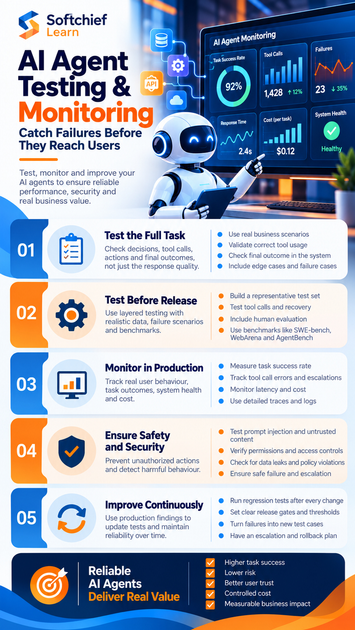
Reliable AI agents start with tests of decisions, actions, and outcomes
A chatbot may answer in one turn. An agent can take several steps, call outside services, and affect real systems along the way. That makes the full task the right unit of evaluation.
Test the full task, not just the final response
A fluent answer doesn’t prove the agent completed the work correctly. For a scheduling agent, check whether it understood the request, chose the calendar tool, used the right date and time, and created the intended event. A response that says “Done” is not enough if no event exists.
Record whether the agent reached the correct outcome and followed the required steps. If it couldn’t proceed safely, asking for clarification or handing the task to a person may count as the right result.
Map tools, permissions, and failure points
List the agent’s tools, data sources, user permissions, and available actions. Mark actions that can send messages, edit records, reveal private data, or start a payment. These paths need more careful tests than actions that only read public information.
Then check which component could fail at each point. A wrong result may come from the model, prompt, search data, tool connection, access rules, or workflow design. Log enough detail to identify the cause without keeping sensitive data you don’t need.
AI agent testing needs layers before release
A single test set can miss rare but risky cases. Use repeatable checks, realistic tasks, human review, and public benchmarks as different sources of evidence. No single score proves that an agent will work safely in your own setting.
Build tests from real tasks and failure cases
Include routine requests, unclear instructions, missing details, and cases where the agent should stop. An order-support agent, for example, should be tested on a clear refund request and one with no order number. Anonymized support tickets and user workflows can help create realistic cases, with personal details removed or protected.
Save failures from earlier tests and user reports as new test cases. Keep the set versioned so you can compare results after changes. Human reviewers can check whether the test result matches what a user or business process actually needs.
Test tool calls, recovery, and benchmark fit
Check whether the agent picks the right tool, sends valid inputs, and handles the tool’s response. Include timeouts, service errors, interrupted tasks, and situations where the safest step is to ask a question. A good agent should not treat an error as permission to guess or repeat a harmful action.
Public benchmarks offer useful reference points. SWE-bench tests software agents on real GitHub issues; WebArena evaluates agents in web environments; AgentBench spans eight interactive settings. Check each benchmark’s version and task fit. Its results don’t predict performance on your tools, users, or rules.
AI Agent Testing & Monitoring in production shows real behavior
Offline tests can’t cover every live request or tool failure. Production monitoring adds evidence about task results and system health as people use the agent. Collect only the data needed to diagnose issues, and apply clear access and retention rules.
Track task success, intervention, and failures
Define each metric before comparing results. Task completion rate can mean the share of eligible runs that reach an agreed end state. Human intervention rate can count runs where a person had to step in; tool-call error rate can count failed calls over all calls. Segment results by task type, tool, and agent version to avoid misleading comparisons.
Track policy violations separately, such as an unauthorized edit or a blocked data request. A low average error rate can hide a serious issue in one task group. Review both the overall trend and high-impact failures.
Monitor speed, cost, and traces
Measure end-to-end time, model and tool latency, token use, and external service errors. These signals help explain delays and operating costs, but faster or cheaper runs aren’t automatically better if they fail more often.
Keep redacted traces with timestamps, correlation IDs, tool names, arguments, returned status, and task outcomes. Where policy allows, retain relevant prompt and response records too. Structured logs let a team reconstruct a failed run without storing unnecessary personal data or private model reasoning.
Safety and security tests limit unauthorized actions
Safety checks must cover the whole action path, including tools and content from outside sources. Test depth should match the agent’s access and the impact of a mistake. An agent that can change account details needs stricter controls than one that only answers from public documents.
Test prompt injection and untrusted content
A webpage or document may contain instructions that conflict with the agent’s trusted rules. Test whether the agent treats that text as untrusted content instead of following it to reveal data or misuse a tool. Repeat these tests with retrieved files and copied user content.
The OWASP Top 10 for LLM Applications, 2025 edition covers risks such as prompt injection, sensitive information disclosure, and excessive agency. Use it to shape security tests, then tailor the cases to your own tools and data.
Verify permissions and safe failure behavior
Give the agent only the access it needs, and enforce permissions outside the model. Test attempts to read another user’s records, bypass role rules, or take an action beyond its assigned authority. Sensitive actions may need a person’s confirmation before the system carries them out.
Also test privacy leaks, unsupported claims, and uncertain requests. The agent should refuse, ask for details, or escalate when it can’t safely complete a task. A safe stop is better than an irreversible action based on a guess.
A continuous testing loop makes improvement measurable
Testing and monitoring work best as a cycle. Use production findings to improve test cases, then confirm that fixes work before release. Assign an owner for reviews and alerts so important failures don’t sit unnoticed.
Run regression tests after every change
Retest after changing the model, prompt, tools, retrieval data, permissions, or workflow. Compare the new results with the prior version using the same test set. A change may improve task success while increasing cost or creating new safety failures, so review the trade-offs together.
Turn confirmed production failures into regression tests. This helps catch the same issue before a later update reaches users. Keep the test set current as tasks and connected services change.
Set release gates and escalation rules
Define release criteria for task quality, safety, reliability, and cost before launch. Set thresholds for alerts, and decide who reviews them and when a person must take over. For high-impact problems, document how to pause the agent, roll back a change, and review affected actions.
The NIST AI Risk Management Framework offers a structure for identifying and managing AI risks across design, development, use, and evaluation. It can guide governance, but it doesn’t replace tests for your system or human oversight of risky actions.
Conclusion
Reliable agents do more than give convincing answers. They choose suitable tools, respect permissions, recover from errors, and reach the right task outcome. Test realistic work before release, monitor clear quality and safety signals in production, and feed failures back into regression tests.
Before granting an agent more access, confirm that its tests cover the actions it can take. Make every serious failure a tracked issue, assign someone to review it, and verify the fix before the next release.









