
Secure Power Apps External API Integration: Protect Credentials and User Data

Introduction
An external API can add useful features to a Power App, such as live shipping details or customer records. But a weak connection can expose credentials or send private data to the wrong people. Secure Power Apps external API integration starts with choices about identity, access, and where each request is handled.
Security doesn’t come from the app alone. Connector settings, API-side checks, data handling, and release controls all affect the risk. The right setup depends on the API and who needs access, so plan the connection before building the app.
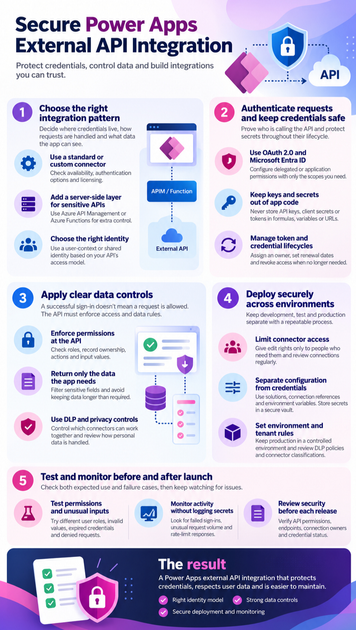
Choose a secure Power Apps external API integration pattern
The connection pattern sets the trust boundary: which component holds credentials, sends requests, and can see API data. Choose one that matches the API’s sensitivity and the work the app must do.
Connect with a standard or custom connector
A standard connector may already support the API. If not, a Power Platform custom connector can describe its operations and authentication method. Check connector availability, supported authentication options, and licensing for your environment and use case before you build around it.
Add a server-side layer for sensitive APIs
Use a backend such as Azure API Management (APIM) or an Azure Function when an API needs privileged credentials, request checks, throttling, or filtered responses. The backend can enforce rules before forwarding a request and can remove fields the app shouldn’t receive.
Where the target service supports it, the backend can use a managed identity to authenticate. That identity belongs to the backend service; it is separate from the Power App user’s connection. Microsoft’s APIM managed identity guidance explains how APIM can access protected resources without provisioning or rotating a secret.
Decide which identity the API should see
With a user-context connection, each person signs in with their own credentials. This can support personal access rules and user-level audit records, but each user must have an active connection and the right API permissions.
A shared or app-level identity can help when the API doesn’t support individual user access. It also means the API may see every request as one identity, so apply least privilege and keep an audit trail that identifies the Power Apps user. Plan how to disable that identity when the app or service is retired.
Authenticate API requests and keep credentials safe
Authentication proves who or what is making a request. It doesn’t decide whether that identity should read a specific record or perform a specific action.
Use OAuth 2.0 and Microsoft Entra ID where supported
When the API supports OAuth 2.0 with Microsoft Entra ID, configure the connector for the API’s expected identity model. Delegated permissions act on behalf of a signed-in user; application permissions let an app act as itself. Confirm which mode the API and connector support, then request only the scopes or roles the integration needs.
Check consent requirements and the token audience. A token issued for the wrong API won’t grant the intended access. Follow Microsoft’s custom connector Entra ID setup for connector-specific configuration.
Keep keys and secrets out of app code
Never put an API key, client secret, or bearer token in a formula, app variable, URL, or client-side request. App users may be able to inspect client-side content, and secrets in URLs can end up in logs or browser history.
Use connector-managed authentication when it fits the API. If the API requires a privileged key, place it in a secured backend and have the app call that service instead. Ordinary environment variables are configuration values, not secret storage; use an approved secret store for sensitive credentials.
Manage token and credential lifecycles
Secrets and tokens can expire, become exposed, or no longer be needed. Assign an owner for each connection and credential, record its purpose and renewal plan, and set a reminder before expiry. Microsoft notes in its connector guidance that OAuth client credentials need regular renewal.
When a user leaves or an integration is retired, revoke access and remove unused connections. Rotate any credential that may have been exposed, then verify the replacement works before removing the old one.
Secure Power Apps external API integration with clear data controls
A successful sign-in doesn’t guarantee that a request is allowed. The API must check what the caller can do and which data they can access.
Enforce permissions and validate requests at the API
Check roles, record ownership, allowed actions, and input values at the API or backend boundary. Don’t rely on hidden screens, disabled buttons, or Power Apps formulas to block unauthorized requests; users can change or bypass client-side behavior.
The OWASP API Security Top 10 highlights risks such as broken object-level authorization, broken authentication, and unrestricted resource use. Validate record IDs and inputs on every request, and set limits that help prevent excessive calls.
Return only the data the app needs
Ask the API for only the fields and records the app uses. Filter sensitive information at the API, then avoid keeping it longer than needed in collections, variables, or logs.
For example, a service app might request only open cases assigned to the signed-in user. The API should verify that user’s access rather than trusting a user ID supplied by the app.
Apply DLP and privacy controls
Power Platform data loss prevention (DLP) policies let admins control which connectors can work together and share data. They help govern data movement, but they don’t replace API authorization or record-level checks. Microsoft describes connector controls in its DLP policy guidance.
Also review what personal data the integration handles, how long it is kept, and which organizational rules apply. Keep the API response and app storage limited to the stated purpose.
Deploy secure Power Apps external API integrations across environments
Development, test, and production should have clear boundaries. A repeatable deployment process helps prevent test settings or credentials from carrying into a live app.
Limit connector access and review connections
Give custom connector edit rights only to people who need them, and review who can create or use connectors. Sharing a connector and sharing a connection are different: users may need their own connection, depending on how the connector is set up.
Check connection owners and app users against the intended identity model. Microsoft’s custom connector sharing guidance explains how connectors can be shared directly or with an app. Review access when roles change.
Separate configuration from credentials
Use solutions, connection references, and environment variables to move apps between environments without hardcoding endpoint details. A development endpoint can then be replaced with a test or production endpoint during deployment.
Environment variables can hold ordinary configuration, but don’t treat a text value as a secure vault. Microsoft supports secret-type environment variables linked to Azure Key Vault; see its environment variable documentation. Provision production credentials through an approved secret-management process.
Set environment and tenant rules
Keep production apps in a controlled environment, limit maker permissions, and review connector classifications and DLP policies. Before enabling a new external connector, involve the Power Platform admin and API owner. They can confirm that the endpoint, data flow, and access rules fit the organization’s standards.
Test and monitor the integration before and after launch
Security checks should cover both expected use and failure cases. Test the connection with the same roles and limits planned for production.
Test permissions, errors, and unusual inputs
Try the app with users who have different access levels. Test invalid values, expired or revoked credentials, API timeouts, and denied requests. Confirm that a user can’t change a record ID or action to reach data they shouldn’t see.
Error messages should help users recover without revealing secrets, internal paths, or sensitive response data. Make sure the app handles rate limits and service outages without exposing raw API output.
Monitor activity without logging secrets
Watch for failed sign-ins, unusual request volume, repeated authorization failures, and rate-limit responses. Logs should help teams find problems without storing keys, tokens, or full personal data payloads.
Redact sensitive fields in app, connector, and backend logs. Limit log access and retention to the people and period needed for support and security work.
Review security before each release
Before deployment, verify API permissions, DLP policies, connection owners, endpoint URLs, and credential status. Confirm rollback steps in case the new connector setup fails. Schedule periodic access reviews so unused connections and former owners don’t retain access.
Conclusion
Secure Power Apps external API integration depends on the app, connector, API, and operating environment working together. Choose an identity model that fits the API, keep privileged credentials out of client-side code, and enforce access rules at the API boundary. Use DLP and environment controls as added safeguards, then test and review the connection throughout its life.
Before launch, check who can call the API, what data comes back, and where credentials live. Keep those checks in every release, and your integration will be easier to trust and maintain.









