
API-Based Power Platform Solutions: Connect Apps and Automate Work
Introduction
A sales team updates one system, finance checks another, and someone copies the same order details into both. API-based Power Platform solutions can reduce this manual work by connecting apps and services through supported connectors, custom connectors, or direct API calls. The right approach depends on the API, the job, and your organization’s security and licensing rules.
Power Apps, Power Automate, and Power BI can all work with API-connected data, but each solution needs a clear design. Start by choosing an integration method, then plan for access controls, API limits, errors, and future updates. Good governance helps the solution keep working after it leaves the test environment.
Connect Power Platform systems through APIs
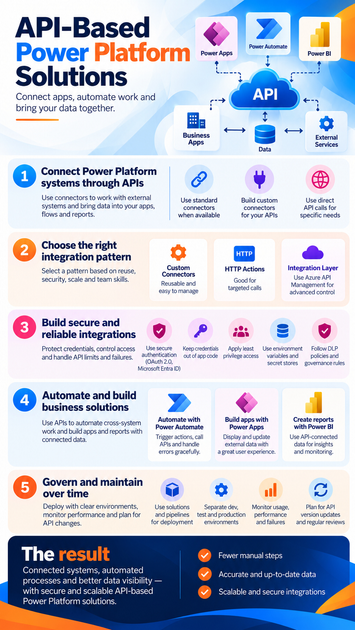
An API lets one service request data or actions from another. Power Platform uses connectors to make many of these operations available in apps and flows, so makers can work with actions such as creating a record or retrieving an order without writing every request from scratch.
Understand APIs and connectors
An API defines how software can request data or functionality. A connector packages API operations for use in Power Apps, Power Automate, or related services. The connector is not the API itself; it provides a Power Platform-friendly way to call it.
Microsoft’s custom connector documentation explains how connectors wrap REST APIs and expose their operations to apps and flows. Connectors can work with public APIs or private APIs, though private network access may require a supported gateway or network setup.
Check connector fit and licensing
First, check Microsoft’s connector catalog for a supported connector. Confirm that it includes the operations you need, supports the required authentication, and works in the Power Platform service you plan to use. A connector that appears suitable may still lack a specific API action.
Licensing can vary by connector, app, flow, and user. Check the current Power Platform licensing FAQ and licensing guide before choosing a design. Standard, premium, and custom connector access isn’t included in every plan.
Know when to call an API directly
A standard connector may not expose the endpoint, request fields, or behavior your process needs. In that case, a custom connector can make the API reusable, while an HTTP action may suit a single, targeted call if its authentication and governance options meet your requirements.
For a complex API, an integration layer such as Azure API Management can centralize routing, policies, and monitoring. That layer also adds setup and ongoing work, so use it when those controls justify the extra service.
Choose an API pattern for Power Platform solutions
Choose the simplest pattern that meets your requirements for reuse, scale, security, and team skills. A one-off request may not need the same structure as an integration used across several apps and flows.
Build reusable custom connectors
A custom connector gives makers a defined set of API actions in Power Apps and Power Automate. You can describe operations in an OpenAPI definition or Postman collection, or configure them in the connector portal where supported. Then set up authentication and publish the connector for use.
Microsoft documents authentication options such as OAuth 2.0, Microsoft Entra ID, basic authentication, and API keys. Choose an option that fits the API and your security policy. When the API’s fields or operations change, update and republish the connector, then test the apps and flows that depend on it.
Use HTTP actions for focused calls
An HTTP action can be useful when a flow needs to make a specific request and no connector exposes the required operation. Before using it, check licensing, available authentication methods, data policies, and the target API’s terms and limits.
HTTP actions can put request details directly in a flow, which may make reuse and oversight harder. If several solutions need the same API behavior, a managed custom connector or integration layer is often easier to support.
Secure API-based Power Platform solutions
Security and reliability depend on the full path: the user or service identity, the connector, the API, and the data returned. Requirements differ by API, tenant, connector, and license, so verify each part before production use.
Protect credentials and limit access
Grant only the permissions the app or flow needs. Use the API’s supported authentication method, assign clear connection owners, and plan what happens if an owner leaves the organization. Don’t place passwords, tokens, or keys in app formulas or flow steps.
Use connection references and environment variables to keep connections and configuration separate from solution logic. Microsoft’s environment variable guidance explains how values can vary between environments; secret values may need a dedicated secret store such as Azure Key Vault. Admins can also use data policies to classify or block connectors and control which services may share data.
Plan for limits, failures, and changing data
Check the API documentation for rate limits, throttling responses, page size, and timeout behavior. Power Platform also has request and connector limits. Microsoft’s request limits and allocations notes that retries and pagination can count as action executions, so estimate expected usage before launch.
Build flows to handle temporary failures with suitable retries and clear exception paths. For large results, use pagination and avoid fetching fields the solution doesn’t need. Map API fields carefully, validate user input, and account for missing or null values. Useful error messages and logs should help support teams diagnose problems without exposing sensitive data.
Apply API-based Power Platform solutions
API integrations can support routine work across different systems. Start with a clear business process, name the systems involved, and identify the API operation needed at each step.
Automate cross-system work with Power Automate
A common flow pattern starts with a trigger, such as a new request in a service desk. Power Automate can call an API to create a record in another system, then send a confirmation when the call succeeds. If the API rejects the request, an exception path can record a safe error summary and alert a support team.
Keep business rules visible in the flow and check the API response before marking work complete. For example, a successful connection alone doesn’t prove that the API accepted or saved the requested record.
Build apps and reports with connected data
Power Apps can use connector operations to display or update records held outside the platform. A useful app shows a loading state while it waits for the API, checks fields before sending them, and gives users a clear next step when a request fails.
Power BI can use API-connected data for reports, but the connection method affects refresh, permissions, and data volume. For example, Microsoft documents an asynchronous Power BI REST API refresh process that can return a request ID for checking refresh status later. Confirm that the API and Power BI setup support the refresh design you need.
Govern and maintain solutions over time
An integration needs more than a successful test run. Teams should plan for deployment, ownership, monitoring, and API changes before relying on it in production.
Deploy with clear environments and configuration
Separate development, test, and production work so changes can be checked before release. Package apps and flows in solutions, use connection references where appropriate, and document environment-specific values. Microsoft’s Power Platform pipelines guidance describes how pipelines can deploy solutions with configuration such as connections and environment variables.
Monitor performance and measure value
Review flow run history, connector behavior, API responses, and service health. Watch for API version changes or deprecation notices, and test updates before deploying them. Track a few measures tied to the original need, such as fewer manual steps, fewer failed records, or shorter completion time. Set a baseline first so you can compare results fairly.
Conclusion
API-based Power Platform solutions work best when the integration method fits the task and the team can support it. Confirm connector and licensing fit, protect access, plan for limits and failures, and use managed deployment and monitoring as the solution grows.
Start with one high-friction process. Map the systems and API operations it needs, then test the smallest secure integration that can show whether it improves the work.









