
Secure Multi-Client APIs on Azure: Prevent Cross-Tenant Data Exposure

Introduction
A shared API can make it easier to serve many customers, but one weak tenant check can expose another client’s records. Secure multi-client APIs on Azure need protection across the full request path, not only at the gateway.
Microsoft Entra ID can verify identities, while Azure API Management can apply shared gateway rules. Your application and data layer must still decide which tenant and resources each caller may use. The right setup depends on whether your clients are organizations, apps, users, or a mix.
A clear design helps you set tenant boundaries, validate and authorize requests, control traffic, and spot changes that could weaken security. Start by defining who each client is and what data they’re allowed to reach.
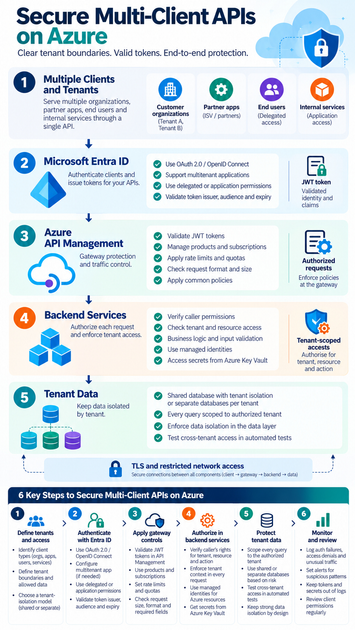
Secure Multi-Client APIs on Azure with clear tenant boundaries
Define what “client” and “tenant” mean
A client might be a customer organization, partner app, internal service, or end user. One API can serve several of these at once, so write down which identity makes each request and whose data it may access.
A client ID identifies an app in an identity system. It doesn’t prove that the app can access a particular customer’s data. Keep identity, authorization, and data isolation separate in your design.
Choose a tenant-isolation model
A shared app and database can store records for many tenants, with each record tied to a tenant ID. This can reduce operating work and cost, but every query and update must enforce the right tenant boundary.
Separate databases or app resources can give tenants stronger isolation. They can also add cost and management work. Choose based on your risk, legal needs, and the impact a cross-tenant access error would have.
Map the request path and trust boundaries
Trace a call from the client through API Management to the backend and data store. Mark where the token is checked, how the tenant context is established, and which service makes each access decision.
For example, a request to /tenants/acme/invoices includes a tenant name in its path. Treat that name as a request, not proof of access. The backend must check whether the authenticated caller can read Acme’s invoices.
Authenticate clients and authorize every request
Use Microsoft Entra ID for tokens
Microsoft Entra ID can issue tokens for APIs that use OAuth 2.0. OpenID Connect supports sign-in and user identity, while OAuth access tokens let clients call protected APIs. Use delegated permissions when an app acts for a signed-in user; use application permissions when a service acts as itself.
For a SaaS API that accepts customers from different directories, follow Microsoft’s guidance for converting an app to multitenant. A multitenant sign-in does not automatically grant access to every organization’s data. Your app still needs its own tenant access rules.
Validate claims, then check tenant access
Validate the token’s issuer, audience, expiry, and required scopes or roles. API Management’s validate-jwt policy can reject missing or invalid tokens before they reach your backend.
A tenant ID in a URL, header, or request body is only caller input. Compare it with trusted identity claims and your own authorization data before acting. In a multitenant app, also validate the token issuer against the identity provider’s metadata.
Keep resource authorization in the backend
Gateway checks help stop invalid requests early, but they don’t replace authorization where data is read or changed. The backend should verify the caller’s rights for the requested tenant, resource, and action.
For example, a user may have permission to view invoices but not change them. Check that permission for the specific invoice operation. This helps protect data if a gateway rule is missing or a request reaches the service by another route.
Secure multi-client APIs on Azure with API Management
Use products and subscriptions to manage client access
API Management products can group APIs and set access terms for different client groups. Subscriptions can help you issue and manage client-specific access keys for those products.
A subscription key identifies an API Management subscription, not a user or app. Microsoft’s API Management security guidance says not to use subscription keys as authentication. Pair them with strong identity checks, such as OAuth tokens, and keep keys out of public client code.
Apply token validation and traffic limits
Use gateway policies to validate tokens and reject calls that fail required checks. Rate limits can slow abusive traffic; quotas can set call limits over a longer period. Set limits by plan or client need, and make sure the key used for a limit does not become your only proof of identity.
You can also check request size, format, or required fields at the gateway. These controls reduce bad traffic before it reaches your services. The backend must still validate input and enforce tenant permissions.
Protect the gateway-to-backend connection
Use TLS for calls between clients, the gateway, and backend services. Restrict backend access so only approved network paths or identities can reach it. Depending on your setup, private endpoints or virtual network controls can reduce public exposure.
Azure API Management supports several network and gateway models, and the right fit depends on your tier and traffic path. Check current Microsoft networking guidance before choosing a setup. Avoid assuming one private connectivity option fits every deployment.
Protect tenant data, secrets, and API operations
Scope every data query to the authorized tenant
After the service confirms tenant access, carry that trusted tenant context into every query and write. For a shared database, tenant filtering should be part of the data access design, not an optional filter added by a caller.
Test the boundary directly. A user from Tenant A should not read or change Tenant B’s records by editing a URL, request body, or identifier. Include these cross-tenant checks in automated tests and release reviews.
Use managed identities and Azure Key Vault
Managed identities let Azure services authenticate to supported Azure resources without storing a password or key in app settings. Grant each identity only the access it needs. For secrets that must be stored, use Key Vault and restrict who and what can read them.
API Management can use a managed identity to access Key Vault or authenticate to a backend. Keep secrets out of policy text and source code, and rotate credentials that cannot be replaced with managed identity. Review access rights when services or teams change.
Monitor access and review permissions
Log authentication failures, authorization denials, unusual traffic, and changes to client access. Set alerts for patterns that may signal misuse, such as repeated denied requests or a sudden rise in calls from one client.
Keep tokens, passwords, and secret values out of logs. Review client permissions on a set schedule, remove access that is no longer needed, and repeat tenant-isolation tests after changes to APIs, policies, or data models.
Set a repeatable security baseline for Azure APIs
Align identity, gateway, backend, and data controls
A secure design uses several checks that support each other. Entra ID verifies tokens; API Management applies common gateway controls; backend services authorize each action; and the data layer limits access to the approved tenant.
Write down which layer owns each decision. That makes gaps easier to spot and helps teams apply the same rules as new clients and APIs are added.
Put the controls in place in a clear order
First, document the tenant model and the data each client may access. Then implement token validation and backend authorization, followed by API Management policies and protected service credentials. Test cross-tenant access before release, and repeat the tests after meaningful changes.
Conclusion
Secure multi-client APIs on Azure depend on clear tenant boundaries, valid tokens, resource-level authorization, and data access scoped to the right tenant. API Management can apply consistent checks and traffic limits, but the backend must still protect each resource.
Define the tenant model, build the checks into every layer, and test the boundaries before launch. Use current Microsoft documentation to confirm service-specific settings, then review access as clients and APIs change.









