
AI Approval Workflow Architecture: Build Safer, Faster Decisions
Introduction
An AI system can approve a routine request in seconds, but a wrong decision may cost money, harm a customer, or break a rule. AI approval workflow architecture sets the boundaries: which decisions AI can make, which need human review, and how each outcome gets recorded.
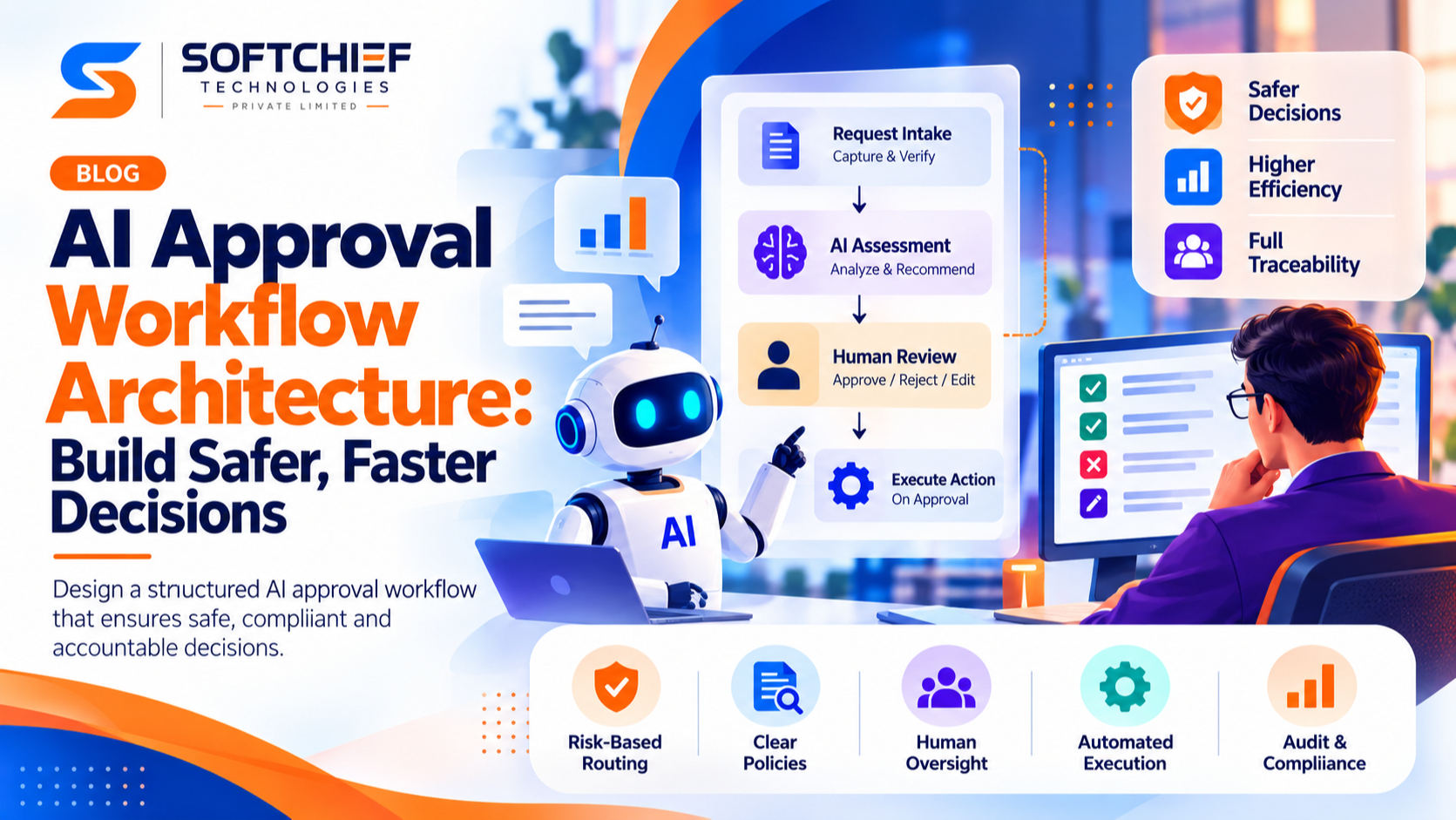
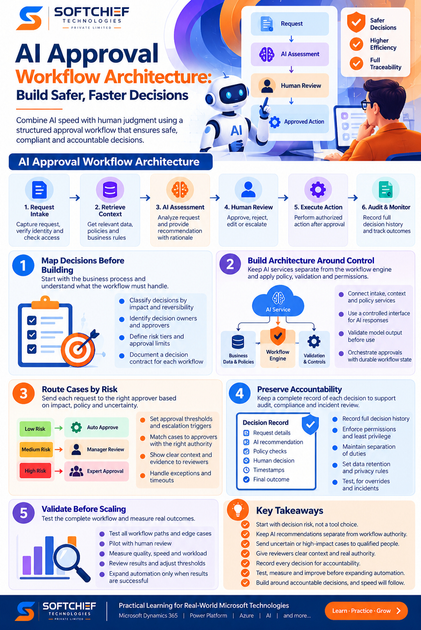
An AI approval workflow is the coordinated path from request intake and AI assessment through routing, human decision, action, and audit. It differs from an approval form, which may collect a yes or no without managing the full process, and from a model running alone, which lacks reliable controls for routing and execution.
Start by classifying decisions by risk, then design the workflow components, escalation rules, and records around those needs. AWS Step Functions and Microsoft Power Automate can illustrate orchestration patterns; their mention here isn’t an endorsement for AI decision-making.
Map decisions before building your AI approval workflow
Start with the business process, not a choice of model or software. A decision map shows what the workflow must handle and who owns each outcome. It also exposes unclear rules before automation makes them harder to spot.
Classify decisions by impact and reversibility
A low-value request that’s easy to undo may be safe to automate under clear rules. A decision that affects customer access, a large payment, safety, or a legal duty deserves tighter review. Assign risk tiers, then define which tiers require a person to approve.
Reversibility matters, too. An action that can be paused or rolled back carries a different risk from one that cannot be undone.
Identify decision owners and approvers
Name the owner of the business result, the person who reviews AI recommendations, and the person allowed to override or escalate a case. These roles may belong to different teams, but every case needs a clear path to a final decision.
Avoid shared responsibility with no named owner. Set backup approvers and define who steps in when the assigned reviewer is absent or lacks authority.
Write a decision contract for every workflow
For each workflow, document the request inputs, expected AI output, allowed actions, approval limits, exceptions, and final outcome. For example, a refund workflow might allow automatic approval below a set amount, while missing proof or a policy exception sends the request to a reviewer.
A clear contract gives teams a test plan and a record of what the workflow is meant to do. It also makes rule changes easier to review before release.
Build AI approval workflow architecture around control
Keep the AI service separate from the workflow engine. The model can assess a case, but it shouldn’t set its own permissions, choose who approves, or execute a high-impact action. A controlled workflow moves the request through fixed checks and records each decision.
Connect intake, context, and policy services
The workflow begins with a request, identity check, and access check. It can then retrieve approved business context, such as order history or a current policy, and apply rules before asking AI to assess the case.
Check that required data is present, current, and tied to the right person or account. Limit the model and reviewers to the sensitive data each role needs.
Keep AI services behind a controlled decision interface
Ask the model for structured fields, such as a recommendation, short rationale, confidence signal, and references to supporting evidence. Validate the response before using it: check required fields, allowed values, and whether the evidence points to approved sources.
Treat the result as an input to workflow rules, not as an instruction to run. If the response is missing, malformed, or outside the allowed format, pause the case or route it for review.
Orchestrate approvals with durable workflow state
The workflow engine should track the case while it waits for a person. It needs to assign tasks, handle timeouts and retries, and resume from the right point after a reviewer responds or a service recovers.
AWS Step Functions documents a callback pattern with task tokens: a task can pause while an external process returns its token, then continue. Microsoft Power Automate also illustrates workflow automation patterns. These tools show ways to manage process state; they don’t decide which AI use is safe.
Route AI approval workflow cases by risk
Routing should account for business impact, policy, missing evidence, and uncertainty. A model’s confidence score alone can’t show that an action is safe; a confident answer can still rely on poor data or miss a key rule. Set routing conditions using both model signals and business controls.
Set approval thresholds and escalation triggers
Combine model output with firm rules, such as transaction limits, restricted actions, policy exceptions, or missing documents. A low-risk request may pass automatically when all checks succeed, while a high-impact request goes to a qualified approver even when the model sounds certain.
Begin with conservative thresholds. Change them only after reviewing real cases, errors, and overrides.
Match cases to approvers with the right authority
Route by role, subject knowledge, approval limit, availability, and separation-of-duties rules. A finance reviewer may handle a payment exception, while a support lead reviews a customer remedy.
Set backup routes and overdue alerts in advance. The workflow should escalate a stalled case rather than leave it in an unattended queue.
Make review screens support informed decisions
A reviewer needs the original request, AI recommendation, evidence, known limits, and policy criteria in one view. Show the available actions and what happens after each choice; avoid asking people to approve a summary without access to the source details.
Record why reviewers override a recommendation. Make it easy to correct an input or request more evidence, so review improves the case instead of adding a click.
Preserve accountability with controls and audit trails
A decision may need explanation months after it was made. Keep enough detail to reconstruct what the AI saw, which rules applied, who reviewed the case, and what action followed. The NIST AI Risk Management Framework offers a voluntary structure for managing AI risks across design, use, and evaluation.
Record the full decision history
Capture a request ID, model and workflow versions, input or data references, AI output, policy checks, approver identity, timestamps, rationale, and final action. Store data references where retaining full sensitive inputs would create needless exposure.
Set retention and access rules to match organizational policy and legal duties. Logs that can’t be found or read won’t help with an audit or incident review.
Enforce permissions, privacy, and separation of duties
Use role-based access and least privilege for reviewers, workflow owners, and system administrators. Limit who can approve a case, change rules, or deploy a new model; these tasks shouldn’t fall to one person without oversight.
Review access on a schedule and test permission boundaries. Confirm that a reviewer can’t approve their own request when separation of duties is required.
Plan for overrides, incidents, and regulatory review
Where possible, build pause and rollback options into the workflow. Give staff a clear way to flag harmful or unexpected outcomes, and use the decision record to investigate what happened.
Human-oversight duties vary by jurisdiction and use case. Verify the rules that apply to your organization before putting a workflow into service.
Validate performance before expanding automation
Treat launch as a measured progression: test the workflow, release it to a limited group, then expand only when results support the change. Track decision quality and operating effort together. A faster process isn’t a success if it creates more errors or rework.
Test workflow paths, not just model outputs
Test approvals, denials, escalations, timeouts, missing data, service failures, and permission errors. Include edge cases, such as conflicting records or a request just above an approval limit.
Repeat the tests when models, prompts, policies, or integrations change. A model can pass its own output checks while the workflow still routes or acts incorrectly.
Pilot with human review and compare outcomes
In a controlled pilot, let reviewers compare AI recommendations with their own decisions before automation expands. Look for patterns in disagreements: they may point to weak rules, missing context, or unclear reviewer guidance.
Use those findings to adjust the workflow or model inputs, then test again. Don’t treat a low override rate as proof of quality unless you also check outcomes.
Measure quality, speed, and reviewer workload
Set baseline measures before launch. Track turnaround time, escalation and override rates, errors, rework, and reviewer workload, then review them by risk tier.
A single overall average can hide trouble in high-impact cases. Pause expansion if quality slips, even when average approval time improves.
Conclusion: Make every AI decision traceable and reviewable
Good AI approval workflow architecture starts with decision risk, not a tool choice. Keep AI recommendations separate from workflow authority, send uncertain or high-impact cases to qualified people, and retain a record that explains each outcome.
Test the full process before expanding automation, then use quality and workload data to guide each change. Build around accountable decisions, and speed will follow where it’s safe.









