
Building AI Chatbots with Copilot Studio and Azure OpenAI (Complete 2026 Guide)
Introduction
Artificial Intelligence has fundamentally changed how businesses interact with customers, employees and partners. Modern organisations no longer rely solely on traditional rule-based chatbots that provide scripted responses. Instead, they are adopting intelligent AI-powered assistants capable of understanding natural language, generating meaningful responses and completing business tasks autonomously.
Microsoft has made enterprise chatbot development significantly easier through Copilot Studio and Azure OpenAI. Together, these technologies enable businesses to create secure, scalable and intelligent conversational experiences without building complex AI infrastructure from scratch.
Whether you want to develop a customer support assistant, HR helpdesk, IT service bot, sales assistant or internal knowledge assistant, Copilot Studio combined with Azure OpenAI provides a powerful platform for building enterprise-ready AI chatbots.
In this comprehensive guide, we’ll explore how these technologies work together, how to build intelligent chatbots, best practices, real-world use cases and why this combination is shaping the future of conversational AI in 2026.
What Is Microsoft Copilot Studio?
Microsoft Copilot Studio is a low-code conversational AI platform that enables organisations to create, customise and deploy AI-powered copilots and intelligent agents.
It allows businesses to:
- Build AI chatbots
- Create AI agents
- Design conversational workflows
- Connect enterprise systems
- Automate business processes
- Integrate with Microsoft 365
- Extend Dynamics 365 and Power Platform solutions
Unlike traditional chatbot platforms, Copilot Studio combines conversational AI with enterprise automation, enabling assistants to take meaningful actions rather than simply answering questions.
What Is Azure OpenAI?
Azure OpenAI is Microsoft’s enterprise AI service that provides secure access to advanced large language models (LLMs) through the Azure cloud.
Azure OpenAI enables chatbots to:
- Understand natural language
- Generate human-like responses
- Summarise conversations
- Translate text
- Analyse documents
- Generate emails
- Answer questions
- Support multilingual interactions
Because Azure OpenAI runs within Azure, organisations benefit from enterprise-grade security, compliance and governance.
Why Combine Copilot Studio with Azure OpenAI?
Copilot Studio provides the conversational framework, while Azure OpenAI supplies advanced language intelligence.
Together they enable chatbots that can:
- Hold natural conversations
- Access enterprise knowledge
- Generate contextual responses
- Automate workflows
- Connect with business applications
- Perform multi-step tasks
- Support employees and customers 24/7
This combination transforms simple chatbots into intelligent digital assistants.
Solution Architecture
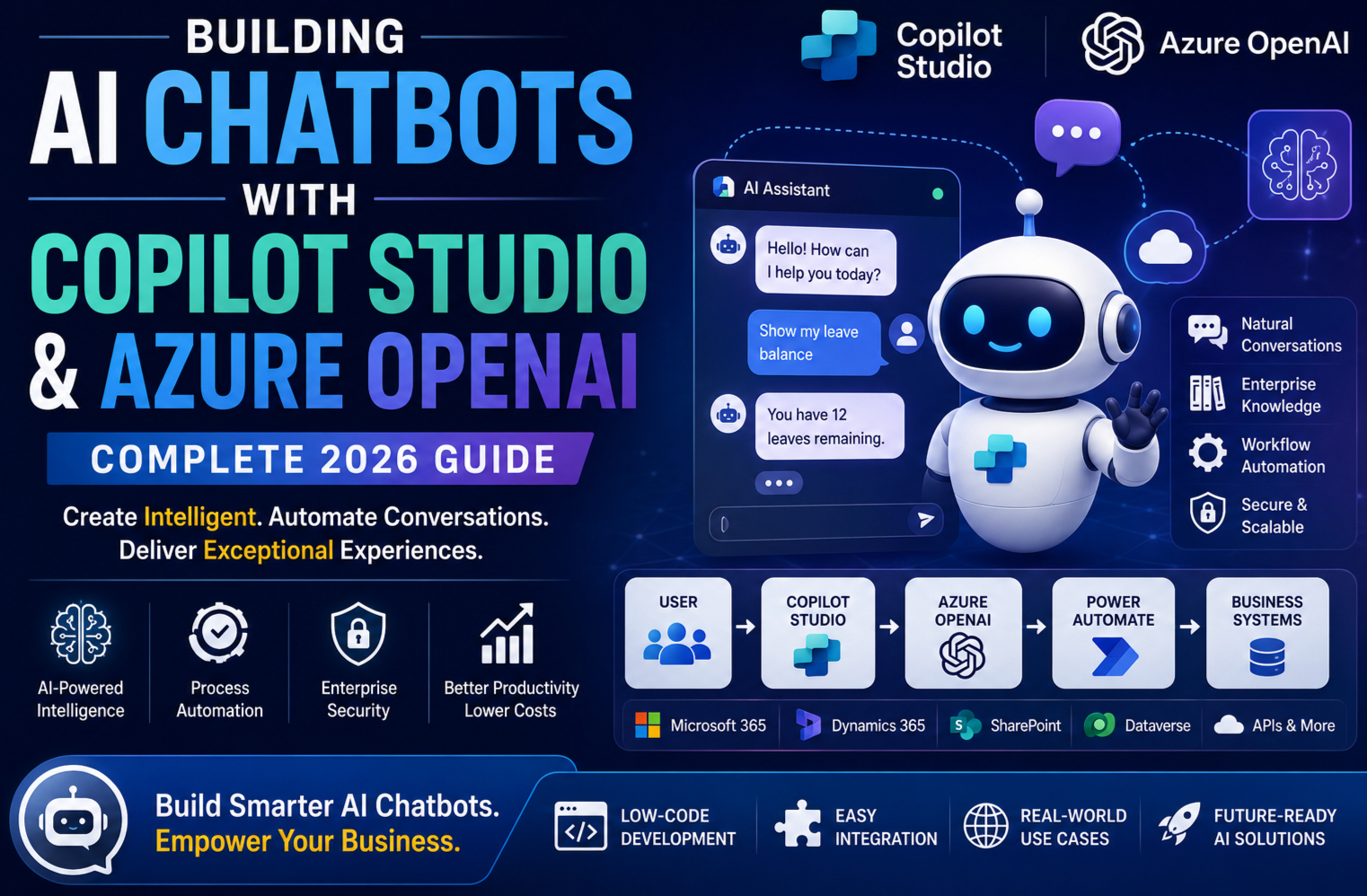
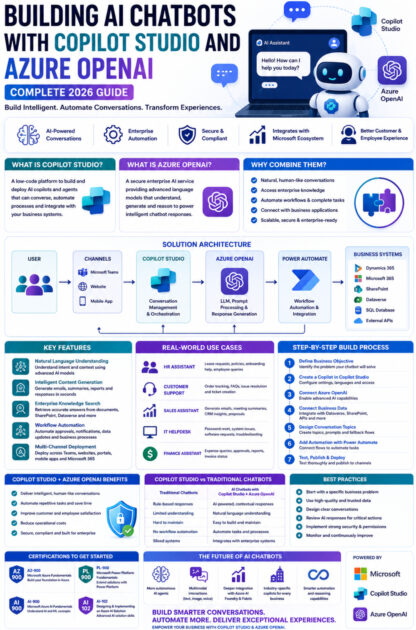
A typical enterprise AI chatbot architecture includes:
User
   │
   ▼
Microsoft Teams / Website / Mobile App
   │
   ▼
Copilot Studio
   │
   ▼
Azure OpenAI
   │
   ├── Large Language Model (LLM)
   ├── Prompt Processing
   ├── Response Generation
   └── Reasoning
   │
   ▼
Power Automate
   │
   ▼
Business Systems
   ├── Dynamics 365
   ├── Microsoft 365
   ├── SharePoint
   ├── Dataverse
   ├── SQL Database
   └── External APIs
Component Overview
Copilot Studio
Manages conversations, user interactions and orchestration.
Azure OpenAI
Generates intelligent responses and performs advanced language processing.
Power Automate
Executes business workflows and connects the chatbot to enterprise systems.
Business Applications
Provide access to organisational data and business processes.
Key Features of AI Chatbots
1. Natural Language Understanding
Users interact using everyday language.
Examples include:
- “What’s my remaining leave balance?”
- “Create a support ticket.”
- “Summarise yesterday’s sales meeting.”
- “Show my pending approvals.”
The chatbot interprets the intent and responds appropriately.
2. Intelligent Content Generation
Azure OpenAI enables chatbots to generate:
- Emails
- Meeting summaries
- Reports
- Product descriptions
- Customer responses
- Proposal drafts
- Internal documentation
Users can review generated content before taking action.
3. Enterprise Knowledge Search
Instead of searching through documents manually, users can ask:
- What is our travel policy?
- How do I request new equipment?
- Where is the employee handbook?
By combining Azure OpenAI with enterprise search or Retrieval-Augmented Generation (RAG), the chatbot retrieves relevant information from trusted organisational sources and presents concise, context-aware answers.
4. Workflow Automation
Through Power Automate, chatbots can:
- Submit leave requests
- Create CRM records
- Schedule meetings
- Trigger approvals
- Send notifications
- Update databases
- Generate documents
The chatbot becomes an active participant in business processes rather than only an information source.
5. Multi-Channel Deployment
Copilot Studio chatbots can be deployed across:
- Microsoft Teams
- Company websites
- Customer portals
- Mobile applications
- Microsoft 365
- Dynamics 365
- Custom applications
This ensures users receive a consistent conversational experience wherever they engage.
Step-by-Step Guide to Building an AI Chatbot
Step 1: Define the Business Objective
Identify the problem your chatbot will solve.
Examples include:
- Customer support
- Employee self-service
- IT helpdesk
- HR enquiries
- Sales assistance
- Appointment scheduling
A well-defined objective helps shape the chatbot’s conversations and integrations.
Step 2: Create a Copilot in Copilot Studio
Start by creating a new copilot.
Configure:
- Name
- Description
- Supported languages
- Authentication
- User access
- Conversation settings
You can quickly establish a conversational foundation using the low-code design environment.
Step 3: Connect Azure OpenAI
Integrate Azure OpenAI to provide advanced language capabilities.
The chatbot can then:
- Generate responses
- Summarise information
- Rewrite content
- Translate text
- Analyse conversations
Azure OpenAI handles the reasoning while Copilot Studio manages the interaction flow.
Step 4: Connect Business Data
Enterprise chatbots become more valuable when connected to organisational systems such as:
- Dynamics 365
- Microsoft Dataverse
- SharePoint
- SQL Server
- Microsoft 365
- External APIs
These integrations allow the chatbot to answer questions using business data and perform operational tasks.
Step 5: Design Conversation Topics
Create conversation topics for common scenarios such as:
- Leave requests
- Password resets
- Product enquiries
- Order status
- Customer support
- Policy guidance
Use clear prompts, branching logic and fallback responses to provide a smooth user experience.
Step 6: Add Automation with Power Automate
Enhance the chatbot by connecting Power Automate flows.
Examples include:
- Creating support tickets
- Sending approval requests
- Updating CRM records
- Notifying managers
- Scheduling meetings
- Generating reports
This enables end-to-end process automation directly from conversations.
Step 7: Test and Publish
Before deployment:
- Test conversation accuracy.
- Validate AI-generated responses.
- Verify integrations.
- Review security settings.
- Monitor performance.
Once validated, publish the chatbot to the required channels.
Real-World Use Cases
HR Assistant
Employees can:
- Check leave balances.
- Access HR policies.
- Request documents.
- Submit leave applications.
- Ask onboarding questions.
The chatbot reduces administrative workload while improving employee self-service.
Customer Support Assistant
Customers can:
- Track orders.
- Raise support requests.
- Receive troubleshooting guidance.
- Access FAQs.
- Escalate complex issues.
Support teams benefit from reduced ticket volumes and faster response times.
Sales Assistant
Sales professionals can:
- Generate follow-up emails.
- Summarise customer meetings.
- Retrieve CRM information.
- Recommend next actions.
- Draft proposals.
This helps sales teams focus on customer engagement rather than repetitive administrative tasks.
IT Helpdesk
Employees can:
- Reset passwords.
- Report technical issues.
- Check system status.
- Request software.
- Access troubleshooting guides.
Routine support requests are handled automatically, allowing IT staff to focus on more complex work.
Best Practices
To build effective enterprise AI chatbots:
- Start with a specific business problem.
- Use high-quality organisational data.
- Connect AI to trusted knowledge sources.
- Review AI-generated responses before critical actions.
- Secure sensitive information using Microsoft Entra ID and role-based access control.
- Monitor chatbot usage and continuously improve conversations.
- Apply responsible AI principles and governance policies.
Common Challenges
Knowledge Accuracy
Without access to relevant enterprise information, AI responses may be incomplete. Integrating trusted knowledge sources improves reliability.
Data Security
Protect confidential information through secure authentication, encryption and least-privilege access controls.
Conversation Design
Even with advanced AI, thoughtful conversation design is essential to guide users and handle unexpected inputs gracefully.
User Adoption
Provide guidance and training so employees understand the chatbot’s capabilities and limitations.
The Future of AI Chatbots
Microsoft continues to expand the capabilities of Copilot Studio and Azure OpenAI.
Future developments are expected to include:
- More autonomous AI agents.
- Enhanced reasoning and planning.
- Richer multimodal interactions with text, images and voice.
- Deeper integration with Azure AI Foundry and Microsoft Fabric.
- Industry-specific copilots for sectors such as healthcare, finance and retail.
- Improved collaboration with Microsoft 365 and Dynamics 365.
These innovations will enable AI assistants to manage increasingly sophisticated business processes.
Why Businesses Should Invest in AI Chatbots
Adopting AI-powered chatbots offers several advantages:
- Improved customer satisfaction.
- Faster employee support.
- Reduced operational costs.
- Increased productivity.
- Consistent service quality.
- 24/7 availability.
- Scalable automation across departments.
Businesses that embrace conversational AI today will be better positioned to meet growing customer and employee expectations.
Conclusion
Building AI chatbots with Microsoft Copilot Studio and Azure OpenAI empowers organisations to create intelligent, secure and scalable conversational experiences. By combining low-code chatbot development with advanced language models, businesses can automate support, streamline workflows and provide users with accurate, context-aware assistance.
Whether you’re developing a customer service assistant, HR helpdesk, IT support bot or sales copilot, this powerful combination enables rapid development without sacrificing enterprise security or flexibility. As conversational AI continues to evolve, organisations that invest in Copilot Studio and Azure OpenAI will be well equipped to drive digital transformation and deliver exceptional user experiences in 2026 and beyond.









