
Building Enterprise AI Agents with C# and Azure AI Foundry
Introduction
Artificial Intelligence has evolved beyond simple chatbots and virtual assistants. Today’s businesses are adopting AI Agents capable of understanding business context, interacting with enterprise systems, making intelligent decisions and automating complex workflows.
Microsoft is leading this transformation with Azure AI Foundry, a comprehensive platform for developing, evaluating, deploying and managing enterprise AI solutions. When combined with C# and .NET, developers can build secure, scalable and intelligent AI agents that integrate seamlessly with business applications.
Whether you’re developing customer support assistants, sales copilots, HR automation tools or intelligent business process agents, C# and Azure AI Foundry provide a robust foundation for enterprise AI development.
In this guide, we’ll explore how to build enterprise AI agents using C# and Azure AI Foundry, covering architecture, implementation, best practices and real-world business scenarios.
What Are Enterprise AI Agents?
An Enterprise AI Agent is an intelligent software system that can:
- Understand natural language
- Interpret business context
- Retrieve information from enterprise systems
- Perform actions across connected applications
- Execute multi-step workflows
- Learn from interactions
- Assist employees and customers
- Support business decision-making
Unlike traditional chatbots that mainly answer questions, AI agents can actively perform tasks such as updating CRM records, creating support tickets, generating reports and orchestrating business processes.
Why Choose C# and .NET for AI Development?
C# remains one of the most widely used programming languages for enterprise software development. Combined with the .NET platform, it offers:
- High performance
- Strong type safety
- Excellent tooling with Visual Studio
- Cross-platform development
- Extensive Azure integration
- Rich ecosystem of libraries
- Enterprise-grade security
- Scalability for cloud-native applications
Many organisations already use C# for internal applications, making it a natural choice for extending existing systems with AI capabilities.
What Is Azure AI Foundry?
Azure AI Foundry is Microsoft’s unified platform for building and managing AI applications.
It enables developers to:
- Access foundation models
- Build generative AI applications
- Manage prompts
- Evaluate AI performance
- Monitor deployments
- Implement responsible AI practices
- Integrate enterprise data
- Deploy AI securely within Azure
Azure AI Foundry simplifies the lifecycle of AI application development, from experimentation to production.
Core Components of an Enterprise AI Solution
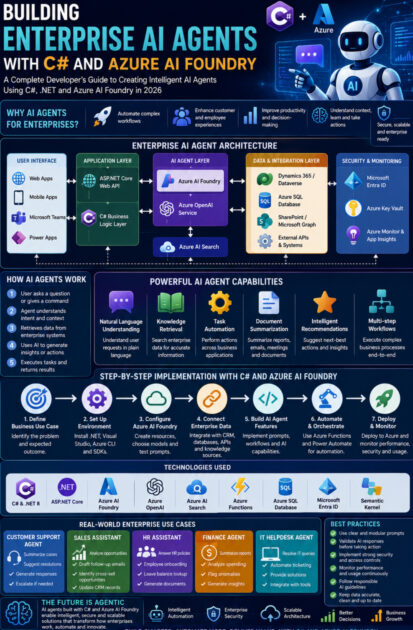
A typical enterprise AI agent architecture includes:
- ASP.NET Core Web API – exposes endpoints for client applications.
- C# Business Logic Layer – handles workflows, validation and orchestration.
- Azure AI Foundry – manages AI models, prompts and evaluations.
- Azure OpenAI Service – powers generative AI capabilities.
- Azure AI Search – enables retrieval of enterprise knowledge.
- Microsoft Entra ID – provides secure authentication and authorisation.
- Azure SQL Database or Microsoft Dataverse – stores structured business data.
- Azure Functions – runs event-driven or background tasks.
- Azure Monitor and Application Insights – track application health and performance.
This modular architecture supports scalability, maintainability and secure enterprise deployments.
Step 1: Define the Business Use Case
Before writing code, identify the business problem your AI agent will solve.
Examples include:
- Customer support automation
- Sales opportunity assistance
- Employee HR assistant
- IT helpdesk automation
- Invoice processing
- Knowledge management
- Procurement support
- Internal policy assistant
A clear use case helps define data sources, integrations and success metrics.
Step 2: Set Up the Development Environment
Install the required tools:
- Visual Studio 2022 or later
- .NET 8 (or the latest supported LTS version)
- Azure CLI
- Azure AI Foundry access
- Azure subscription
- Git for source control
Recommended NuGet packages include:
- Azure AI SDKs
- Azure Identity
- ASP.NET Core packages
- Microsoft.Extensions.Configuration
- Semantic Kernel (where appropriate for orchestration scenarios)
Keeping dependencies updated ensures access to the latest features and security improvements.
Step 3: Design the Agent Architecture
A well-designed AI agent separates responsibilities into layers.
Presentation Layer
- Web applications
- Mobile applications
- Microsoft Teams apps
- Power Apps
- REST APIs
Business Layer
- Validation
- Workflow orchestration
- Rules engine
- Service classes
AI Layer
- Prompt management
- AI model interaction
- Response generation
- Tool invocation
Data Layer
- CRM
- ERP
- SQL databases
- SharePoint
- Microsoft Graph
- External APIs
This layered approach improves maintainability and simplifies testing.
Step 4: Integrate Azure AI Foundry
Connect your C# application to Azure AI Foundry using the Azure AI SDKs.
Typical capabilities include:
- Sending prompts to language models
- Managing prompt templates
- Evaluating model outputs
- Monitoring usage
- Applying responsible AI policies
Azure AI Foundry also provides tools for experimentation and performance evaluation before production deployment.
Step 5: Connect Enterprise Data
AI agents become significantly more valuable when they can access business information.
Common enterprise data sources include:
- Dynamics 365
- Microsoft Dataverse
- Azure SQL Database
- SharePoint
- Microsoft Graph
- SAP
- Salesforce
- REST APIs
Rather than relying solely on model knowledge, the agent retrieves relevant organisational data and incorporates it into responses, improving accuracy and relevance.
Step 6: Add Intelligent Capabilities
Your AI agent can support features such as:
Natural Language Understanding
Employees ask questions using everyday language.
Example:
“Show all high-priority support tickets assigned to me.”
The agent interprets the request, retrieves data and presents the results.
Document Summarisation
The agent summarises:
- Contracts
- Meeting notes
- Policies
- Reports
- Customer emails
This reduces the time spent reviewing lengthy documents.
Task Automation
Examples include:
- Creating support tickets
- Scheduling meetings
- Updating CRM records
- Sending approval requests
- Generating reports
The agent not only responds but also performs useful business actions.
Intelligent Recommendations
AI can suggest:
- Next-best sales actions
- Risk mitigation strategies
- Inventory replenishment
- Customer follow-ups
- Knowledge articles
These recommendations help employees make better decisions.
Step 7: Secure the AI Agent
Security is essential for enterprise AI.
Implement:
- Microsoft Entra ID authentication
- Role-based access control (RBAC)
- Managed identities
- Secure secret management with Azure Key Vault
- HTTPS encryption
- Input validation
- Logging and auditing
Never expose confidential business data without appropriate authorisation.
Real-World Enterprise Scenarios
Customer Support Agent
An employee asks:
“Summarise all unresolved cases for Contoso.”
The agent:
- Retrieves CRM records
- Summarises case history
- Identifies recurring issues
- Suggests resolution steps
Sales Assistant
The AI agent:
- Reviews customer interactions
- Generates follow-up emails
- Identifies cross-selling opportunities
- Recommends next actions
- Updates CRM records
Human Resources
Employees ask:
- “What is our remote working policy?”
- “How many leave days do I have remaining?”
- “Generate an onboarding checklist.”
The agent retrieves policy information and performs approved actions.
Finance
The AI agent:
- Summarises financial reports
- Analyses spending trends
- Flags unusual transactions
- Generates executive summaries
This accelerates financial analysis and reporting.
Best Practices for Enterprise AI Development
To build reliable AI agents:
Keep Prompts Modular
Store prompt templates separately from application code so they can be updated without redeploying the application.
Validate AI Responses
Critical business decisions should include human review where appropriate.
Optimise for Performance
Cache frequently accessed data and minimise unnecessary AI requests.
Monitor Continuously
Use Azure Monitor and Application Insights to track latency, errors and usage patterns.
Follow Responsible AI Principles
Design systems that are transparent, fair and accountable, and provide users with clear guidance on how AI-generated outputs should be used.
Challenges to Consider
While AI agents offer significant value, developers should prepare for:
Data Quality
AI responses are only as reliable as the underlying enterprise data.
Cost Management
Monitor token usage, API requests and infrastructure costs to optimise spending.
Governance
Establish policies for access control, prompt management and AI usage.
User Trust
Clearly communicate when users are interacting with AI and encourage validation of important outputs.
Future Trends in Enterprise AI
Enterprise AI development is evolving rapidly. Key trends include:
- Autonomous AI agents
- Multi-agent collaboration
- AI orchestration across business systems
- Retrieval-Augmented Generation (RAG)
- Context-aware enterprise assistants
- Natural language application development
- AI-assisted software engineering
- Industry-specific AI agents
- Deeper integration with Microsoft Fabric and Microsoft 365
Developers who understand these patterns will be well prepared for the next generation of enterprise applications.
Who Should Learn This Technology?
Building enterprise AI agents with C# and Azure AI Foundry is particularly valuable for:
- C# Developers
- .NET Developers
- Azure Developers
- Solution Architects
- AI Engineers
- Cloud Engineers
- Enterprise Application Developers
- Technical Consultants
- Power Platform Developers extending enterprise systems
- Students preparing for Microsoft AI careers
Career Opportunities
Mastering C# and Azure AI technologies can open doors to roles such as:
- AI Software Engineer
- Azure AI Developer
- Enterprise Solutions Architect
- Cloud Developer
- AI Application Developer
- Full-Stack .NET Developer
- Microsoft Azure Consultant
- Generative AI Engineer
- Technical Lead
- AI Solutions Consultant
As enterprises continue adopting AI-first strategies, demand for these roles is expected to grow across industries.
Final Thoughts
Enterprise AI is no longer limited to experimental projects—it is becoming a core component of modern business applications. By combining the reliability of C# and .NET with the capabilities of Azure AI Foundry, developers can build intelligent agents that automate workflows, retrieve enterprise knowledge and enhance productivity across departments.
The key to success lies not only in integrating powerful AI models but also in designing secure, scalable and well-governed solutions that align with business objectives. By following best practices, using high-quality data and maintaining human oversight where appropriate, organisations can create AI agents that deliver measurable value while earning user trust.
For developers looking to future-proof their careers, learning how to build enterprise AI agents with C# and Azure AI Foundry is one of the most valuable investments they can make in 2026.









