
How to Build an AI-Powered CRM Using Dynamics 365 and Azure OpenAI
Introduction
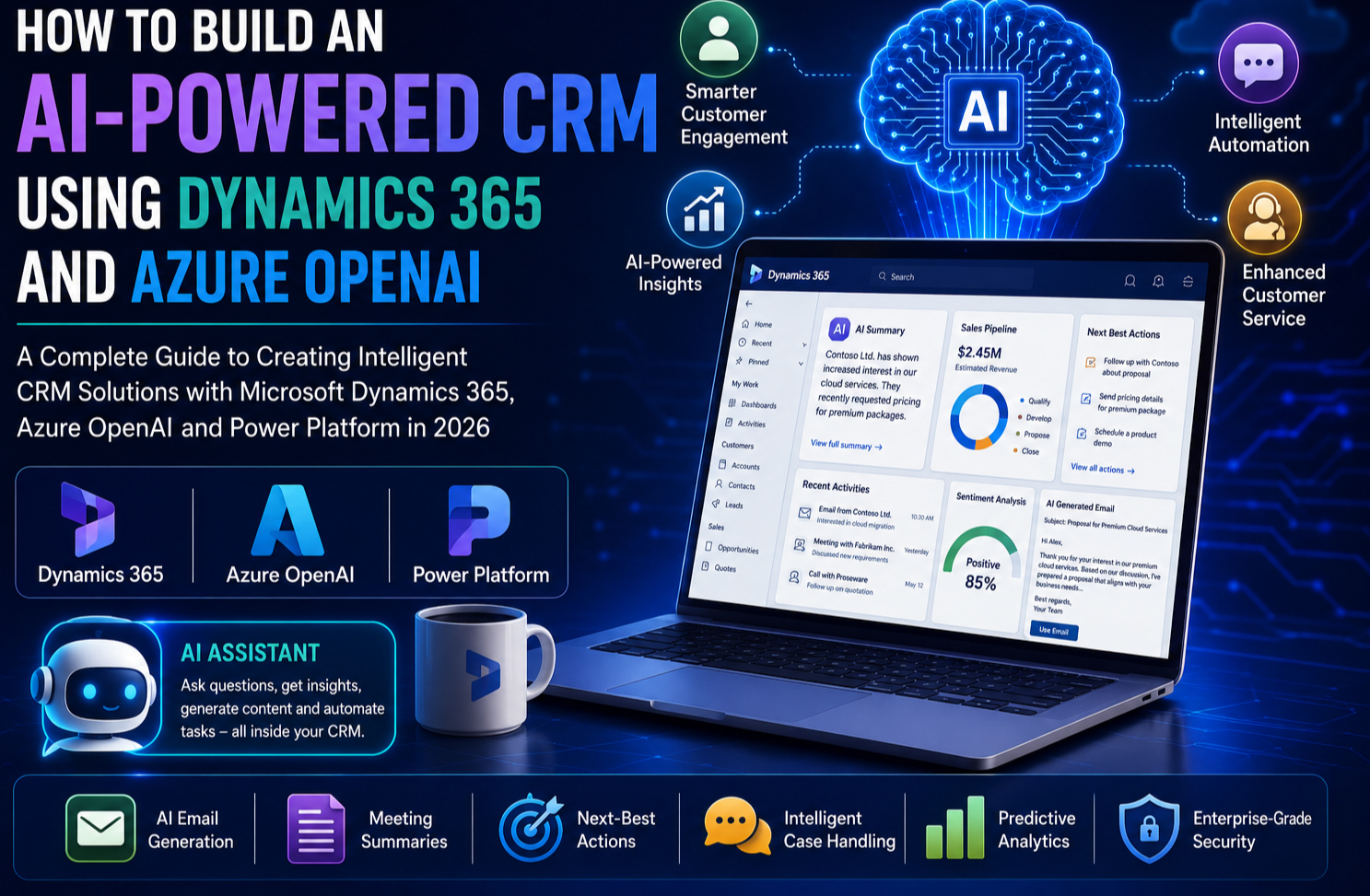
Customer Relationship Management (CRM) has evolved far beyond storing contact details and tracking sales opportunities. In today’s competitive business environment, organisations need intelligent systems that can understand customer intent, automate repetitive tasks, generate personalised communications and provide actionable insights in real time.
This is where Microsoft Dynamics 365 and Azure OpenAI come together to create a new generation of AI-powered CRM solutions. By combining the robust CRM capabilities of Dynamics 365 with the generative AI capabilities of Azure OpenAI, businesses can enhance customer engagement, improve sales productivity and automate service operations while maintaining enterprise-grade security and governance.
In this comprehensive guide, you’ll learn how to build an AI-powered CRM using Dynamics 365 and Azure OpenAI, explore the solution architecture, implementation steps, best practices and real-world business scenarios.
Why AI Is Redefining CRM
Traditional CRM systems help organisations manage customer information, sales pipelines and support cases. However, they often depend on users manually analysing data, writing emails and deciding the next steps.
AI changes this by enabling CRM systems to:
- Generate personalised customer communications
- Summarise meetings and interactions
- Predict sales opportunities
- Recommend next-best actions
- Automate customer support
- Analyse customer sentiment
- Produce intelligent reports
- Assist employees using natural language
Instead of simply recording information, AI-powered CRM systems actively support decision-making and daily operations.
What Is Microsoft Dynamics 365?
Microsoft Dynamics 365 is a cloud-based suite of business applications that combines CRM and ERP capabilities.
For CRM, commonly used applications include:
- Dynamics 365 Sales
- Dynamics 365 Customer Service
- Dynamics 365 Customer Insights
- Dynamics 365 Field Service
- Dynamics 365 Customer Insights – Journeys
These applications integrate with Microsoft 365, Azure, Power Platform and third-party systems, making Dynamics 365 a powerful foundation for intelligent customer engagement.
What Is Azure OpenAI?
Azure OpenAI is Microsoft’s enterprise service for accessing advanced generative AI models through the Azure cloud.
Developers can use it to build applications that:
- Generate natural language responses
- Summarise large amounts of information
- Draft emails and proposals
- Classify customer enquiries
- Translate content
- Extract insights from documents
- Power conversational AI experiences
Because Azure OpenAI runs within Azure, organisations benefit from enterprise security, compliance, identity management and governance.
Why Combine Dynamics 365 with Azure OpenAI?
Integrating Dynamics 365 with Azure OpenAI creates a CRM that not only stores customer data but also understands context, generates content and assists users with everyday tasks.
Key benefits include:
- Faster sales processes
- Improved customer experiences
- Reduced manual effort
- AI-assisted decision-making
- Better productivity
- Enhanced personalisation
- Enterprise-grade security
Solution Architecture
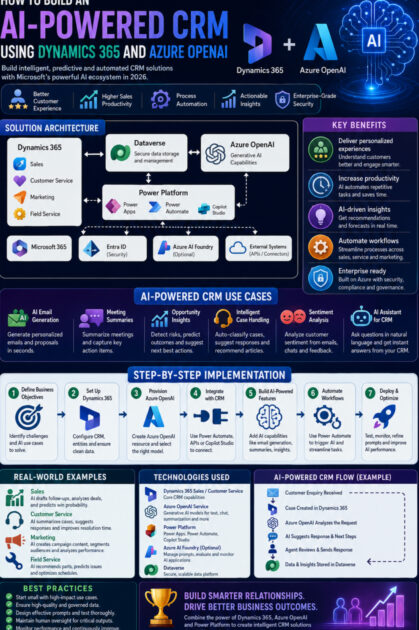
A typical AI-powered CRM solution includes the following components:
- Dynamics 365 Sales or Customer Service for customer data and business processes
- Azure OpenAI for generative AI capabilities
- Microsoft Dataverse for secure data storage
- Power Automate for workflow automation
- Power Apps for custom user interfaces
- Microsoft Copilot Studio (optional) for AI assistants
- Azure AI Foundry (optional) for prompt management and evaluation
- Microsoft Entra ID for authentication and access control
This architecture provides scalability, flexibility and seamless integration across the Microsoft ecosystem.
Step 1: Define Your Business Objectives
Before introducing AI, identify the business challenges you want to solve.
Examples include:
- Sales teams spend too much time writing follow-up emails.
- Customer service agents need faster access to case history.
- Managers require better sales forecasting.
- Customers expect quicker responses.
- Support teams manually categorise incoming requests.
Clear objectives ensure that AI delivers measurable business value.
Step 2: Set Up Dynamics 365
Create or configure your Dynamics 365 environment.
Typical entities include:
- Accounts
- Contacts
- Leads
- Opportunities
- Activities
- Cases
- Products
- Quotes
- Orders
Ensure your CRM data is clean, consistent and well structured, as AI performs best with high-quality information.
Step 3: Provision Azure OpenAI
Create an Azure OpenAI resource within your Azure subscription.
After deployment:
- Select the appropriate language model for your use case.
- Configure authentication.
- Secure access using Microsoft Entra ID.
- Define responsible AI and governance policies.
- Test prompts before integrating with Dynamics 365.
Step 4: Connect Dynamics 365 to Azure OpenAI
There are several integration approaches:
Power Automate
Create cloud flows that send CRM data to Azure OpenAI and return AI-generated responses.
Custom APIs
Develop secure integrations using Azure Functions or .NET APIs for advanced scenarios.
Copilot Studio
Build conversational AI assistants that access Dynamics 365 data and Azure OpenAI capabilities.
The best approach depends on your application’s complexity and business requirements.
Step 5: Build AI-Powered Features
Here are some practical capabilities you can add to your CRM.
AI Email Generation
When a salesperson opens an opportunity, Azure OpenAI can generate a personalised follow-up email based on:
- Customer profile
- Previous conversations
- Products of interest
- Opportunity stage
This saves time while improving communication quality.
Customer Meeting Summaries
After meetings, AI can summarise:
- Key discussion points
- Customer concerns
- Agreed actions
- Follow-up tasks
These summaries can be stored directly in Dynamics 365 activities.
Opportunity Analysis
AI reviews customer interactions and identifies:
- Sales risks
- Buying signals
- Recommended actions
- Upsell opportunities
Sales managers gain valuable insights without manually analysing every record.
Intelligent Customer Service
When a support case is created, Azure OpenAI can:
- Summarise the issue
- Classify the enquiry
- Suggest knowledge articles
- Draft response emails
- Recommend escalation if required
This helps agents resolve cases more efficiently.
Sentiment Analysis
By analysing emails, chat transcripts and customer feedback, AI can identify whether customer sentiment is positive, neutral or negative.
This enables proactive engagement with dissatisfied customers.
Step 6: Automate Business Workflows
Use Power Automate to create intelligent workflows.
Example:
Customer submits enquiry
↓
Dynamics 365 creates a case
↓
Azure OpenAI analyses the request
↓
AI categorises the issue
↓
Suggested response is generated
↓
Agent reviews and approves
↓
Customer receives personalised communication
↓
Manager receives analytics
Automation reduces response times while maintaining human oversight.
Step 7: Build an AI Assistant
Using Copilot Studio, create an internal CRM assistant that allows employees to ask questions such as:
- “Summarise my opportunities closing this month.”
- “Which customers haven’t been contacted recently?”
- “Show high-value leads requiring follow-up.”
- “Draft an email for Contoso regarding product renewal.”
The assistant retrieves Dynamics 365 data and uses Azure OpenAI to generate meaningful responses.
Real-World Business Scenarios
Sales
A sales executive preparing for a client meeting asks:
“Summarise the last six months of interactions with this customer.”
Within seconds, AI provides:
- Meeting summaries
- Open opportunities
- Purchase history
- Outstanding issues
- Suggested talking points
Customer Service
A support engineer receives a technical case.
AI:
- Summarises previous tickets
- Identifies similar issues
- Suggests troubleshooting steps
- Drafts a customer response
Resolution times improve significantly.
Financial Services
Relationship managers use AI to:
- Prepare customer reviews
- Generate investment summaries
- Draft client communications
- Identify cross-selling opportunities
Healthcare
Patient engagement teams use AI to:
- Summarise patient interactions
- Draft appointment reminders
- Answer common administrative questions
- Improve service consistency
Benefits of an AI-Powered CRM
Organisations implementing Dynamics 365 with Azure OpenAI can expect:
- Faster response times
- Increased sales productivity
- Better customer experiences
- Reduced administrative workload
- Improved employee efficiency
- More accurate forecasting
- Enhanced personalisation
- Higher customer satisfaction
- Better decision-making
- Scalable AI capabilities
Best Practices
To ensure successful implementation:
- Start with clearly defined business scenarios.
- Keep CRM data accurate and complete.
- Use secure authentication and role-based access.
- Review AI-generated content before sending it externally.
- Monitor prompt performance and refine prompts over time.
- Train employees on responsible AI usage.
- Establish governance for AI applications and data.
Challenges and Considerations
Although AI delivers significant benefits, organisations should address several important considerations.
Data Privacy
Ensure sensitive customer information is handled according to organisational policies and applicable regulations.
Prompt Quality
Well-designed prompts produce more accurate and useful AI responses.
Human Oversight
AI-generated recommendations should support—not replace—human judgement, especially in high-impact business decisions.
Adoption
Provide training and encourage employees to incorporate AI into their daily workflows.
Future of AI-Powered CRM
The next generation of CRM will include:
- Autonomous AI agents managing customer interactions
- Predictive opportunity management
- Conversational CRM experiences
- AI-generated dashboards and reports
- Hyper-personalised customer engagement
- Voice-enabled CRM assistants
- Multi-agent collaboration across business functions
- Deeper integration with Microsoft Fabric and Power Platform
As these capabilities evolve, CRM systems will become increasingly proactive and intelligent.
Who Should Learn This Technology?
Building AI-powered CRM solutions is valuable for:
- Dynamics 365 Developers
- Dynamics 365 Functional Consultants
- Power Platform Developers
- Azure Developers
- Solution Architects
- CRM Consultants
- Business Analysts
- AI Engineers
- Technical Consultants
- Students pursuing Microsoft certifications
These skills are becoming increasingly important as organisations adopt AI across customer engagement platforms.
Final Thoughts
The combination of Microsoft Dynamics 365 and Azure OpenAI represents a significant step forward in the evolution of customer relationship management. By integrating generative AI into CRM processes, organisations can automate routine tasks, improve customer engagement and empower employees with intelligent recommendations.
Rather than replacing existing CRM systems, Azure OpenAI enhances Dynamics 365 by making it more conversational, predictive and efficient. Sales professionals gain valuable insights, customer service teams resolve issues more quickly and business leaders make informed decisions using AI-generated intelligence.
As businesses continue investing in digital transformation, learning how to build AI-powered CRM solutions with Dynamics 365 and Azure OpenAI will become an increasingly valuable skill for developers, consultants and IT professionals. Organisations that embrace these technologies today will be better positioned to deliver exceptional customer experiences and maintain a competitive advantage in the AI-driven business landscape.









