
Dynamics 365 Sales vs. Customer Service: Choose the Right Module for Your Role

Introduction
A sales team tracks prospects, conversations, and deals. A support team tracks customer issues and works toward solutions. If you’re choosing between Dynamics 365 Sales vs Customer Service, start with the kind of work you want to do.
Both apps belong to Microsoft’s business application family, but they focus on different processes and records. Sales centers on leads and opportunities; Customer Service centers on cases and support work.
The best first module depends on your current role or the one you want next. This comparison covers daily tasks, transferable skills, and a practical way to begin. Features and access can vary by product version, license, and setup.
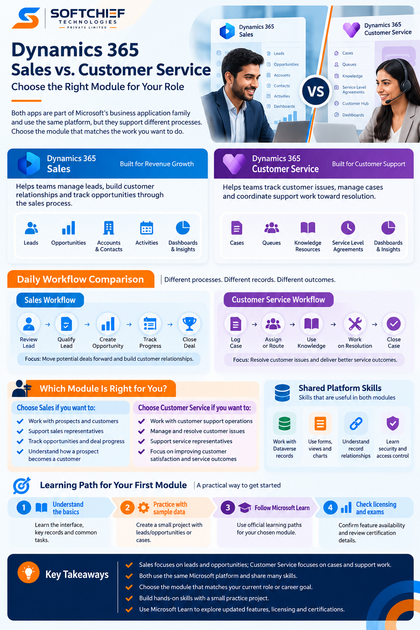
Dynamics 365 Sales vs Customer Service starts with the customer problem
Sales helps teams move potential deals forward
Dynamics 365 Sales supports the work of building customer relationships and tracking possible purchases. Teams can manage leads, qualify prospects, record customer interactions, and follow opportunities through the sales process. Microsoft’s Dynamics 365 Sales overview describes the app as supporting sales activity from lead to order.
Customer Service helps teams resolve support requests
Dynamics 365 Customer Service helps staff track customer problems and coordinate support work. A case can hold details about an issue and its related interactions, while service staff work toward a response or resolution. Microsoft’s Dynamics 365 Customer Service overview also describes features such as knowledge resources, routing, and service-level agreements, subject to licensing and setup.
Shared platform skills can carry over
Both apps use Microsoft’s business application environment, and Dynamics 365 apps use Dataverse to store and secure their data. The Dataverse documentation explains how tables, records, forms, and relationships support business apps. Learning to work with records and views can help in either module, but it won’t teach you each team’s distinct process.
Dynamics 365 Sales vs Customer Service: Compare daily workflows
A Sales workflow follows a lead toward an opportunity
A learner might begin by reviewing a lead and checking its contact details, source, and interest. If the prospect is a good fit, qualifying the lead can connect it with account and contact information and create an opportunity to track. The sales team then records activity and updates the opportunity as the deal progresses; exact steps can vary by organization.
A Customer Service workflow follows a case toward resolution
A service worker records a customer issue as a case, then assigns or routes it to the right person or team. They can review related customer details, consult available knowledge resources, and add updates as work continues. Queues, routing rules, service-level tracking, and channel tools depend on the app setup and license.
Each workflow uses different records and measures
Leads and opportunities help sales teams organize prospects and assess deal progress. Cases help service teams record issues and track support work. A business may measure outcomes such as opportunity status or time to resolve a case, but its chosen measures depend on its goals and configuration.
Choose a Dynamics 365 module for your target role
Start with Sales for revenue-focused work
Sales may be a good first choice if you want to support sales representatives, sales operations, or CRM administration for a sales team. The work often involves keeping customer details current, following up on activity, and tracking deals. Try Sales first if you’re interested in how a prospect becomes a potential customer.
Start with Customer Service for support operations
Customer Service may fit roles such as service representative, support team lead, or CRM administrator for a service team. You’ll learn how staff record requests, manage cases, and follow support processes. Choose it if resolving customer issues sounds more engaging than tracking sales opportunities.
Choose the work, not the product’s perceived status
Neither module is automatically the better career choice. Read job descriptions for roles you want and note which app, records, and tasks employers ask for. Then ask yourself whether you’d rather organize sales activity and deal progress or manage support requests and service outcomes.
Build skills across Dynamics 365 Sales and Customer Service
Learn the shared interface and data basics
Begin by working with the app interface, records, views, and forms. Learn how records connect, such as a contact linked to an account, and how users find and update information. These basics can transfer between apps, though the screens and setup can differ by organization.
Add Sales skills for leads and opportunities
Practice reviewing sample leads, qualifying them, and following the resulting opportunities. Learn how account and contact details give sales staff context, and how activities help keep a record of customer interactions. Microsoft Learn is the place to check current Sales terminology and product guidance.
Add Customer Service skills for cases and service work
Practice creating sample cases, assigning or routing them, recording updates, and tracking progress toward resolution. Learn how staff find and use knowledge resources when those tools are available in the environment. Check Microsoft’s documentation for feature setup and licensing before studying advanced routing or channel features.
Make a practical first-module learning plan
Use your role and preferred workflow to decide
Consider your current job, the role you want, and the kind of task you’d enjoy practicing. Compare those needs with local job postings instead of assuming one module has more career value. Start with the app that matches the work you want to do.
Build a small practice project with sample data
For Sales, create a practice flow that follows sample leads through qualification and opportunity tracking. For Customer Service, record sample cases, assign them, add progress notes, and mark them resolved. Use fictional data, and treat the project as a way to learn the process rather than a real customer record.
Check learning paths, licenses, and exam details
Use Microsoft Learn to find current learning content for the module you chose. Before trying a feature, check whether your practice environment and license include it. If you’re considering a credential, review Microsoft’s current certification and exam details before you commit time or money.
Conclusion: Choose the workflow you want to practice
Learn Dynamics 365 Sales first if you want to work with leads, customer relationships, and opportunities. Choose Customer Service first if you want to manage cases and support operations. Shared skills with records, forms, and views can help when you move to the other module later.
Pick one module, find a role-aligned learning path on Microsoft Learn, and complete a small practice project with sample data. That gives you a concrete first step and a clearer sense of which work fits you best.









