
How to Protect Business Forms Against Accidental Double Submission in C# Full Stack Applications
Introduction
Prevent double form submission in C# Full Stack applications by implementing reliable protection across the frontend, ASP.NET Core API, application service, and database layers.
Accidental repeated submissions can create duplicate customer records, orders, invoices, and payments. In enterprise applications, these issues can affect business data integrity, transaction accuracy, and user experience.
In this technical guide, we explore practical ways to prevent duplicate business transactions using JavaScript, C#, ASP.NET Core, Entity Framework Core, SQL Server, and idempotency keys. We will also examine how to implement multi-layer protection and handle real-world scenarios such as network failures, browser refreshes, concurrent requests, and API retries.
What Is Accidental Double Submission?
Accidental double submission occurs when the same business operation is submitted more than once within a short period, either intentionally or unintentionally.
Consider a customer registration form:
- The customer enters their name, email address, and contact details.
- The customer clicks the Submit button.
- The browser sends an HTTP POST request to the ASP.NET Core application.
- Before receiving a response, the customer clicks Submit again.
- The application receives two requests containing the same business information.
- Both requests attempt to create a customer record.
If the application does not have appropriate duplicate protection, it may create two records.
A similar problem occurs when a payment request is processed twice or when an employee submits the same expense claim multiple times.
Common situations that cause duplicate submissions
| Scenario | Potential consequence |
|---|---|
| User double-clicks Submit | Duplicate database records |
| Slow network response | User retries the operation |
| Browser refresh after submission | Form resubmission |
| API timeout | Client sends the request again |
| Multiple browser tabs | Same operation submitted concurrently |
| JavaScript event handler executes twice | Multiple HTTP requests |
| Automatic retry mechanism | Duplicate business transactions |
The important distinction is that the user may not actually intend to perform the operation twice.
The application must therefore distinguish between a new business transaction and another attempt to execute an existing transaction.
Why Disabling the Submit Button Is Not Enough
One of the most common approaches is to disable the Submit button immediately after the first click.
For example:
document.getElementById("submitButton").disabled = true;This prevents additional clicks on that particular button after the JavaScript executes.
However, consider the following situations:
- The same API is called directly using Postman or another HTTP client.
- The browser sends two requests before the button becomes disabled.
- The user opens the same form in two browser tabs.
- A network retry sends the same POST request again.
- A malicious or defective client sends repeated requests.
In these situations, the backend may still receive duplicate requests.
The browser cannot guarantee database consistency.
A production-grade solution must enforce duplicate protection on the server side, with the database providing the final integrity guarantee.
Understanding the Multi-Layer Protection Architecture
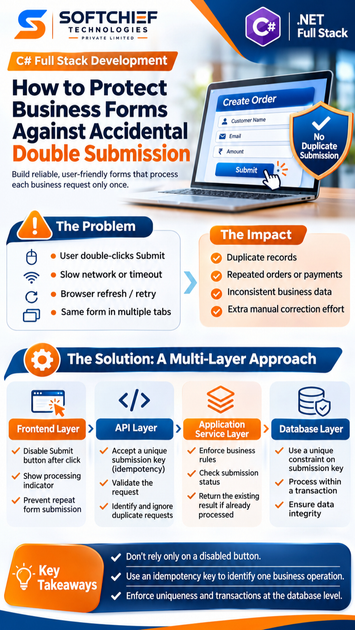
In an enterprise C# Full Stack application, duplicate submission protection should be implemented across four major layers.
Frontend Layer – Prevent Repeated User Actions
The frontend should:
- Disable the Submit button after the first valid submission attempt.
- Display a processing indicator.
- Prevent duplicate JavaScript event execution.
- Avoid allowing repeated form submission while the request is in progress.
- Restore the button when a recoverable request failure occurs.
API Layer – Identify Duplicate Requests
The API should:
- Accept a unique submission identifier or idempotency key.
- Validate the request.
- Identify whether the same operation has already been processed.
- Return an appropriate response for repeated requests.
- Avoid creating another business transaction.
Application Service Layer – Enforce Business Rules
The service layer should:
- Validate business conditions.
- Check the submission identifier.
- Coordinate transaction processing.
- Handle concurrent requests.
- Return the existing result when the same operation has already completed.
Database Layer – Enforce Data Integrity
The database should:
- Enforce unique constraints on submission identifiers.
- Prevent two concurrent requests from creating the same business transaction.
- Use transactions for related database operations.
- Support concurrency handling where necessary.
The following architecture illustrates how these layers work together.
        USER
         |
         v
  BUSINESS FORM
         |
         v
 FRONTEND PROTECTION
  - Disable button
  - Loading indicator
  - Prevent repeat click
         |
         v
   ASP.NET CORE API
         |
         v
  REQUEST VALIDATION
  - Validate input
  - Check submission key
         |
         v
  APPLICATION SERVICE
  - Business validation
  - Idempotency check
  - Transaction handling
         |
         v
     SQL SERVER
  - Unique constraint
  - Transaction
  - Data integrity
         |
         v
  SUCCESS / EXISTING RESULT
Each layer has a different responsibility. Combining them provides considerably stronger protection than relying on a single JavaScript function.
Implementation 1: Prevent Multiple Clicks Using JavaScript
Let’s start with the frontend.
Assume we have an employee registration form in an ASP.NET Core MVC application.
The form collects employee information and sends it to the server using an HTTP POST request.
To prevent double form submission reliably, ASP.NET Core applications must validate repeated requests at the server level.
HTML form
<form id="employeeForm">

    <div>
        <label>Employee Name</label>
        <input type="text"
               id="employeeName"
               name="employeeName"
               required />
    </div>

    <div>
        <label>Email Address</label>
        <input type="email"
               id="email"
               name="email"
               required />
    </div>

    <button type="submit" id="submitButton">
        Submit
    </button>

</form>

<p id="statusMessage"></p>
JavaScript implementation
Although JavaScript helps prevent double form submission, frontend protection alone cannot guarantee transaction integrity.
const form = document.getElementById("employeeForm");

const submitButton =
    document.getElementById("submitButton");

const statusMessage =
    document.getElementById("statusMessage");

let isSubmitting = false;

form.addEventListener("submit", async function (event) {

    event.preventDefault();

    if (isSubmitting) {
        return;
    }

    if (!form.reportValidity()) {
        return;
    }

    isSubmitting = true;

    submitButton.disabled = true;

    submitButton.textContent = "Submitting...";

    statusMessage.textContent =
        "Please wait while your request is processed.";

    try {

        const response = await fetch("/Employee/Create", {

            method: "POST",

            body: new FormData(form)

        });

        if (!response.ok) {
            throw new Error("Unable to process the request.");
        }

        statusMessage.textContent =
            "Employee registered successfully.";

    }
    catch (error) {

        statusMessage.textContent =
            "Submission failed. Please try again.";

        isSubmitting = false;

        submitButton.disabled = false;

        submitButton.textContent = "Submit";

    }

});
How does this implementation work?
The isSubmitting variable acts as a client-side submission flag.
When the user submits the form:
- The application checks whether a submission is already in progress.
- If the flag is true, another submission is ignored.
- If the flag is false, the application sets it to true.
- The Submit button is disabled.
- The browser sends the request.
- If the request succeeds, the user receives a confirmation message.
- If a recoverable failure occurs, the application allows another attempt.
The important detail is that the submission flag is set before the asynchronous network request begins.
This prevents repeated event execution from initiating multiple requests in the same page instance.
Production consideration: Do not assume that a network error means the server did not process the request. The server might have committed the transaction while the response was lost. This is why the frontend must be combined with server-side idempotency.
Implementation 2: Use Server-Side Validation in ASP.NET Core
Frontend validation improves the user experience, but the server must independently validate incoming data.
A client can bypass JavaScript completely.
Let’s define an employee registration model.
EmployeeCreateRequest.cs
using System.ComponentModel.DataAnnotations;

public class EmployeeCreateRequest
{
    [Required]
    [StringLength(100)]
    public string EmployeeName { get; set; } = string.Empty;

    [Required]
    [EmailAddress]
    public string Email { get; set; } = string.Empty;
}
The model uses Data Annotation attributes to validate incoming values.
Now consider the controller.
EmployeeController.cs
using Microsoft.AspNetCore.Mvc;

public class EmployeeController : Controller
{
    private readonly IEmployeeService _employeeService;

    public EmployeeController(
        IEmployeeService employeeService)
    {
        _employeeService = employeeService;
    }

    [HttpPost]
    [ValidateAntiForgeryToken]
    public async Task<IActionResult> Create(
        EmployeeCreateRequest request)
    {
        if (!ModelState.IsValid)
        {
            return BadRequest(ModelState);
        }

        var result =
            await _employeeService.CreateEmployeeAsync(request);

        return Ok(result);
    }
}
The controller performs server-side model validation before invoking the application service.
The [ValidateAntiForgeryToken] attribute is also important for browser-based MVC applications that use cookie authentication.
However, understand the distinction:
- Model validation checks whether submitted data satisfies application validation rules.
- Antiforgery validation protects against cross-site request forgery.
- Neither mechanism independently prevents duplicate business transactions.
These controls solve different security and reliability problems.
Implementation 3: Introduce an Idempotency Key
This is where the implementation becomes more interesting.
A reliable way to protect business operations is to introduce an idempotency key.
An idempotency key is a unique identifier associated with one intended business operation.
For example, when a customer opens an order creation form, the application generates a unique identifier.
An idempotency key provides an effective mechanism to prevent double form submission when clients retry the same business request.
That identifier accompanies the submission.
If the same request is sent again using the same identifier, the backend recognizes it as another attempt to execute the same operation.
Instead of creating another order, the application returns the result of the original operation.
Example
Consider an order submission.
| Request | Submission Key | Expected behaviour |
|---|---|---|
| First request | ORDER-123 | Create order |
| Second request | ORDER-123 | Return existing result |
| Third request | ORDER-123 | Return existing result |
| New order | ORDER-456 | Create a new order |
The key is not the customer’s email address or order number.
It identifies one particular submission attempt.
Two legitimate orders from the same customer must be allowed to have different keys.
Generate a submission identifier
In ASP.NET Core MVC, the server can generate the identifier when rendering the form.
public IActionResult Create()
{
    ViewBag.SubmissionId =
        Guid.NewGuid().ToString();

    return View();
}
Add the identifier to the Razor form:
<form asp-action="Create"
      asp-controller="Order"
      method="post">

    <input type="hidden"
           name="SubmissionId"
           value="@ViewBag.SubmissionId" />

    <input type="text"
           name="CustomerName"
           required />

    <input type="number"
           name="Amount"
           required />

    <button type="submit">
        Place Order
    </button>

</form>
Every retry of this particular submission must reuse the same identifier.
A new identifier should be generated when the user intentionally starts a new order.
Implementation 4: Enforce Duplicate Protection in SQL Server
Database-level uniqueness is essential when implementing protection against double form submission in concurrent application scenarios.
A unique identifier in the browser is useful, but it becomes reliable only when the backend and database enforce it.
Let’s introduce an order entity.
Order.cs
public class Order
{
    public int Id { get; set; }

    public string CustomerName { get; set; }
        = string.Empty;

    public decimal Amount { get; set; }

    public Guid SubmissionId { get; set; }

    public DateTime CreatedOn { get; set; }
}
The SubmissionId property represents the identity of the intended submission.
Now configure a unique database index.
OrderDbContext.cs
using Microsoft.EntityFrameworkCore;

public class OrderDbContext : DbContext
{
    public OrderDbContext(
        DbContextOptions<OrderDbContext> options)
        : base(options)
    {
    }

    public DbSet<Order> Orders => Set<Order>();

    protected override void OnModelCreating(
        ModelBuilder modelBuilder)
    {
        modelBuilder.Entity<Order>()
            .HasIndex(x => x.SubmissionId)
            .IsUnique();
    }
}
After creating and applying the EF Core migration, SQL Server enforces uniqueness on the SubmissionId column.
This is an important design decision.
Suppose two HTTP requests arrive simultaneously with the same submission identifier.
Both requests may initially check the database and find no matching order.
Both may then attempt to insert a record.
A normal application-level existence check cannot prevent this race condition.
The unique database index ensures that only one insert using that identifier can succeed.
The second insert will violate the unique constraint.
This is why database-level enforcement is essential.
Implementation 5: Handle Duplicate Submissions in the C# Service Layer
Now let’s implement the business logic.
The service should first check whether the submission has already been processed.
If an order already exists for the identifier, it should return that order rather than creating another one.
OrderService.cs
using Microsoft.EntityFrameworkCore;

public class OrderService
{
    private readonly OrderDbContext _context;

    public OrderService(OrderDbContext context)
    {
        _context = context;
    }

    public async Task<Order> CreateOrderAsync(
        string customerName,
        decimal amount,
        Guid submissionId)
    {
        var existingOrder = await _context.Orders
            .SingleOrDefaultAsync(
                x => x.SubmissionId == submissionId);

        if (existingOrder != null)
        {
            return existingOrder;
        }

        var order = new Order
        {
            CustomerName = customerName,
            Amount = amount,
            SubmissionId = submissionId,
            CreatedOn = DateTime.UtcNow
        };

        _context.Orders.Add(order);

        try
        {
            await _context.SaveChangesAsync();

            return order;
        }
        catch (DbUpdateException)
        {
            var duplicateOrder = await _context.Orders
                .SingleOrDefaultAsync(
                    x => x.SubmissionId == submissionId);

            if (duplicateOrder != null)
            {
                return duplicateOrder;
            }

            throw;
        }
    }
}
Understanding the implementation
There are three important stages.
Stage 1: Check for an existing transaction
var existingOrder = await _context.Orders
    .SingleOrDefaultAsync(
        x => x.SubmissionId == submissionId);
If the same submission was successfully processed earlier, the existing order is returned.
Stage 2: Attempt to create a new transaction
If no matching record exists, the service creates a new order and saves it.
Stage 3: Handle concurrent insertion
If another request inserts the same submission identifier first, the database rejects the second insertion because of the unique index.
The service then checks whether the original order now exists and returns it.
If the exception was caused by another database problem, it is rethrown instead of being incorrectly treated as a duplicate.
This example demonstrates the core principle, but a production implementation should identify the specific unique-constraint violation rather than treating every DbUpdateException as a duplicate.
Also, the duplicate response should be returned only when the incoming request represents the same operation and the same payload. Reusing an identifier with different order details must be rejected, not silently accepted.
For a payment, invoice, or multi-table business workflow, use an explicit idempotency record and transaction to coordinate the entire operation rather than relying only on the business table’s unique index.
Implementation 6: Understand Idempotency in REST APIs
In a Full Stack application, the frontend may communicate with an ASP.NET Core Web API rather than an MVC controller.
In this scenario, the idempotency key can be passed through an HTTP request header.
For example:
POST /api/orders
Content-Type: application/json
Idempotency-Key: 9e42f08a-5a0c-4c6d-91d1-1f5c8c1d3e22
The API uses this key to identify the intended transaction.
A simplified request model could be:
public class CreateOrderRequest
{
    public string CustomerName { get; set; }
        = string.Empty;

    public decimal Amount { get; set; }
}
The API endpoint can read the key from the request header:
[HttpPost]
public async Task<IActionResult> CreateOrder(
    [FromBody] CreateOrderRequest request)
{
    if (!Request.Headers.TryGetValue(
        "Idempotency-Key", out var keyValue))
    {
        return BadRequest(
            "Idempotency-Key header is required.");
    }

    if (!Guid.TryParse(keyValue, out var submissionId))
    {
        return BadRequest(
            "Invalid idempotency key.");
    }

    var result = await _orderService.CreateOrderAsync(
        request.CustomerName,
        request.Amount,
        submissionId);

    return Ok(result);
}
This example connects the API request with the service-layer duplicate protection.
However, a production API should implement a complete idempotency lifecycle.
That means storing:
- The idempotency key.
- The authenticated user or tenant.
- The operation or endpoint identity.
- A hash of the normalized request payload.
- The processing status.
- The resulting HTTP status and response.
- The creation and expiration timestamps.
The backend should also define what happens when a matching request is still being processed.
For example:
| Situation | Recommended API behaviour |
|---|---|
| New key | Process the request |
| Same key, completed request | Return stored result |
| Same key, processing request | Return a documented in-progress response |
| Same key, different payload | Reject the request |
| Expired key | Apply the documented retention policy |
A common implementation uses an idempotency table with a unique composite constraint on the authenticated scope, operation, and key.
The request claim, business transaction, and stored result must be coordinated carefully. In a single-database design, they can be handled using an appropriate database transaction. For distributed workflows, additional coordination and recovery mechanisms may be necessary.
Do not rely only on an in-memory dictionary or a static variable. These approaches fail when the application runs across multiple instances or restarts.
Implementation 7: Use Transactions for Business-Critical Operations
Consider a financial application where submitting an invoice involves:
- Creating an invoice.
- Updating the customer balance.
- Recording a transaction.
- Creating an audit entry.
These operations are related.
If the application creates an invoice but fails before updating the customer balance, the system may enter an inconsistent state.
EF Core supports database transactions to coordinate related operations.
For example:
await using var transaction =
    await _context.Database.BeginTransactionAsync();

try
{
    _context.Invoices.Add(invoice);

    customer.OutstandingBalance += invoice.Amount;

    _context.Transactions.Add(
        new FinancialTransaction
        {
            Amount = invoice.Amount,
            CreatedOn = DateTime.UtcNow
        });

    await _context.SaveChangesAsync();

    await transaction.CommitAsync();
}
catch
{
    await transaction.RollbackAsync();

    throw;
}
The transaction ensures that the related database changes commit or roll back together, provided they participate in the same database transaction.
However, a database transaction alone does not prevent the same business operation from being executed twice.
The transaction must work together with idempotency enforcement.
For external operations, such as payment gateway calls, email delivery, or third-party integrations, database transactions cannot automatically roll back an already completed external action. Such workflows need additional mechanisms such as durable idempotency records, transactional outbox processing, and provider-supported idempotency.
Implementation 8: Understand Optimistic Concurrency in EF Core
Double submission and concurrent updates are related, but they are not identical problems.
Double submission concerns repeated execution of the same intended operation.
Optimistic concurrency concerns multiple operations attempting to update the same existing data.
For example:
- Employee A opens an employee record.
- Employee B opens the same record.
- Employee B updates the employee’s department.
- Employee A submits an older version of the record.
Without concurrency protection, Employee A might overwrite Employee B’s changes.
EF Core supports optimistic concurrency using concurrency tokens.
For SQL Server, a row version can be used.
public class Employee
{
    public int Id { get; set; }

    public string EmployeeName { get; set; }
        = string.Empty;

    [Timestamp]
    public byte[] RowVersion { get; set; }
        = Array.Empty<byte>();
}
Configure the property as a row-version concurrency token.
When EF Core updates the record, it checks whether the original version still matches the database version.
If another operation has modified the record, EF Core can throw a DbUpdateConcurrencyException.
The application can then inform the user that the record has changed and ask them to reload or resolve the conflict.
This protects against lost updates.
Important: A row-version column does not replace an idempotency key. Use idempotency for repeated business operations and concurrency tokens for conflicting updates to existing records.
Implementation 9: Handle Browser Refresh and Form Resubmission
Another common issue occurs when users refresh the browser after submitting a form.
Depending on the browser and application response, the user may be prompted to resubmit the form.
A common solution is the Post/Redirect/Get (PRG) pattern.
The sequence is:
- Browser sends a POST request.
- Server processes the submission.
- Server responds with an HTTP redirect.
- Browser sends a GET request to display the result page.
Example:
[HttpPost]
[ValidateAntiForgeryToken]
public async Task<IActionResult> Create(
    OrderCreateViewModel model)
{
    if (!ModelState.IsValid)
    {
        return View(model);
    }

    var order = await _orderService.CreateOrderAsync(
        model.CustomerName,
        model.Amount,
        model.SubmissionId);

    return RedirectToAction(
        "Details",
        new { id = order.Id });
}
The browser now displays the GET request rather than the original POST response.
Refreshing the details page therefore does not normally repeat the original POST operation.
However, PRG is a browser-navigation pattern, not a substitute for server-side idempotency. A repeated POST can still arrive through another tab, an API client, or a network retry.
Implementation 10: Common Mistakes Developers Should Avoid
A technically correct implementation must also avoid common architectural mistakes.
| Mistake | Why it is problematic | Better approach |
|---|---|---|
| Only disabling the button | Does not protect the API | Add server-side idempotency |
| Using only JavaScript flags | State is limited to one page instance | Enforce uniqueness on the server |
| Checking existence without a unique index | Concurrent requests can both pass | Use a database unique constraint |
| Generating a new key for every retry | Every retry looks like a new operation | Reuse the original key |
| Treating every database exception as a duplicate | Hides genuine database failures | Identify the specific constraint violation |
| Using antiforgery tokens as duplicate identifiers | CSRF protection and idempotency solve different problems | Implement separate controls |
| Using only PRG | Does not protect direct API retries | Combine PRG with idempotency |
| Using only a database transaction | Does not identify repeated business requests | Combine transactions with idempotency |
Best Practices to Prevent Double Form Submission in C# Applications
For an enterprise-grade C# Full Stack application, I would recommend the following design.
Frontend
- Use a submission-in-progress flag.
- Disable the Submit button.
- Display an appropriate loading state.
- Generate or obtain a submission identifier when the user begins a new operation.
- Reuse that identifier during retries.
ASP.NET Core API
- Validate the request model.
- Validate the authenticated user’s permissions.
- Apply antiforgery protection where browser cookie authentication requires it.
- Accept and validate the idempotency key.
- Check the key’s processing state.
- Reject requests that reuse a key with different payloads.
Application Service
- Keep business rules in the service layer.
- Process a new operation only once.
- Coordinate idempotency records with business transactions.
- Return the original result for completed duplicate requests.
- Implement safe recovery for interrupted processing.
Database
- Add unique constraints for submission identifiers.
- Use transactions for related database changes.
- Apply optimistic concurrency where multiple users can edit the same record.
- Maintain appropriate audit information.
Monitoring
- Log duplicate request attempts.
- Track failed and incomplete transactions.
- Monitor repeated API requests.
- Avoid logging sensitive information or payment credentials.
- Use correlation identifiers to trace requests across application components.
How to Test Double Submission Protection
Testing prevent double form submission scenarios helps developers identify race conditions, repeated API requests, and unexpected transaction behaviour.
Developers should not consider this feature complete simply because the Submit button becomes disabled.
The implementation should be tested against realistic scenarios.
| Test scenario | Expected result |
|---|---|
| Click Submit once | One business record created |
| Double-click Submit | One business record created |
| Send two simultaneous requests with the same key | One business operation created |
| Retry after a successful response is lost | Original result returned |
| Submit a different request with a new key | New business record created |
| Reuse an existing key with different data | Request rejected |
| Refresh after successful form submission | Details page displayed |
| Submit from two browser tabs using the same key | One business operation created |
| Submit two legitimate orders with different keys | Both orders created |
| Simulate a database failure | No false success response |
For concurrency testing, use separate HTTP requests or independent database contexts. A sequential test alone does not adequately demonstrate protection against race conditions.
Conclusion
Preventing double form submission should be treated as a business data integrity requirement rather than simply a frontend usability improvement.
Accidental double submission is a small user-interface problem only when viewed from the browser.
In an enterprise application, it can become a serious data-integrity issue involving duplicate customers, repeated orders, incorrect invoices, duplicate payments, and inconsistent business records.
The right solution is not to depend on a disabled button or a JavaScript variable.
A reliable C# Full Stack implementation combines:
- Frontend submission protection.
- ASP.NET Core request validation.
- Server-side idempotency.
- Database unique constraints.
- Transaction management.
- Optimistic concurrency where appropriate.
The most important engineering principle is this:
Never assume that a business request will reach your server only once. Design the backend so that repeated delivery of the same intended operation cannot create duplicate business effects.
That is the difference between a form that works during a normal demonstration and a business application that can handle real-world network failures, user behaviour, and concurrent requests.
Frequently Asked Questions
How do I prevent users from clicking the Submit button multiple times in C#?
Use JavaScript to track the submission state, disable the Submit button, and display a loading indicator. However, implement server-side idempotency and database uniqueness to protect against repeated requests that bypass the browser.
What is an idempotency key in ASP.NET Core?
An idempotency key is a unique identifier assigned to an intended business operation. ASP.NET Core can use this identifier to recognize repeated requests and return the result of an already completed operation instead of executing it again.
Does disabling a Submit button prevent duplicate database records?
No. Disabling the button prevents many repeated user actions, but it cannot guarantee that only one request reaches the backend. Database constraints and server-side duplicate protection are required.
Can Entity Framework Core prevent duplicate submissions?
EF Core can enforce unique indexes and coordinate transactions through database operations. Developers should combine these features with application-level idempotency logic to identify repeated business operations.
What is the difference between idempotency and optimistic concurrency?
Idempotency prevents repeated execution of the same intended operation. Optimistic concurrency detects conflicting modifications to existing records. Both are important in enterprise applications, but they solve different problems.
Is the Post/Redirect/Get pattern enough to prevent duplicate submissions?
No. PRG reduces accidental form resubmission during browser navigation, but it does not prevent repeated API calls, concurrent requests, or network retries. It should be combined with server-side idempotency.
Where should duplicate submission logic be implemented?
Use the frontend for user experience, the API and application service for request and business-operation handling, and the database for final uniqueness and integrity enforcement.
Technical References
- Microsoft Learn – Prevent Cross-Site Request Forgery (XSRF/CSRF) Attacks in ASP.NET Core
- Microsoft Learn – Handling Concurrency Conflicts in EF Core
- Microsoft Learn – ASP.NET Core MVC with EF Core: CRUD Operations
- Microsoft Learn – ASP.NET Core Best Practices
Want to Build Stronger C# Full Stack Development Skills?
Understanding how to build reliable business applications requires more than knowing C# syntax. Developers need practical experience with ASP.NET Core, Web APIs, Entity Framework Core, SQL Server, frontend technologies, and real-world application architecture.
At Softchief Learn, explore practical C# Full Stack Development training designed to help learners develop application-building skills through structured learning and hands-on projects.
Explore C# Full Stack Live Training