
Top Dynamics 365 Features Released in 2026 You Should Know (Complete Guide)
Introduction
Microsoft Dynamics 365 continues to evolve as one of the world’s leading business application platforms, helping organisations manage sales, customer service, finance, supply chain, human resources and business operations through a unified cloud ecosystem.
In 2026, Microsoft has significantly expanded Dynamics 365 by introducing more intelligent AI capabilities, deeper automation, enhanced analytics and improved user experiences. With the continued growth of Microsoft Copilot, AI Agents, Azure AI Foundry and the Power Platform, Dynamics 365 is becoming more than a CRM and ERP solution—it’s transforming into an intelligent business platform.
Whether you’re a Dynamics 365 developer, consultant, administrator or business leader, understanding the latest features will help you maximise productivity and prepare for the future of enterprise applications.
In this blog, we’ll explore the most important Dynamics 365 features introduced and enhanced in 2026, along with their business benefits and practical use cases.
Why Dynamics 365 Continues to Lead Enterprise Applications
Modern organisations require business applications that are:
- Intelligent
- Scalable
- Secure
- Cloud-native
- AI-powered
- Easy to integrate
- Highly automated
Microsoft continues to invest heavily in Dynamics 365 to meet these needs while providing seamless integration with Microsoft 365, Azure and the Power Platform.
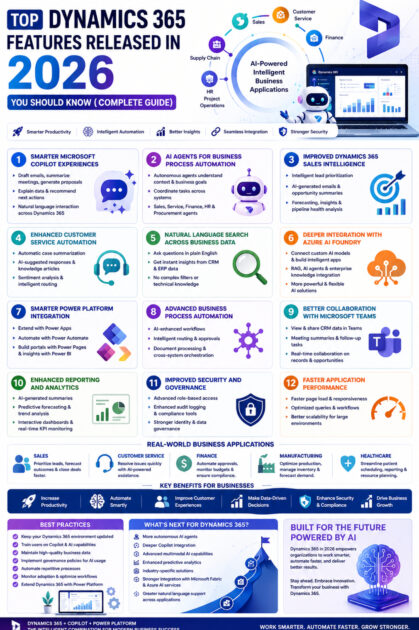
1. Smarter Microsoft Copilot Experiences
One of the most significant improvements in 2026 is the expansion of Microsoft Copilot across Dynamics 365 applications.
Copilot now helps users:
- Draft customer emails
- Summarise meetings
- Generate sales proposals
- Create customer responses
- Analyse CRM records
- Explain business data
- Recommend next actions
Instead of navigating multiple screens, users can interact with Dynamics 365 using natural language.
Business Benefits
- Increased productivity
- Reduced administrative work
- Faster decision-making
- Improved customer communication
2. AI Agents for Business Process Automation
Dynamics 365 now supports more advanced AI Agents capable of managing complex business processes.
Unlike traditional automation, AI Agents can:
- Understand business objectives
- Analyse context
- Coordinate multiple tasks
- Access enterprise systems
- Trigger workflows
- Recommend decisions
Common use cases include:
- Sales assistants
- Customer service agents
- Finance assistants
- HR onboarding agents
- Procurement coordinators
These AI Agents help organisations automate processes while allowing human oversight for critical decisions.
3. Improved Dynamics 365 Sales Intelligence
Dynamics 365 Sales has introduced enhanced AI-driven capabilities that assist sales teams throughout the customer journey.
New features include:
- Intelligent lead prioritisation
- Opportunity summaries
- AI-generated follow-up emails
- Sales forecasting
- Customer engagement insights
- Pipeline health analysis
Sales professionals can focus on relationship-building while AI handles repetitive administrative tasks.
4. Enhanced Customer Service Automation
Customer Service capabilities have expanded with AI-powered tools that improve support efficiency.
Enhancements include:
- Automatic case summarisation
- Suggested knowledge articles
- AI-generated responses
- Sentiment analysis
- Intelligent case routing
- Conversation summaries
These features help support teams resolve issues more quickly and deliver consistent customer experiences.
5. Natural Language Search Across Business Data
Searching for business information is now much simpler.
Users can ask questions such as:
- Which opportunities are closing this month?
- Show overdue invoices.
- List customers with open support cases.
- Which products generated the highest revenue?
Dynamics 365 interprets these queries and returns relevant information without requiring complex filters or reports.
6. Deeper Integration with Azure AI Foundry
Dynamics 365 now integrates more effectively with Azure AI Foundry, enabling organisations to build advanced AI-powered business applications.
Developers can:
- Connect custom AI models.
- Build intelligent assistants.
- Implement Retrieval-Augmented Generation (RAG).
- Create AI agents.
- Integrate enterprise knowledge bases.
This provides greater flexibility for organisations developing industry-specific AI solutions.
7. Smarter Power Platform Integration
The integration between Dynamics 365 and Microsoft Power Platform continues to improve.
Businesses can:
- Extend Dynamics 365 using Power Apps.
- Automate workflows with Power Automate.
- Build customer portals using Power Pages.
- Create interactive dashboards with Power BI.
- Develop AI-powered business solutions using Copilot.
This enables organisations to customise Dynamics 365 without extensive custom development.
8. Advanced Business Process Automation
Workflow automation has become more intelligent.
AI-enhanced automation now supports:
- Multi-step approvals
- Intelligent routing
- Automated notifications
- Predictive task assignment
- Document processing
- Cross-system orchestration
These improvements reduce manual effort while increasing operational efficiency.
9. Better Collaboration with Microsoft Teams
Dynamics 365 users can collaborate more effectively through tighter Microsoft Teams integration.
Teams can:
- Share customer records during meetings.
- View CRM information without switching applications.
- Generate meeting summaries.
- Create follow-up tasks.
- Collaborate on opportunities in real time.
This improves communication between departments and reduces context switching.
10. Enhanced Reporting and Analytics
Business intelligence capabilities continue to expand.
Users benefit from:
- AI-generated executive summaries
- Predictive forecasting
- Interactive dashboards
- Real-time KPI monitoring
- Trend analysis
- Intelligent recommendations
Decision-makers receive actionable insights faster, helping them respond quickly to changing business conditions.
11. Improved Security and Governance
Microsoft has strengthened security across the Dynamics 365 ecosystem.
Enhancements include:
- Expanded role-based access control
- Better audit logging
- Enhanced compliance tools
- Improved identity management with Microsoft Entra ID
- Data governance enhancements
- AI governance features
These capabilities help organisations meet regulatory and security requirements.
12. Faster Application Performance
Performance improvements introduced in 2026 include:
- Faster page loading
- Improved form responsiveness
- Optimised data queries
- Reduced workflow latency
- Better scalability for large environments
These updates contribute to a smoother user experience across CRM and ERP applications.
Real-World Business Applications
Sales Organisations
Dynamics 365 helps sales teams by:
- Prioritising high-value leads.
- Generating personalised follow-up emails.
- Predicting sales outcomes.
- Recommending next actions.
Customer Support
Support teams benefit from:
- Automatic ticket summaries.
- Intelligent case assignment.
- AI-generated responses.
- Faster issue resolution.
Finance
Finance departments can:
- Automate approvals.
- Monitor budgets.
- Generate reports.
- Improve compliance.
Manufacturing
Manufacturers use Dynamics 365 to:
- Track inventory.
- Optimise production.
- Forecast demand.
- Monitor supply chains.
Healthcare
Healthcare providers streamline:
- Patient scheduling.
- Administrative workflows.
- Reporting.
- Resource planning.
Benefits for Businesses
| Feature | Business Benefit |
|---|---|
| Microsoft Copilot | Increased employee productivity |
| AI Agents | Intelligent business automation |
| Sales Intelligence | Higher conversion rates |
| Customer Service AI | Faster support resolution |
| Power Platform Integration | Rapid application development |
| Azure AI Foundry Integration | Custom enterprise AI solutions |
| Advanced Analytics | Better business decisions |
| Enhanced Security | Improved compliance and governance |
Best Practices for Using Dynamics 365 in 2026
To maximise the value of the latest features:
- Keep your Dynamics 365 environment updated.
- Train users on Copilot and AI capabilities.
- Maintain high-quality business data for accurate AI insights.
- Implement governance policies for AI usage.
- Automate repetitive business processes with Power Automate.
- Monitor adoption and optimise workflows continuously.
- Extend Dynamics 365 with Power Platform where appropriate.
Looking Ahead
Microsoft’s roadmap suggests that Dynamics 365 will continue to evolve with a strong focus on AI and intelligent automation.
Future developments are expected to include:
- More autonomous AI agents.
- Deeper integration with Microsoft Copilot.
- Advanced multimodal AI capabilities.
- Enhanced predictive analytics.
- Expanded industry-specific solutions.
- Richer integration with Microsoft Fabric and Azure AI services.
- Greater support for natural language interactions across business applications.
These innovations will further strengthen Dynamics 365 as a comprehensive platform for enterprise digital transformation.
Conclusion
The Dynamics 365 features introduced in 2026 reflect Microsoft’s continued commitment to building intelligent, AI-first business applications. From enhanced Copilot experiences and AI Agents to smarter automation, advanced analytics and deeper Power Platform integration, these updates help organisations work more efficiently, make informed decisions and deliver better customer experiences.
Whether you’re implementing Dynamics 365 for the first time or expanding an existing deployment, taking advantage of these new capabilities can improve productivity, streamline operations and support long-term business growth. For developers, consultants and business professionals, staying current with these innovations is essential to making the most of Microsoft’s rapidly evolving business applications ecosystem.









