
Getting Started with Microsoft Entra ID for Azure Administrators: The Complete Guide
Introduction
In today’s cloud-first world, managing identities securely is just as important as managing servers, virtual machines and networks. As organizations adopt Microsoft Azure, Microsoft 365 and hybrid cloud environments, identity has become the new security perimeter.
According to Microsoft’s security research, compromised identities remain one of the leading causes of cloud security incidents. Attackers no longer need to breach data centres if they can simply steal user credentials or exploit excessive permissions.
This is why Microsoft Entra ID has become one of the most important services every Azure Administrator must understand.
Whether you’re preparing for Microsoft certifications, managing Azure subscriptions or planning a career in cloud administration, learning Microsoft Entra ID is essential.
In this comprehensive guide, you’ll learn what Microsoft Entra ID is, how it works, its core components, security features, administration best practices and why it has become the foundation of modern identity and access management.
What is Microsoft Entra ID?
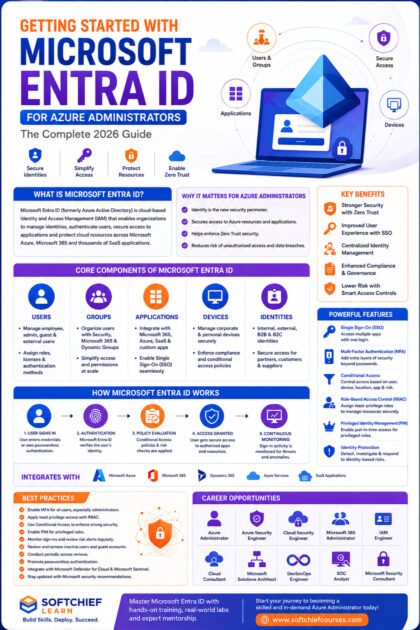
Microsoft Entra ID (formerly Azure Active Directory) is Microsoft’s cloud-based Identity and Access Management (IAM) solution.
It enables organizations to:
- Manage users and groups
- Authenticate identities
- Control access to applications
- Secure cloud resources
- Enable Single Sign-On (SSO)
- Enforce security policies
- Protect privileged accounts
- Manage external identities
Unlike traditional Active Directory, Microsoft Entra ID is designed specifically for cloud environments and integrates seamlessly with Microsoft Azure, Microsoft 365 and thousands of third-party applications.
Why Microsoft Renamed Azure Active Directory
Many professionals still refer to the service as Azure Active Directory (Azure AD).
Microsoft renamed Azure AD to Microsoft Entra ID to better reflect its broader identity platform, which includes:
- Microsoft Entra ID
- Microsoft Entra Permissions Management
- Microsoft Entra Verified ID
- Microsoft Entra Internet Access
- Microsoft Entra Private Access
The functionality remains familiar, but the new branding emphasizes Microsoft’s comprehensive approach to identity security.
Why Azure Administrators Must Learn Microsoft Entra ID
Every Azure resource relies on identity.
Before a user can create a virtual machine, access a storage account or manage a subscription, Microsoft Entra ID verifies who they are and what they are allowed to do.
Without proper identity management, organizations face risks such as:
- Unauthorized access
- Privilege escalation
- Data breaches
- Compliance violations
- Credential theft
- Insider threats
Understanding Microsoft Entra ID enables Azure Administrators to secure cloud environments effectively while supporting business productivity.
Core Components of Microsoft Entra ID
1. Users
Users represent individuals who access organizational resources.
Examples include:
- Employees
- Contractors
- Students
- Administrators
- Developers
Each user has:
- Username
- Password or passwordless credentials
- Assigned roles
- Group memberships
- Authentication methods
- Licenses
Azure Administrators regularly create, update and manage user accounts.
2. Groups
Groups simplify permission management by allowing administrators to assign access to collections of users rather than managing permissions individually.
Common group types include:
- Security Groups
- Microsoft 365 Groups
- Dynamic Groups
- Mail-enabled Groups
Using groups reduces administrative overhead and improves consistency.
3. Applications
Organizations often use hundreds of cloud applications.
Microsoft Entra ID supports integration with:
- Microsoft 365
- Dynamics 365
- Salesforce
- ServiceNow
- Dropbox
- SAP
- Workday
- Custom business applications
Administrators can centrally manage authentication and authorization for these applications.
4. Devices
Microsoft Entra ID can manage:
- Windows devices
- macOS
- iOS
- Android
- Hybrid-joined devices
- Azure AD joined devices
Device management improves security by ensuring that only trusted devices access organizational resources.
Authentication vs Authorization
Understanding the difference between authentication and authorization is fundamental.
Authentication
Authentication answers the question:
Who are you?
Examples include:
- Username and password
- Multi-Factor Authentication (MFA)
- Fingerprint
- Face recognition
- Security keys
Authorization
Authorization answers:
What are you allowed to access?
For example:
- Can create virtual machines
- Can manage storage accounts
- Can view billing information
- Can manage users
- Can access financial reports
Microsoft Entra ID manages both processes securely.
Single Sign-On (SSO)
One of the most valuable features of Microsoft Entra ID is Single Sign-On.
Instead of remembering multiple passwords, users authenticate once and gain access to authorized applications.
Benefits include:
- Better user experience
- Fewer password resets
- Improved security
- Increased productivity
- Centralized authentication
Organizations often use SSO to simplify access to Microsoft 365, Dynamics 365 and third-party applications.
Multi-Factor Authentication (MFA)
Passwords alone are no longer sufficient.
Microsoft Entra ID supports Multi-Factor Authentication by requiring an additional verification method.
Supported methods include:
- Microsoft Authenticator
- SMS codes
- Voice calls
- FIDO2 security keys
- Windows Hello for Business
- Passkeys
Even if a password is compromised, MFA significantly reduces the likelihood of unauthorized access.
Conditional Access
Conditional Access allows organizations to define rules that determine when and how users can access resources.
Policies can evaluate conditions such as:
- User identity
- Group membership
- Device compliance
- Geographic location
- Application being accessed
- Sign-in risk
- User risk
Example
A policy could require MFA when users sign in from an unfamiliar location while allowing seamless access from trusted corporate devices.
Conditional Access is considered one of the most effective tools for implementing a Zero Trust security model.
Role-Based Access Control (RBAC)
Not every administrator should have full access to Azure resources.
Role-Based Access Control ensures users receive only the permissions required to perform their responsibilities.
Common Azure roles include:
- Owner
- Contributor
- Reader
- User Access Administrator
- Virtual Machine Contributor
- Storage Account Contributor
- Network Contributor
Following the principle of least privilege reduces security risks and simplifies governance.
Privileged Identity Management (PIM)
Highly privileged accounts should not remain permanently active.
Privileged Identity Management enables organizations to:
- Provide Just-In-Time (JIT) access
- Require approval before role activation
- Enforce MFA for privileged actions
- Set activation time limits
- Maintain audit logs
This minimizes the attack surface while ensuring administrators have access when needed.
Identity Protection
Microsoft Entra ID continuously evaluates sign-in activity using AI and threat intelligence.
It can detect:
- Impossible travel
- Anonymous IP addresses
- Password spray attacks
- Leaked credentials
- Suspicious sign-ins
- Unfamiliar locations
- Malware-related authentication attempts
Administrators can configure automated responses, such as requiring MFA or blocking access until the risk is resolved.
External Identity Management
Modern organizations collaborate with suppliers, partners and customers.
Microsoft Entra ID supports secure external collaboration through:
- Business-to-Business (B2B)
- Business-to-Consumer (B2C)
- Guest users
- External authentication providers
This enables secure collaboration without creating unnecessary internal accounts.
Integrating Microsoft Entra ID with Azure
Every Azure Administrator should understand how Entra ID integrates with Azure services.
Common integrations include:
- Azure Virtual Machines
- Azure Storage
- Azure SQL Database
- Azure App Service
- Azure Kubernetes Service
- Azure Key Vault
- Azure Functions
- Azure DevOps
- Microsoft Defender for Cloud
- Microsoft Sentinel
Identity-based authentication eliminates the need for shared credentials and improves overall security.
Microsoft Entra ID and Zero Trust Security
Zero Trust is based on the principle of “Never trust, always verify.”
Microsoft Entra ID supports Zero Trust by continuously evaluating:
- User identity
- Device health
- Application access
- Authentication strength
- Risk signals
- Session behaviour
Organizations can enforce adaptive access policies that respond dynamically to changing security conditions.
Real-World Scenario
Imagine an international financial organization with employees working from offices, homes and while travelling.
Using Microsoft Entra ID, the company implements:
- Single Sign-On for Microsoft 365 and Dynamics 365
- Multi-Factor Authentication for all users
- Conditional Access requiring compliant devices
- Privileged Identity Management for administrators
- Identity Protection to detect risky sign-ins
- Guest access for external auditors
As a result, employees enjoy secure and seamless access while the organization’s security posture is significantly strengthened.
Best Practices for Azure Administrators
To maximize security and efficiency when managing Microsoft Entra ID:
- Enable Multi-Factor Authentication for all users, especially administrators.
- Apply the principle of least privilege through Role-Based Access Control.
- Use Conditional Access instead of relying solely on passwords.
- Enable Privileged Identity Management for administrative roles.
- Monitor Identity Protection alerts regularly.
- Review guest accounts and remove inactive users.
- Group users logically to simplify permission management.
- Conduct periodic access reviews.
- Enable passwordless authentication where appropriate.
- Integrate Microsoft Defender for Cloud and Microsoft Sentinel for comprehensive security monitoring.
Common Mistakes to Avoid
Many organizations unintentionally weaken their security by:
- Granting Global Administrator rights unnecessarily.
- Leaving privileged accounts permanently active.
- Disabling Multi-Factor Authentication.
- Ignoring risky sign-in alerts.
- Using shared administrator accounts.
- Failing to review access permissions regularly.
- Not implementing Conditional Access policies.
- Overlooking guest user governance.
Avoiding these mistakes greatly enhances identity security.
Career Opportunities
Microsoft Entra ID skills are increasingly required across cloud and cybersecurity roles.
Career paths include:
- Azure Administrator
- Azure Security Engineer
- Cloud Security Engineer
- Microsoft 365 Administrator
- Identity and Access Management (IAM) Engineer
- Cloud Consultant
- DevSecOps Engineer
- Microsoft Solutions Architect
- Security Operations Center (SOC) Analyst
- Microsoft Security Consultant
Professionals with expertise in Microsoft Entra ID, Azure, Microsoft Defender and Microsoft Sentinel are among the most sought-after in the cloud computing industry.
Learn Microsoft Entra ID with Softchief Learn
At Softchief Learn, we help IT professionals build practical cloud administration and identity management skills through real-world, instructor-led training.
Our Azure learning paths include:
- Microsoft Entra ID Administration
- Azure Administration
- Azure Networking
- Azure Virtual Machines
- Azure Storage
- Azure Security
- Microsoft Defender for Cloud
- Microsoft Sentinel
- Azure Policy and Governance
- PowerShell Automation
- Azure DevOps
- Certification Preparation (AZ-104, AZ-500 and related Microsoft certifications)
With hands-on labs, live projects, interview preparation and expert mentorship, our programs are designed to help learners become confident Azure Administrators and cloud security professionals.
Conclusion
Microsoft Entra ID is far more than a directory service—it is the identity foundation that secures Microsoft Azure, Microsoft 365 and thousands of enterprise applications. Features such as Single Sign-On, Multi-Factor Authentication, Conditional Access, Role-Based Access Control and Privileged Identity Management enable organizations to adopt a Zero Trust approach while maintaining a seamless user experience.
For Azure Administrators, mastering Microsoft Entra ID is no longer optional. It is a core competency that supports secure cloud operations, regulatory compliance and modern identity governance.
Whether you’re beginning your cloud journey or preparing for advanced Azure roles, investing time in Microsoft Entra ID will strengthen your technical expertise and open doors to exciting opportunities in cloud administration and cybersecurity.









