
Dynamics 365 Business Central Implementation Guide for Small Businesses (2026 Complete Guide)
Introduction
Running a small business is more challenging than ever. Business owners are expected to manage finance, inventory, sales, purchasing, customer relationships, compliance and reporting—often with limited resources and growing customer expectations.
Many small businesses begin with spreadsheets, standalone accounting software or disconnected applications. While these tools may work initially, they often become barriers to growth as operations expand. Manual data entry, duplicate records, delayed reporting and inefficient workflows can slow decision-making and reduce productivity.
This is where Microsoft Dynamics 365 Business Central makes a significant difference.
Business Central is Microsoft’s cloud-based Enterprise Resource Planning (ERP) solution designed specifically for small and medium-sized businesses (SMBs). It brings together finance, sales, purchasing, inventory, warehousing, project management, reporting and AI-powered insights into a single, integrated platform.
However, purchasing an ERP solution is only the first step. A successful implementation requires careful planning, stakeholder involvement, structured execution and user adoption.
In this comprehensive guide, you’ll learn how to successfully implement Dynamics 365 Business Central for a small business, avoid common implementation mistakes and maximize your return on investment.
Why Small Businesses Need an ERP System
As businesses grow, operational complexity increases.
Common challenges include:
- Data stored across multiple systems
- Manual accounting processes
- Inventory inaccuracies
- Delayed financial reporting
- Inefficient purchasing workflows
- Limited business visibility
- Compliance difficulties
- Poor forecasting
- Customer service delays
- Time-consuming administrative tasks
An integrated ERP system eliminates these issues by creating a single source of truth for business operations.
What is Microsoft Dynamics 365 Business Central?
Microsoft Dynamics 365 Business Central is an all-in-one cloud ERP solution that helps organizations manage their entire business from a unified platform.
It includes modules for:
- Financial Management
- Sales Management
- Purchasing
- Inventory Management
- Warehouse Management
- Supply Chain Management
- Project Management
- Manufacturing
- Service Management
- Reporting and Analytics
- AI-powered insights
- Workflow automation
Because Business Central is cloud-based, organizations can securely access their business data from anywhere while benefiting from automatic updates, scalability and enterprise-grade security.
Why Business Central is Ideal for Small Businesses
Unlike traditional ERP systems that require significant infrastructure investments and lengthy deployments, Business Central offers:
- Faster implementation
- Lower infrastructure costs
- Flexible licensing
- Automatic updates
- Seamless Microsoft 365 integration
- AI-powered productivity
- Easy scalability
- Enterprise-grade security
- Mobile accessibility
- Built-in business intelligence
These advantages allow small businesses to adopt enterprise capabilities without enterprise-level complexity.
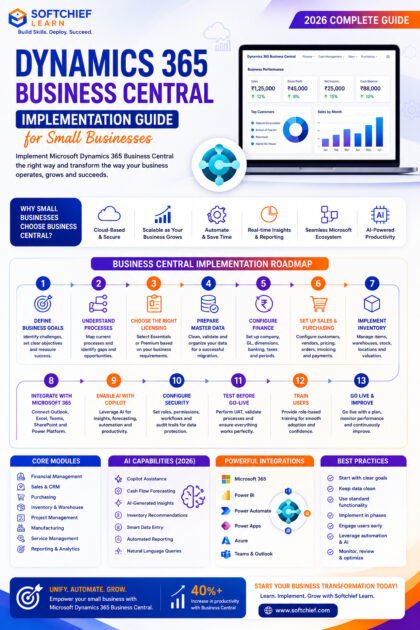
Step 1: Define Business Goals
Every successful ERP implementation begins with clear objectives.
Before configuring the system, identify the business problems you want to solve.
Examples include:
- Reduce manual accounting
- Improve inventory accuracy
- Automate purchasing
- Accelerate month-end closing
- Enhance reporting
- Improve customer service
- Increase operational efficiency
- Support business growth
Document measurable success criteria to evaluate the project’s outcomes after implementation.
Step 2: Understand Current Business Processes
One of the most common implementation mistakes is configuring the ERP before understanding existing workflows.
Map your current processes for:
- Sales
- Purchasing
- Inventory
- Finance
- Warehousing
- Customer service
- Production
- Project management
Identify:
- Bottlenecks
- Duplicate work
- Manual approvals
- Data inconsistencies
- Compliance risks
This analysis helps determine where Business Central can deliver the greatest improvements.
Step 3: Choose the Right Licensing
Microsoft offers multiple licensing options based on organizational needs.
The two primary editions are:
Essentials
Suitable for organizations requiring:
- Finance
- Sales
- Purchasing
- Inventory
- Warehouse management
- CRM capabilities
- Reporting
Premium
Includes everything in Essentials plus:
- Manufacturing
- Service Management
Selecting the appropriate license ensures you pay only for the functionality your business requires while maintaining flexibility for future expansion.
Step 4: Prepare Master Data
High-quality data is the foundation of a successful ERP implementation.
Review and cleanse data before migration.
Typical master data includes:
- Customers
- Vendors
- Products
- Chart of Accounts
- Employees
- Fixed Assets
- Payment Terms
- Tax Codes
- Inventory Locations
- Bank Accounts
Remove duplicate, outdated and inaccurate records before importing them into Business Central.
Step 5: Configure Financial Management
Finance is typically the first module implemented.
Configuration activities include:
- Company setup
- Fiscal years
- Accounting periods
- General Ledger
- Financial Dimensions
- Bank accounts
- Tax setup
- Payment methods
- Currency configuration
- Posting groups
A well-designed financial structure supports accurate reporting and future business growth.
Step 6: Configure Sales and Purchasing
Business Central streamlines the entire order lifecycle.
Sales configuration includes:
- Customer management
- Sales quotations
- Sales orders
- Invoicing
- Pricing
- Discounts
- Customer payments
Purchasing configuration includes:
- Vendor management
- Purchase quotations
- Purchase orders
- Goods receipt
- Vendor invoices
- Payment processing
Automation reduces manual effort while improving accuracy.
Step 7: Implement Inventory Management
Inventory management is essential for businesses dealing with physical products.
Business Central supports:
- Item master management
- Stock transfers
- Inventory adjustments
- Lot tracking
- Serial number tracking
- Multiple warehouses
- Inventory valuation
- Demand forecasting
- Reorder planning
Accurate inventory information improves customer satisfaction while reducing carrying costs.
Step 8: Integrate with Microsoft 365
One of Business Central’s greatest strengths is its seamless integration with Microsoft applications.
Common integrations include:
- Outlook
- Excel
- Teams
- SharePoint
- OneDrive
- Power BI
- Power Automate
- Power Apps
Employees can work within familiar tools while accessing real-time ERP data.
Step 9: Enable AI with Microsoft Copilot
Microsoft Copilot is transforming Business Central by simplifying everyday business operations.
AI-powered capabilities include:
- Product description generation
- Financial analysis
- Sales insights
- Cash flow forecasting
- Inventory recommendations
- Report summaries
- Natural language queries
- Intelligent data entry assistance
These features help employees complete tasks faster while improving decision-making.
Step 10: Configure Security and Permissions
Security should be implemented from the beginning.
Business Central supports:
- Role-based permissions
- User groups
- Approval workflows
- Audit trails
- Multi-Factor Authentication
- Microsoft Entra ID integration
Users should receive only the permissions necessary to perform their responsibilities.
Step 11: Test Before Go-Live
Comprehensive testing minimizes implementation risks.
Recommended testing activities include:
- User Acceptance Testing (UAT)
- Financial validation
- Inventory reconciliation
- Purchase-to-pay process
- Order-to-cash process
- Integration testing
- Workflow testing
- Security testing
Business users should actively participate in validating business scenarios.
Step 12: Train Users
Technology succeeds only when people know how to use it effectively.
Training should cover:
- Daily business processes
- Navigation
- Reporting
- Financial transactions
- Inventory operations
- Sales management
- Purchasing workflows
- Approval processes
Well-trained users adapt more quickly and reduce post-implementation support requests.
Step 13: Go Live with Confidence
A structured go-live plan should include:
- Final data migration
- Opening balances
- User account verification
- Backup procedures
- Support team availability
- Communication plan
- Performance monitoring
Many organizations choose a phased rollout to minimize operational disruption.
AI Capabilities in Business Central (2026)
Artificial Intelligence continues to enhance Business Central with intelligent automation and predictive insights.
Key AI features include:
- Microsoft Copilot assistance
- Predictive cash flow forecasting
- AI-generated product descriptions
- Intelligent financial summaries
- Sales forecasting
- Purchase recommendations
- Invoice assistance
- Automated report generation
AI enables small businesses to achieve enterprise-level productivity without increasing headcount.
Reporting and Business Intelligence
Business Central provides powerful reporting capabilities through integration with Microsoft Power BI.
Organizations can analyze:
- Revenue
- Profitability
- Cash flow
- Inventory turnover
- Sales performance
- Vendor analysis
- Customer profitability
- Financial KPIs
Executives gain real-time visibility into business performance from interactive dashboards.
Common Implementation Challenges
Small businesses frequently encounter challenges such as:
- Poor data quality
- Lack of executive sponsorship
- Inadequate user training
- Excessive customization
- Unclear business requirements
- Resistance to change
- Unrealistic timelines
Addressing these challenges early significantly improves implementation success.
Best Practices for a Successful Business Central Implementation
To maximize the value of your ERP investment:
- Clearly define project objectives before implementation.
- Involve business users throughout the project lifecycle.
- Cleanse and validate master data before migration.
- Minimize customizations by using standard functionality whenever possible.
- Implement modules in manageable phases rather than attempting everything at once.
- Configure security based on the principle of least privilege.
- Leverage Microsoft Copilot and Power Platform to automate repetitive tasks.
- Build executive dashboards with Power BI for real-time insights.
- Provide role-based user training before and after go-live.
- Establish ongoing governance, support and continuous improvement processes.
Real-World Example
Imagine a growing wholesale distribution company using spreadsheets for inventory management and separate accounting software for finance.
Challenges include:
- Duplicate customer records
- Inventory shortages
- Delayed financial reporting
- Manual purchase approvals
- Limited sales visibility
After implementing Dynamics 365 Business Central, the company achieves:
- Automated financial processes
- Centralized customer and vendor data
- Real-time inventory tracking
- AI-assisted forecasting
- Integrated Power BI dashboards
- Faster month-end closing
- Improved cash flow visibility
- Better collaboration through Microsoft Teams integration
Within months, the organization experiences improved operational efficiency, better decision-making and greater confidence in its business data.
Why Learn Dynamics 365 Business Central?
Business Central has become one of Microsoft’s fastest-growing ERP solutions, creating strong demand for skilled professionals.
Career opportunities include:
- Dynamics 365 Business Central Functional Consultant
- ERP Consultant
- Business Analyst
- Solution Architect
- Finance Consultant
- Supply Chain Consultant
- ERP Project Manager
- Business Central Administrator
- Microsoft Dynamics Developer
- Digital Transformation Consultant
Professionals with Business Central expertise, combined with Power Platform, Azure and AI knowledge, are highly sought after across industries.
Learn Dynamics 365 Business Central with Softchief Learn
At Softchief Learn, we provide practical, career-focused training designed to prepare professionals for real-world ERP implementations.
Our Business Central learning programs include:
- Microsoft Dynamics 365 Business Central
- Financial Management
- Sales and Purchasing
- Inventory and Warehouse Management
- Manufacturing
- Power BI Reporting
- Power Automate
- Power Apps
- Microsoft Copilot
- Microsoft Azure Fundamentals
- Live Projects
- Interview Preparation
- Microsoft Certification Guidance
Our expert-led sessions, hands-on labs and implementation-focused approach help learners build confidence and become job-ready Business Central consultants.
Conclusion
Microsoft Dynamics 365 Business Central empowers small businesses with enterprise-grade capabilities that were once available only to large organizations. By unifying finance, sales, purchasing, inventory, reporting and AI-driven insights into a single platform, it enables businesses to streamline operations, improve decision-making and scale confidently.
A successful implementation, however, goes beyond software installation. It requires thoughtful planning, clean data, well-designed business processes, user engagement and continuous improvement.
Whether you’re a business owner seeking operational efficiency or an IT professional building ERP expertise, mastering Business Central implementation is a valuable investment that supports long-term growth and digital transformation.









