
How to Optimize the Dynamics 365 Sales Pipeline Using Automation
Introduction
In today’s competitive business environment, sales teams are under constant pressure to generate more revenue, close deals faster and deliver personalized customer experiences. However, many organizations struggle with inefficient sales processes, disconnected customer data, manual follow-ups and inaccurate forecasting.
A poorly managed sales pipeline can result in:
- Lost opportunities
- Delayed follow-ups
- Poor lead conversion rates
- Inaccurate revenue forecasts
- Reduced sales productivity
- Missed customer engagement opportunities
Modern organizations need intelligent sales systems that can automate repetitive tasks, provide real-time insights and help sales teams focus on what matters most—building relationships and closing deals.
This is where Microsoft Dynamics 365 Sales automation becomes a powerful solution.
Dynamics 365 Sales provides organizations with a comprehensive Customer Relationship Management (CRM) platform that combines sales automation, AI-powered insights, workflow automation, customer intelligence and analytics to optimize the entire sales pipeline.
In this expert guide, we will explore how businesses can use Dynamics 365 Sales pipeline optimization using automation to improve lead management, accelerate sales cycles, enhance forecasting accuracy and maximize revenue growth.
What is Dynamics 365 Sales?
Microsoft Dynamics 365 Sales is a cloud-based CRM solution designed to help organizations manage their entire sales lifecycle.
It enables sales teams to:
- Capture and qualify leads
- Manage opportunities
- Track customer interactions
- Automate sales activities
- Forecast revenue
- Analyze sales performance
- Improve customer relationships
Dynamics 365 Sales integrates with the wider Microsoft ecosystem, including:
- Microsoft 365
- Outlook
- Teams
- Power Platform
- Power BI
- Microsoft Copilot
- Azure AI services
This integration creates a connected sales environment where teams can work more efficiently and make better decisions.
Understanding the Sales Pipeline
A sales pipeline represents the journey a potential customer takes from initial contact to final purchase.
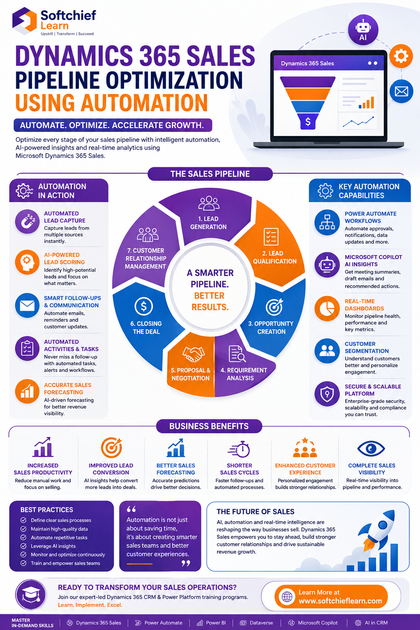
A typical sales pipeline includes:
- Lead Generation
↓
- Lead Qualification
↓
- Opportunity Creation
↓
- Requirement Analysis
↓
- Proposal and Negotiation
↓
- Closing the Deal
↓
- Customer Relationship Management
Each stage requires effective communication, accurate data and timely actions.
Without automation, sales teams spend significant time performing manual tasks instead of engaging with customers.
Why Sales Pipeline Optimization Matters
Sales pipeline optimization helps organizations:
- Increase conversion rates
- Reduce sales cycle duration
- Improve forecasting accuracy
- Identify sales bottlenecks
- Prioritize high-value opportunities
- Improve customer experience
- Increase sales team productivity
An optimized pipeline provides managers with visibility into:
- Current opportunities
- Expected revenue
- Sales performance
- Customer engagement
- Potential risks
Common Sales Pipeline Challenges
Many organizations face similar challenges:
Manual Lead Management
Sales representatives manually enter and update customer information.
Problems include:
- Duplicate records
- Missing information
- Data inconsistencies
Lack of Follow-Up Automation
Sales opportunities are often lost because follow-ups happen too late.
Poor Sales Forecasting
Without accurate data, managers struggle to predict revenue.
Limited Customer Visibility
Sales teams may not have complete information about customer interactions.
Time-Consuming Administrative Tasks
Salespeople spend too much time on:
- Data entry
- Report creation
- Email updates
- Task management
Automation solves these challenges by creating intelligent and efficient sales processes.
How Dynamics 365 Sales Automation Optimizes the Pipeline
Dynamics 365 Sales provides multiple automation capabilities that improve every stage of the sales journey.
1. Automated Lead Capture and Management
A strong pipeline begins with effective lead management.
Dynamics 365 Sales allows businesses to automatically capture leads from multiple sources:
- Website forms
- Marketing campaigns
- Social media channels
- Events
- Email campaigns
- Partner referrals
Once captured, leads can automatically be:
- Assigned to sales representatives
- Categorized
- Scored
- Prioritized
Example:
A customer submits a website inquiry.
↓
Dynamics 365 automatically creates a lead record.
↓
The system assigns it to the appropriate salesperson.
↓
A follow-up task is created automatically.
This ensures no opportunity is missed.
2. Intelligent Lead Scoring Using AI
Not every lead has the same potential value.
Dynamics 365 Sales uses AI-driven insights to help organizations identify high-quality opportunities.
AI can analyze:
- Customer engagement history
- Previous interactions
- Buying behavior
- Similar successful opportunities
Sales teams can focus their efforts on leads most likely to convert.
Benefits:
- Higher conversion rates
- Better sales productivity
- Reduced wasted effort
3. Automated Opportunity Management
Opportunity management is the core of sales pipeline optimization.
Dynamics 365 Sales helps teams track:
- Opportunity stage
- Estimated revenue
- Probability of closing
- Expected close date
- Customer requirements
- Competitor information
Automation can:
- Create reminders
- Update stages
- Trigger approval processes
- Notify managers
Example:
An opportunity remains inactive for seven days.
↓
Automation detects inactivity.
↓
Sales representative receives a reminder.
↓
Manager receives an alert if no action occurs.
4. Automated Sales Workflows Using Power Automate
Microsoft Power Automate extends Dynamics 365 Sales automation capabilities.
Organizations can automate:
- Approval processes
- Customer notifications
- Task creation
- Email communication
- Data updates
Example Workflow:
New Opportunity Created
↓
Assign Sales Owner
↓
Create Follow-Up Tasks
↓
Send Welcome Email
↓
Notify Sales Manager
↓
Update CRM Records
This reduces manual effort and ensures consistent sales processes.
5. Email and Communication Automation
Sales success depends heavily on timely communication.
Dynamics 365 integrates with Outlook to provide:
- Email tracking
- Meeting synchronization
- Customer interaction history
- Email templates
Sales teams can automate:
- Follow-up emails
- Meeting reminders
- Customer updates
- Sales communications
This improves engagement while saving valuable time.
6. Automated Sales Activity Management
Sales representatives manage multiple opportunities simultaneously.
Dynamics 365 Sales helps automate activities such as:
- Phone call reminders
- Meeting scheduling
- Task creation
- Follow-up notifications
Sales managers gain visibility into:
- Completed activities
- Pending actions
- Sales representative performance
7. AI-Powered Sales Insights with Microsoft Copilot
Microsoft Copilot brings artificial intelligence into Dynamics 365 Sales.
Copilot helps sales professionals by:
- Summarizing customer interactions
- Drafting emails
- Preparing meeting notes
- Identifying opportunities
- Providing sales recommendations
Example:
Before a customer meeting:
Copilot analyzes previous conversations.
↓
Creates a summary.
↓
Highlights customer concerns.
↓
Suggests discussion points.
This allows sales representatives to prepare faster and engage customers more effectively.
8. Automated Sales Forecasting
Accurate forecasting is essential for business planning.
Traditional forecasting often depends on manual spreadsheets and assumptions.
Dynamics 365 Sales forecasting uses:
- Historical sales data
- Opportunity information
- Pipeline trends
- AI predictions
Sales leaders can analyze:
- Expected revenue
- Sales risks
- Pipeline health
- Team performance
Better forecasting enables better decision-making.
9. Automated Customer Segmentation
Understanding customers is critical for successful selling.
Dynamics 365 helps segment customers based on:
- Industry
- Purchase history
- Engagement level
- Business value
- Customer behaviour
Sales teams can create personalized strategies for different customer segments.
10. Sales Process Automation Using Business Process Flows
Business Process Flows guide users through standardized sales processes.
Example:
Lead Qualification Process:
Lead Created
↓
Contact Information Verified
↓
Business Need Identified
↓
Budget Confirmed
↓
Opportunity Created
This ensures every salesperson follows the same proven process.
11. Real-Time Sales Dashboards and Analytics
Sales managers need immediate visibility into pipeline performance.
Dynamics 365 dashboards provide insights into:
- Open opportunities
- Conversion rates
- Sales targets
- Revenue trends
- Sales activities
Power BI integration enables advanced analytics.
Organizations can identify:
- Slow-moving deals
- High-performing sales representatives
- Revenue trends
- Market opportunities
12. Automating Customer Follow-Ups
Many sales opportunities are lost due to inconsistent follow-ups.
Automation ensures:
- Timely communication
- Scheduled reminders
- Customer engagement tracking
Example:
Proposal Sent
↓
Wait 5 Days
↓
Send Follow-Up Email
↓
Create Sales Task
↓
Notify Representative
Benefits of Dynamics 365 Sales Pipeline Automation
Increased Sales Productivity
Sales teams spend less time on administrative work and more time engaging customers.
Improved Lead Conversion
AI insights and automated follow-ups improve conversion rates.
Better Sales Forecasting
Real-time data improves revenue predictions.
Shorter Sales Cycles
Automation reduces delays and accelerates decision-making.
Enhanced Customer Experience
Personalized interactions create stronger customer relationships.
Improved Sales Visibility
Managers gain complete visibility into pipeline performance.
Real-World Business Scenario: Automating Sales Operations
A technology company managing hundreds of sales opportunities faced several challenges:
Before automation:
- Leads were manually assigned.
- Follow-ups were inconsistent.
- Forecast reports were created manually.
- Sales teams lacked customer visibility.
After implementing Dynamics 365 Sales automation:
- Leads were automatically assigned.
- AI identified high-value opportunities.
- Follow-up activities were automated.
- Power BI dashboards provided real-time insights.
- Copilot helped prepare customer meetings.
Results:
- Faster lead response times
- Improved opportunity conversion
- Better forecasting accuracy
- Increased sales productivity
Best Practices for Dynamics 365 Sales Automation
To maximize the value of Dynamics 365 Sales, organizations should follow these practices:
1. Define Clear Sales Processes
Document:
- Lead qualification rules
- Opportunity stages
- Sales responsibilities
- Approval workflows
2. Maintain High-Quality Data
Ensure:
- Accurate customer information
- Duplicate prevention
- Standardized fields
3. Automate Repetitive Tasks
Identify tasks that consume sales time and automate them.
Examples:
- Follow-ups
- Notifications
- Approvals
- Data updates
4. Use AI Insights Effectively
Encourage sales teams to use:
- Copilot
- Predictive scoring
- Sales insights
5. Monitor Pipeline Performance
Regularly analyze:
- Conversion rates
- Sales cycle duration
- Forecast accuracy
- Team productivity
6. Train Sales Teams
Technology only creates value when users adopt it effectively.
Provide:
- Training
- Documentation
- Best practice guidance
Future of Sales Automation with Dynamics 365
The future of sales is becoming increasingly intelligent and automated.
Emerging trends include:
- AI-powered sales agents
- Predictive customer engagement
- Autonomous follow-up management
- Intelligent forecasting
- Voice-based CRM interactions
- Generative AI sales assistants
- Real-time customer insights
Microsoft Dynamics 365 Sales will continue evolving as an intelligent CRM platform that helps organizations build stronger customer relationships and increase revenue.
Skills Every Dynamics 365 Sales Professional Should Learn
Professionals working with Dynamics 365 Sales should understand:
- Dynamics 365 Sales
- CRM Fundamentals
- Dataverse
- Power Apps
- Power Automate
- Power BI
- Microsoft Copilot
- Sales Process Management
- Business Process Flows
- Workflow Automation
- Customer Data Management
- AI in CRM
- Integration with Microsoft 365
- Solution Management
- Security Roles
Conclusion
Dynamics 365 Sales pipeline optimization using automation enables organizations to transform traditional sales processes into intelligent, data-driven operations.
By automating lead management, opportunity tracking, customer communication, forecasting and sales activities, businesses can improve productivity, increase revenue and deliver better customer experiences.
The combination of Dynamics 365 Sales, Power Platform automation, AI-powered insights and Microsoft Copilot creates a powerful ecosystem for modern sales organizations.
For businesses looking to improve sales performance and achieve sustainable growth, implementing automation within Dynamics 365 Sales is not just a technology investment—it is a strategic approach to building a smarter and more efficient sales operation.









