
How to Automate Financial Processes With Dynamics 365 Finance

Introduction
Financial management is one of the most critical functions within any organization. However, many businesses still rely on manual processes, disconnected spreadsheets and outdated systems that create inefficiencies, increase operational risks and slow down decision-making.
As organizations grow globally and financial operations become more complex, enterprises need intelligent solutions that can automate accounting processes, improve compliance and provide real-time financial insights.
Microsoft Dynamics 365 Finance is transforming the way organizations manage their financial operations by combining enterprise resource planning (ERP), automation, artificial intelligence, analytics and cloud capabilities into one powerful platform.
From automating accounts payable and accounts receivable to streamlining financial reporting, budgeting and compliance management, Dynamics 365 Finance enables organizations to create faster, smarter and more accurate financial processes.
This comprehensive guide explores how businesses can automate financial processes using Dynamics 365 Finance, the key automation capabilities, real-world use cases and best practices for successful implementation.
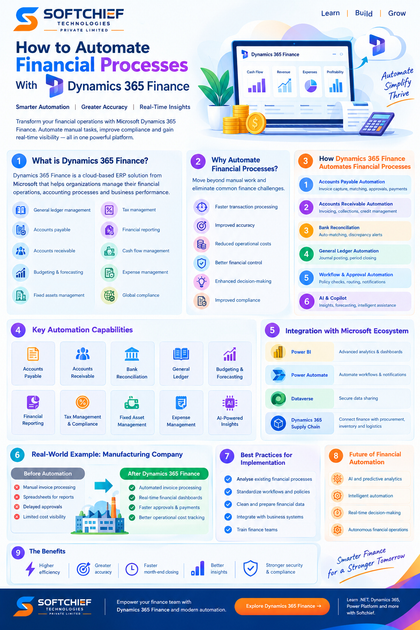
What Is Dynamics 365 Finance?
Dynamics 365 Finance is a cloud-based enterprise resource planning (ERP) application from Microsoft designed to help organizations manage their financial operations, accounting processes and business performance.
It provides comprehensive capabilities for:
- General ledger management
- Accounts payable
- Accounts receivable
- Budgeting and forecasting
- Fixed assets management
- Tax management
- Financial reporting
- Cash flow management
- Expense management
- Global compliance
Unlike traditional ERP systems, Dynamics 365 Finance uses automation, AI and cloud technology to reduce manual effort and provide real-time financial visibility.
Why Financial Process Automation Matters
Traditional finance departments often face challenges such as:
- Manual invoice processing
- Data entry errors
- Delayed financial reporting
- Limited visibility into cash flow
- Time-consuming reconciliations
- Compliance risks
- Inefficient approval processes
Financial automation addresses these challenges by enabling systems to perform repetitive tasks automatically while allowing finance professionals to focus on strategic activities.
Benefits include:
- Faster transaction processing
- Improved accuracy
- Reduced operational costs
- Better financial control
- Enhanced decision-making
- Improved compliance
How Dynamics 365 Finance Automates Financial Processes
1. Automated Accounts Payable Processing
Accounts payable is one of the most time-consuming finance operations.
Traditional invoice processing involves:
- Receiving invoices
- Manual data entry
- Verification
- Approval routing
- Payment processing
Dynamics 365 Finance automates these activities through intelligent workflows.
Key capabilities:
- Vendor invoice automation
- Invoice matching
- Approval workflows
- Payment scheduling
- Duplicate invoice detection
Example: Automated Vendor Invoice Processing
A supplier sends an invoice electronically.
Dynamics 365 Finance can:
- Capture invoice information
- Match invoice details with purchase orders
- Validate vendor information
- Route the invoice for approval
- Process payment automatically
This reduces manual intervention and improves payment accuracy.
2. Intelligent Accounts Receivable Automation
Managing customer payments effectively is essential for maintaining healthy cash flow.
Dynamics 365 Finance helps automate:
- Customer invoicing
- Payment tracking
- Collections management
- Credit management
- Payment reminders
Finance teams can monitor outstanding invoices and identify overdue payments quickly.
AI-Powered Collections Management
With intelligent insights, organizations can analyze:
- Customer payment patterns
- Credit risks
- Outstanding balances
This helps collection teams prioritize high-risk accounts.
3. Automated Bank Reconciliation
Bank reconciliation is a critical financial control process.
Manual reconciliation can consume significant time, especially for organizations processing thousands of transactions.
Dynamics 365 Finance provides automated bank reconciliation capabilities.
The system can:
- Import bank statements
- Match transactions automatically
- Identify discrepancies
- Suggest reconciliation actions
Benefits:
- Faster month-end closing
- Reduced errors
- Improved financial accuracy
4. Streamlining General Ledger Processes
The general ledger is the foundation of financial reporting.
Dynamics 365 Finance helps automate:
- Journal creation
- Account validation
- Financial dimensions
- Posting rules
- Period closing activities
Finance teams can establish automated workflows to ensure transactions follow organizational policies.
5. Automated Financial Workflows and Approvals
Approval processes are essential for financial governance.
Examples include:
- Purchase approvals
- Expense approvals
- Invoice approvals
- Budget approvals
Dynamics 365 Finance allows organizations to create workflow-based approvals.
Example:
An employee submits an expense claim.
The system automatically:
- Validates policy compliance
- Sends approval requests
- Updates financial records
- Processes reimbursement
This eliminates manual email-based approvals.
6. AI and Copilot Capabilities in Financial Operations
Artificial intelligence is changing how finance teams operate.
Microsoft Copilot capabilities help finance professionals:
- Analyse financial data
- Generate summaries
- Identify trends
- Improve forecasting
- Automate repetitive tasks
Example:
A finance manager can ask:
“Show me the key reasons for increased operating costs this quarter.”
AI can analyse financial information and provide insights.
7. Automated Budgeting and Forecasting
Traditional budgeting processes often depend on manual spreadsheets and historical assumptions.
Dynamics 365 Finance improves budgeting through:
- Financial forecasting
- Scenario modelling
- Budget planning workflows
- Predictive analytics
Organizations can create:
- Department budgets
- Project budgets
- Operational forecasts
Finance leaders gain better visibility into future performance.
8. Real-Time Financial Reporting and Analytics
Modern businesses require instant access to financial information.
Dynamics 365 Finance provides real-time reporting through:
- Financial dashboards
- Power BI integration
- Embedded analytics
- Business intelligence tools
Organizations can monitor:
- Revenue performance
- Expenses
- Profitability
- Cash flow
- Budget variance
9. Automated Tax Management and Compliance
Managing tax regulations across regions can be complex.
Dynamics 365 Finance supports:
- Tax calculation automation
- Regulatory reporting
- Compliance monitoring
- Multi-country taxation
This helps global organizations manage changing regulatory requirements.
10. Fixed Asset Management Automation
Managing assets manually can create challenges around:
- Asset tracking
- Depreciation calculations
- Maintenance schedules
- Asset disposal
Dynamics 365 Finance automates fixed asset processes including:
- Asset acquisition
- Depreciation calculation
- Asset transfers
- Retirement processing
Dynamics 365 Finance Integration with Other Microsoft Technologies
One of the biggest advantages of Dynamics 365 Finance is its integration with the Microsoft ecosystem.
Microsoft Power BI
Provides:
- Advanced financial analytics
- Interactive dashboards
- Data visualization
Power Automate
Enables automation of business workflows.
Examples:
- Automatic approval notifications
- Data synchronization
- Document processing
Microsoft Dataverse
Allows secure data sharing between business applications.
Dynamics 365 Supply Chain Management
Connects finance with:
- Procurement
- Inventory
- Manufacturing
- Logistics
Real-World Example: Manufacturing Company Financial Automation
Consider a global manufacturing organization managing multiple factories.
Before automation:
- Vendor invoices processed manually
- Financial reports created using spreadsheets
- Approval processes delayed payments
- Limited visibility into operational costs
After implementing Dynamics 365 Finance:
Automated Invoice Processing
Invoices are automatically validated and approved.
Real-Time Cost Tracking
Finance teams monitor production costs instantly.
Automated Reporting
Management receives accurate financial dashboards.
Improved Compliance
Financial controls are consistently applied.
The organization achieves faster financial operations and better decision-making.
Key Benefits of Automating Finance with Dynamics 365 Finance
1. Increased Operational Efficiency
Automation reduces repetitive manual tasks and allows finance teams to focus on strategic initiatives.
2. Improved Financial Accuracy
Automated validation reduces:
- Data entry mistakes
- Duplicate transactions
- Processing errors
3. Faster Month-End Closing
Automation accelerates:
- Account reconciliation
- Journal processing
- Financial reporting
4. Better Business Insights
Real-time analytics help leaders make informed decisions.
5. Enhanced Security and Compliance
Dynamics 365 Finance provides:
- Role-based security
- Audit trails
- Compliance features
Best Practices for Implementing Dynamics 365 Finance Automation
1. Analyse Existing Financial Processes
Before automation, organizations should identify:
- Manual activities
- Bottlenecks
- Approval challenges
2. Standardize Financial Workflows
Define:
- Approval rules
- Accounting policies
- Reporting requirements
3. Clean and Prepare Financial Data
Successful automation requires accurate:
- Vendor information
- Customer records
- Chart of accounts
- Financial dimensions
4. Integrate Business Systems
Connect Dynamics 365 Finance with:
- CRM systems
- Supply chain platforms
- Banking systems
- Analytics solutions
5. Train Finance Teams
Successful adoption requires users to understand:
- Automated workflows
- Reporting tools
- New processes
The Future of Financial Automation with Dynamics 365 Finance
The future of finance will be driven by:
- Artificial intelligence
- Predictive analytics
- Intelligent automation
- Real-time decision-making
Future capabilities will include:
- Autonomous financial operations
- AI-powered forecasting
- Automated compliance monitoring
- Intelligent financial assistants
Organizations that embrace automation will move from traditional accounting operations toward strategic financial management.
Conclusion
Automating financial processes using Dynamics 365 Finance enables organizations to transform finance departments from transaction-focused teams into strategic business partners.
With powerful automation capabilities across accounts payable, accounts receivable, reporting, budgeting, compliance and analytics, Dynamics 365 Finance helps enterprises improve efficiency, accuracy and financial visibility.
For organizations looking to modernize their ERP systems and achieve digital transformation, Dynamics 365 Finance provides a scalable and intelligent platform designed for the future of finance.
By adopting financial automation today, businesses can build faster, smarter and more agile financial operations.









