
Dynamics 365 Field Service in 2026: Key Trends and Skills Developers Should Know

Introduction
Field service organizations are moving beyond traditional work order management toward more connected and data-driven service operations. Technicians, dispatchers and service managers increasingly need access to accurate asset information, efficient scheduling tools, mobile capabilities and timely operational insights.
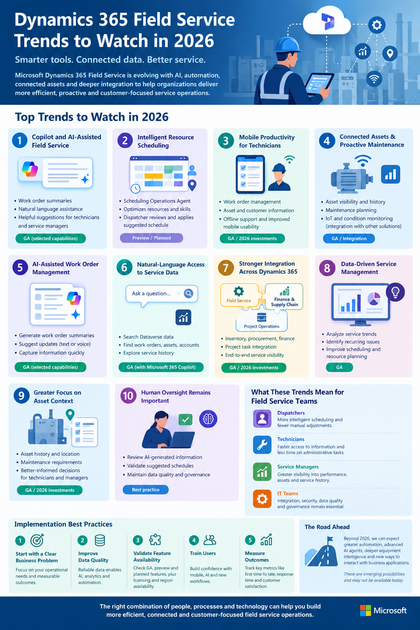
Microsoft Dynamics 365 Field Service is evolving in these areas, with recent and planned investments focused on technician productivity, Copilot and AI capabilities, resource scheduling, work order management, asset management and integration with other Dynamics 365 applications.
For organizations using or evaluating Dynamics 365 Field Service, several developments are particularly relevant in 2026.
1. Copilot and AI-Assisted Field Service
AI is becoming increasingly integrated into field service workflows.
Dynamics 365 Field Service includes Copilot capabilities that can help users work with service information using natural language. Depending on the capability and configuration, users can generate work order summaries, ask questions about information in the application, receive assistance while completing forms, and use natural language to update work order information.
For example, a service manager reviewing a work order can use an AI-generated summary to quickly understand its status, priority, related activities and suggested next actions.
For technicians, reducing the amount of time spent searching for information or entering routine updates can help keep more attention on the service task itself.
The important consideration for organizations is not simply adopting AI, but determining where AI assistance can be introduced while maintaining appropriate security, data access and human oversight.
2. More Intelligent Resource Scheduling
Scheduling remains one of the most important operational areas in field service.
A dispatcher may need to consider technician skills, availability, working hours, location, service requirements and existing bookings. Changes during the day can make this even more difficult.
Microsoft is continuing to develop intelligent scheduling capabilities in Dynamics 365 Field Service through the Scheduling Operations Agent.
The agent can assist dispatchers with schedule optimization by examining existing bookings, service requirements and relevant technician characteristics such as working hours and skills. The dispatcher can review the suggested schedule before applying changes.
Some Scheduling Operations Agent capabilities are currently described by Microsoft as preview features, so organizations should verify availability and release status before planning production use.
This represents an important shift from manually adjusting individual bookings toward assisted optimization.
3. Mobile Productivity for Technicians
Field technicians need reliable access to service information while working at customer locations.
The Dynamics 365 Field Service mobile experience supports activities such as work order management, asset information, inspections and offline scenarios.
Microsoft’s 2026 investments include improvements to mobile usability and offline support, with the objective of helping frontline workers access and update information more efficiently in the field.
This makes mobile experience an important consideration when evaluating a Field Service implementation.
A technically capable backend is not enough if technicians find it difficult to use the application in real-world working conditions.
4. Connected Assets and Proactive Maintenance
Asset information is becoming increasingly important to field service operations.
Organizations need visibility into equipment, maintenance history, service activity and asset location. Microsoft is continuing to invest in asset management, maintenance planning and asset context within Field Service.
IoT and other connected technologies can extend this model by providing operational data from equipment.
A typical connected-service scenario could look like this:
Equipment data → Condition monitoring → Potential issue identified → Service requirement → Work order → Technician assignment
However, organizations should distinguish between capabilities provided directly by Dynamics 365 Field Service and scenarios that require additional IoT, analytics or integration components.
This distinction is important when designing an enterprise architecture.
5. AI-Assisted Work Order Management
Work orders contain much of the information required to execute field service operations.
In 2026, AI assistance is increasingly being applied to how users create, understand and update work orders.
Microsoft documents capabilities for generating work order summaries and using natural language or speech to suggest updates to work order information in the mobile experience.
This can be useful for situations where technicians or service managers need to capture information quickly without navigating multiple fields manually.
Organizations should still establish appropriate review processes, particularly when AI-generated information affects operational records.
6. Natural-Language Access to Service Data
Another important development is the ability to interact with business data using natural language.
Microsoft documents Microsoft 365 Copilot integration within the Field Service web experience, allowing users to ask questions about Dataverse data such as work orders, assets, accounts, bookings and service history.
For example, a service manager could investigate questions such as:
- Which work orders require attention today?
- Which assets have repeated service activity?
- What service history is associated with a particular asset?
- Which records require further investigation?
This type of interaction can reduce the effort involved in locating information across application views.
The usefulness of these capabilities depends on data quality, security configuration and the information available within the organization’s Dataverse environment.
7. Stronger Integration Across Dynamics 365 Applications
Field service rarely operates independently from the rest of an organization.
Service operations may depend on:
- Inventory
- Procurement
- Finance
- Projects
- Customer information
- Asset information
Microsoft’s current Field Service roadmap includes continued work across Field Service, Finance and Supply Chain Management, and Project Operations.
Recent Field Service and Project Operations updates also include the ability to associate project tasks with work orders and provide project context for field scheduling.
This type of integration can help organizations connect field execution with back-office processes rather than managing service activity as a separate workflow.
8. Data-Driven Service Management
Field service generates large amounts of operational data.
This includes information about:
- Work orders
- Bookings
- Assets
- Service history
- Technician activity
- Scheduling
- Maintenance
The value of this data increases when organizations use it to identify operational patterns.
Service managers can use analytics to investigate questions such as:
- Which assets generate repeated service requests?
- Where are scheduling bottlenecks occurring?
- Which types of work require the most technician time?
- Which service processes generate recurring delays?
- Where could preventive maintenance reduce reactive work?
AI and analytics can assist with these questions, but the quality of the results depends heavily on the underlying data.
9. Greater Focus on Asset Context
Asset information is becoming more closely connected to day-to-day service execution.
Rather than viewing a work order as an isolated task, service teams can benefit from understanding the broader asset context:
Asset → Location → Service history → Maintenance requirements → Work order → Technician
Microsoft’s 2026 Field Service investments include improvements related to asset management, maintenance planning and asset location.
This context can help technicians and service managers make better-informed decisions when planning and executing service work.
10. Human Oversight Remains Important
As AI and automation become more prominent in field service, human review remains an important part of operational design.
For example, an AI-assisted scheduling system can suggest changes, but dispatchers may still need to review those recommendations before applying them.
Similarly, AI-generated work order information should be reviewed when accuracy is important.
Microsoft’s Scheduling Operations Agent documentation illustrates this approach: the system generates a suggested schedule that the dispatcher can review and either apply or discard.
This human-in-the-loop approach is particularly relevant for organizations introducing AI into operational processes.
What These Trends Mean for Field Service Teams
The developments in Dynamics 365 Field Service point toward several broader changes in how service organizations operate.
For dispatchers
Scheduling tools are becoming more intelligent, reducing the need to manually adjust every booking.
For technicians
Mobile and AI-assisted experiences can reduce time spent searching for information and completing administrative tasks.
For service managers
Connected data and analytics can provide greater visibility into service performance and asset history.
For IT teams
Integration, security, data quality and governance remain essential when introducing AI and automation.
Best Practices for Organizations Adopting These Capabilities
Technology alone does not guarantee better field service outcomes. Organizations should consider several implementation practices.
Start with a Clear Business Problem
Identify the operational problem before selecting an AI or automation capability.
For example:
- Scheduling delays
- Poor asset visibility
- Excessive administrative work
- Limited service history
- Difficult offline processes
A clearly defined problem makes it easier to measure the value of a technology investment.
Improve Data Quality
AI and analytics depend on reliable data.
Organizations should pay attention to:
- Customer records
- Asset information
- Work order history
- Technician skills
- Service locations
- Maintenance records
Poor-quality data can limit the usefulness of automation and AI-assisted experiences.
Validate Feature Availability
Microsoft distinguishes between generally available, preview and planned capabilities.
Organizations should verify the current availability, licensing requirements and regional availability of a feature before designing production processes around it.
Microsoft’s 2026 Field Service documentation also notes that planned functionality and timelines can change.
Train Users
Successful adoption depends on the people using the system.
Technicians, dispatchers and service managers should understand:
- How to use the mobile application
- How AI assistance works
- When human review is required
- How to correct inaccurate information
- How service data should be maintained
Measure Operational Outcomes
Organizations should establish measurable indicators such as:
- First-time fix rate
- Response time
- Travel time
- Technician utilization
- Work order completion time
- Asset downtime
- Customer satisfaction
These measurements help determine whether technology changes are actually improving service operations.
Looking Beyond 2026
Field service technology is likely to continue moving toward greater automation, AI assistance and connected operations.
Potential future developments include more advanced AI agents, broader autonomous optimization, deeper equipment intelligence and increasingly natural interactions with business applications.
However, these should be treated as emerging possibilities rather than guaranteed product capabilities.
The practical direction is already visible: Dynamics 365 Field Service is bringing together scheduling intelligence, Copilot capabilities, mobile productivity, asset information and integration across business applications.
Conclusion
Dynamics 365 Field Service is evolving alongside the broader shift toward intelligent and connected service operations.
The most important developments to watch in 2026 include AI-assisted workflows, intelligent scheduling, mobile productivity, connected assets, natural-language access to service data, stronger Dynamics 365 integration and data-driven service management.
For organizations planning their Field Service strategy, the key question is not simply which new technology to adopt. It is how each capability can address a specific operational problem while maintaining reliable data, appropriate governance and effective human oversight.
By taking this approach, organizations can evaluate new Dynamics 365 Field Service capabilities based on practical business and service requirements rather than technology trends alone.









