
Azure API Management: A Complete Guide for Developers
Introduction
In today’s digital-first business environment, APIs (Application Programming Interfaces) have become the backbone of modern applications. From mobile applications and enterprise systems to cloud platforms and AI-powered solutions, APIs enable seamless communication between different software components.
However, as organizations scale their digital ecosystems, managing APIs efficiently becomes increasingly complex. Developers and enterprises need solutions that provide security, scalability, monitoring, governance and simplified API lifecycle management.
This is where Azure API Management (Azure APIM) plays a critical role.
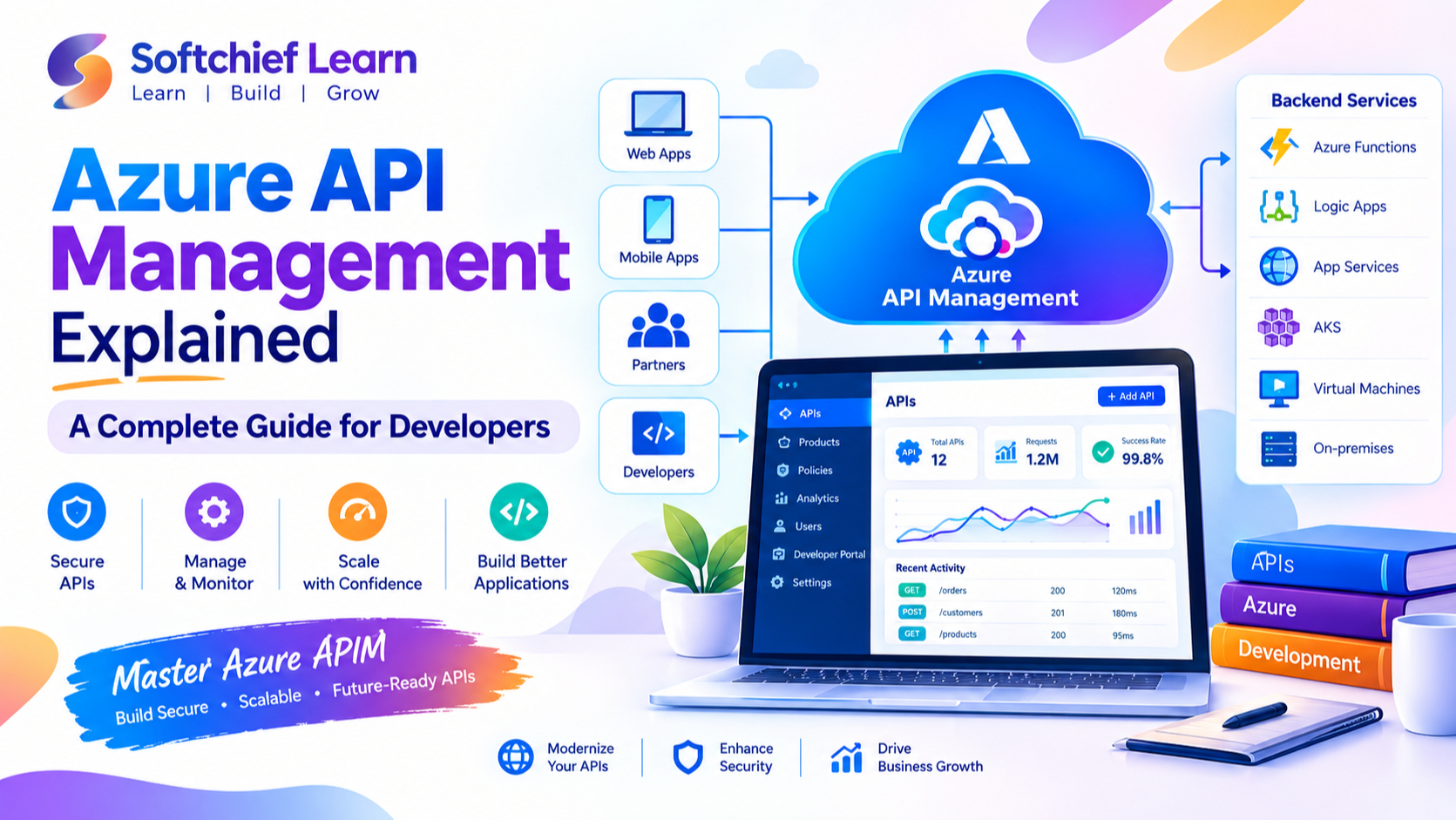
Azure API Management is a fully managed API gateway service from Microsoft Azure that helps organizations publish, secure, transform, monitor and manage APIs across cloud and hybrid environments. It provides developers with the tools needed to create reliable API ecosystems while allowing businesses to maintain control over API usage, security and performance.
In this comprehensive guide, we will explore Azure API Management architecture, key features, benefits, use cases, security capabilities and best practices for developers building enterprise-grade applications.
What Is Azure API Management?
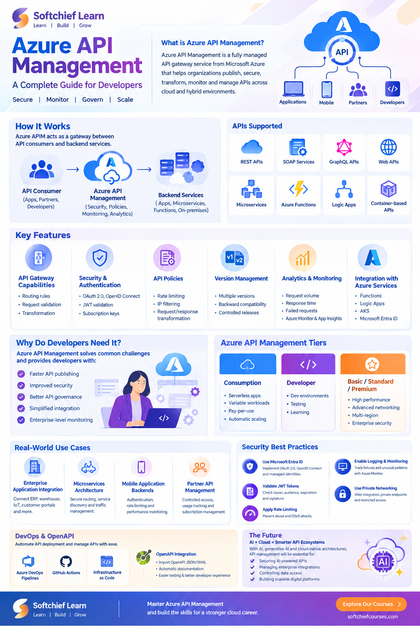
Azure API Management is a Platform-as-a-Service (PaaS) solution that acts as a gateway between API consumers and backend services.
It enables organizations to expose APIs securely to internal teams, external partners and customers while controlling access, enforcing policies and collecting valuable analytics.
Instead of allowing clients to directly communicate with backend applications, Azure APIM sits between consumers and services:
API Consumer → Azure API Management Gateway → Backend Services
The API Management layer handles tasks such as:
- Authentication and authorization
- Request routing
- Rate limiting
- API transformation
- Security enforcement
- Monitoring and analytics
- Developer onboarding
Azure API Management supports APIs built using different technologies including:
- REST APIs
- SOAP services
- GraphQL APIs
- Web APIs
- Microservices
- Azure Functions
- Logic Apps
- Container-based APIs
Why Do Developers Need Azure API Management?
Modern applications are rarely built as standalone systems. Enterprises typically use multiple applications, microservices and third-party integrations.
Without proper API management, organizations may face challenges such as:
- Lack of API security controls
- Difficulty monitoring API performance
- Duplicate API implementations
- Poor developer experience
- Uncontrolled API consumption
- Limited visibility into API usage
Azure API Management solves these challenges by providing a centralized platform to manage the complete API lifecycle.
For developers, Azure APIM provides:
- Faster API publishing
- Improved security
- Better API governance
- Simplified integration
- Enterprise-level monitoring
Azure API Management Architecture
Azure API Management consists of several important components that work together to manage APIs effectively.
1. API Gateway
The API Gateway is the core component of Azure APIM.
It receives API requests from clients and forwards them to backend services after applying required policies.
The gateway handles:
- Request validation
- Authentication
- Traffic management
- Response transformation
- Logging
Example:
A mobile banking application sends a request:
GET /customer/accountsAzure API Management validates the request, checks security policies and forwards it to the banking backend API.
2. Developer Portal
The Developer Portal provides a self-service platform where developers can discover and consume APIs.
It includes:
- API documentation
- API testing tools
- Subscription management
- Interactive API documentation using OpenAPI specifications
Organizations can customize the portal with their branding and provide partners or internal developers with a better API experience.
3. Management Plane
The management plane allows administrators and developers to configure:
- APIs
- Products
- Policies
- Users
- Security settings
- Monitoring options
Management can be performed through:
- Azure Portal
- Azure CLI
- PowerShell
- REST APIs
- Infrastructure-as-Code tools like Azure Resource Manager and Terraform
4. Backend Services
Azure API Management connects with different backend systems including:
- Azure App Services
- Azure Functions
- Azure Kubernetes Service
- Virtual Machines
- On-premises applications
- External APIs
This allows organizations to modernize existing applications without rewriting backend systems.
Key Features of Azure API Management
1. API Gateway Capabilities
Azure APIM provides a powerful gateway layer that controls how APIs are accessed.
Developers can configure:
- Routing rules
- Request validation
- Header modifications
- Query parameter transformations
- Response formatting
This enables organizations to create consistent API experiences.
2. API Security and Authentication
Security is one of the most important aspects of API management.
Azure API Management supports multiple authentication mechanisms including:
- OAuth 2.0
- OpenID Connect
- JWT token validation
- Subscription keys
- Client certificates
- Microsoft Entra ID authentication
Example:
A healthcare application can require users to authenticate through Microsoft Entra ID before accessing patient-related APIs.
Azure APIM validates the token before allowing access to backend services.
3. API Policies
Policies are one of the most powerful features of Azure API Management.
Policies allow developers to control API behavior without modifying backend code.
Common API policies include:
Rate Limiting
Controls the number of API requests allowed within a specific timeframe.
Example:
A free customer subscription may allow:
1000 API requests per daywhile premium customers receive:
100000 API requests per dayIP Filtering
Restricts API access based on client IP addresses.
Useful for:
- Internal applications
- Partner integrations
- Secure enterprise APIs
Request Transformation
Developers can modify incoming requests.
Examples:
- Add HTTP headers
- Rewrite URLs
- Change query parameters
Response Transformation
APIM can modify API responses before sending them to consumers.
Example:
Removing sensitive fields from customer responses.
4. API Version Management
Enterprise APIs evolve continuously.
Azure API Management helps developers manage multiple API versions.
Example:
Current API:
api/customer/v1New version:
api/customer/v2Developers can maintain backward compatibility while gradually migrating consumers.
Benefits:
- Reduced application disruption
- Easier API modernization
- Controlled release management
5. API Analytics and Monitoring
Understanding API performance is essential for maintaining reliable applications.
Azure APIM provides analytics including:
- Request volume
- Response time
- Failed requests
- User activity
- API consumption trends
It integrates with:
- Azure Monitor
- Application Insights
- Log Analytics
Developers can identify:
- Performance bottlenecks
- Security issues
- High-traffic APIs
6. Integration with Azure Services
Azure API Management works seamlessly with Microsoft Azure services.
Common integrations include:
Azure Functions
Developers can expose serverless functions as APIs.
Example:
An order-processing function can be published through APIM with authentication and rate limiting.
Azure Logic Apps
APIM can expose workflow-based integrations as managed APIs.
Azure Kubernetes Service
Microservices running in AKS can be securely exposed through API Management.
Microsoft Entra ID
Enterprise applications can use centralized identity management.
Azure API Management Tiers
Azure API Management offers different service tiers based on business requirements.
Consumption Tier
Designed for:
- Serverless applications
- Variable workloads
- Startups
Benefits:
- Pay-per-use pricing
- Automatic scaling
- No infrastructure management
Developer Tier
Suitable for:
- Development environments
- Testing scenarios
- Learning purposes
Basic, Standard and Premium Tiers
Designed for enterprise workloads.
They provide:
- Higher performance
- Advanced networking
- Multi-region deployment
- Enterprise security features
Azure API Management Use Cases
1. Enterprise Application Integration
Large organizations often have multiple applications built using different technologies.
Azure APIM provides a unified integration layer.
Example:
A manufacturing company can connect:
- ERP systems
- Warehouse applications
- IoT platforms
- Customer portals
through managed APIs.
2. Microservices Architecture
Modern applications use multiple independent services.
Azure APIM provides:
- API routing
- Security enforcement
- Service discovery support
- Traffic management
Example:
An e-commerce platform may have separate services for:
- Product catalog
- Customer management
- Payment processing
- Order tracking
3. Mobile Application Backends
Mobile applications require secure and scalable APIs.
Azure APIM provides:
- Authentication
- Rate limiting
- Performance monitoring
Example:
A banking mobile application can securely access customer account APIs through Azure APIM.
4. Partner API Management
Organizations can expose APIs securely to external partners.
Examples:
- Payment providers
- Suppliers
- Logistics companies
Benefits:
- Controlled access
- Usage tracking
- Subscription management
Azure API Management Security Best Practices
1. Use Microsoft Entra ID Authentication
Avoid exposing APIs without proper identity validation.
Implement:
- OAuth 2.0
- OpenID Connect
- Managed identities
2. Validate JWT Tokens
JWT validation ensures that only authorized applications can access APIs.
Validate:
- Issuer
- Audience
- Expiration
- Signature
3. Apply Rate Limiting
Prevent API abuse by controlling request frequency.
Benefits:
- Improved availability
- Protection against denial-of-service attacks
- Better resource management
4. Enable Logging and Monitoring
Monitor:
- Failed requests
- Unusual traffic patterns
- Performance issues
Integrate with Azure Monitor and Application Insights.
5. Use Private Networking
For enterprise environments:
- Use Virtual Network integration
- Apply private endpoints
- Restrict public exposure
Azure API Management and DevOps Integration
Modern development teams use automation for API deployment.
Azure APIM integrates with DevOps practices through:
- Azure DevOps Pipelines
- GitHub Actions
- Infrastructure-as-Code
Developers can automate:
- API creation
- Policy deployment
- Configuration management
Example deployment workflow:
- Developer creates API definition
- API specification stored in Git repository
- CI/CD pipeline validates changes
- API automatically deployed to Azure APIM
Azure API Management with OpenAPI
OpenAPI specifications simplify API development and documentation.
Developers can import APIs using:
- OpenAPI JSON
- OpenAPI YAML
- Swagger definitions
Benefits:
- Automatic documentation
- Easier testing
- Better developer experience
Example:
A .NET Web API project can generate Swagger documentation and publish it directly into Azure API Management.
Real-World Example: Retail API Platform
Consider a global retail organization with:
- Website application
- Mobile application
- Inventory system
- Payment gateway
- Customer CRM
Without API Management, every application directly connects with backend systems.
With Azure API Management:
- Mobile apps consume secure APIs
- Partners receive controlled API access
- Security policies are centralized
- API performance is monitored
- Backend systems remain protected
The organization gains scalability, security and better governance.
Azure API Management vs API Gateway
Although both concepts are related, API Management provides more capabilities.
| Feature | API Gateway | Azure API Management |
|---|---|---|
| Request Routing | Yes | Yes |
| Authentication | Limited | Advanced |
| API Documentation | Limited | Yes |
| Developer Portal | No | Yes |
| Analytics | Basic | Advanced |
| API Lifecycle Management | No | Yes |
| Policies | Limited | Extensive |
Azure APIM is designed for complete enterprise API lifecycle management.
Future of API Management with AI and Cloud
As organizations adopt:
- Artificial Intelligence
- Generative AI applications
- Cloud-native architectures
- Microservices
API management becomes increasingly important.
Azure API Management helps organizations:
- Secure AI-powered APIs
- Manage enterprise integrations
- Control data access
- Build scalable digital platforms
With technologies like Azure OpenAI Service and AI agents becoming common, API gateways will play a critical role in managing intelligent applications.
Conclusion
Azure API Management is a powerful platform that enables developers and enterprises to securely publish, manage and monitor APIs at scale.
From authentication and security policies to analytics and API lifecycle management, Azure APIM provides everything required to build enterprise-grade API ecosystems.
For developers working with modern cloud applications, microservices and digital transformation projects, learning Azure API Management is an essential skill.
By implementing Azure API Management best practices, organizations can create secure, scalable and reliable API platforms that support innovation and long-term business growth.









