
Entity Framework Core 10: New Features Every .NET Developer Should Know

Introduction
Modern enterprise applications require efficient data access strategies that are secure, scalable and easy to maintain. As applications continue to grow in complexity, developers need powerful tools that simplify database interactions while maintaining high performance.
Entity Framework Core (EF Core) has become one of the most important technologies in the .NET ecosystem for building data-driven applications.
With the release of Entity Framework Core 10, Microsoft continues improving the framework with enhanced performance, better querying capabilities, improved developer productivity and stronger support for modern application architectures.
EF Core 10 is designed to work with the latest generation of .NET applications, helping developers build:
- Enterprise web applications
- Cloud-native solutions
- APIs
- Microservices
- Data-intensive systems
- AI-powered applications
This article explores the key Entity Framework Core 10 features developers should explore and explains how these improvements help organisations build faster, more maintainable and scalable applications.
What is Entity Framework Core?
Entity Framework Core is Microsoft’s modern Object-Relational Mapping (ORM) framework for .NET applications.
It allows developers to work with databases using .NET objects instead of writing large amounts of SQL code.
Traditional database approach:
Application

     |

SQL Queries

     |

Database
Entity Framework Core approach:
Application

     |

.NET Objects

     |

Entity Framework Core

     |

Database
EF Core automatically handles:
- Database communication
- Query generation
- Data mapping
- Change tracking
- Transactions
Why Entity Framework Core 10 Matters for Developers
Enterprise applications face increasing demands:
- Large data volumes
- Faster response times
- Cloud scalability
- Complex business logic
- Multiple database providers
EF Core 10 introduces improvements that help developers:
- Write cleaner code
- Improve application performance
- Reduce database complexity
- Build scalable solutions
Key Entity Framework Core 10 Features Developers Should Explore
1. Improved Query Performance and Optimisation
Performance is one of the most important considerations for enterprise applications.
EF Core 10 continues improving query execution efficiency by optimising how LINQ expressions are translated into database queries.
Developers benefit from:
- Better SQL generation
- Reduced unnecessary database calls
- Improved query execution strategies
- Enhanced performance for complex queries
Example:
A customer management application may need to retrieve:
- Customer details
- Orders
- Payment history
- Support interactions
EF Core 10 improvements help execute these complex queries more efficiently.
2. Enhanced LINQ Query Capabilities
LINQ is one of the most powerful features of .NET development.
It allows developers to query data using C# syntax.
Example:
var customers = context.Customers
    .Where(c => c.IsActive)
    .OrderBy(c => c.Name)
    .ToList();
EF Core 10 continues improving LINQ translation capabilities, allowing developers to write more expressive queries while generating efficient database operations.
Benefits:
- Cleaner application code
- Better maintainability
- Reduced dependency on raw SQL
3. Advanced JSON Data Support
Modern applications increasingly work with flexible data structures.
Examples:
- Product metadata
- Customer preferences
- Configuration settings
- AI-generated information
EF Core 10 improves support for JSON-based data scenarios.
Example:
Customer profile:
{
 "preferences": {
   "language": "English",
   "notifications": true
 }
}
Developers can work with structured JSON data while maintaining relational database advantages.
Benefits:
- Flexible data modelling
- Reduced database complexity
- Better support for modern applications
4. Better Bulk Data Operations
Enterprise applications frequently process large amounts of data.
Examples:
- Importing customer records
- Updating inventory
- Processing transactions
EF Core 10 improvements help developers handle bulk operations more efficiently.
Common scenarios:
- Large database updates
- Batch processing
- Data migration tasks
Benefits:
- Improved performance
- Reduced database round trips
- Better scalability
5. Improved Migration Capabilities
Database migrations are essential for managing application changes.
Example:
Initial application:
Customer TableNew requirement:
Customer Table

+

Customer Loyalty Information
EF Core migrations allow developers to update database structures without manually writing scripts.
EF Core 10 improves migration workflows by providing better developer experiences.
Benefits:
- Easier database evolution
- Safer deployments
- Better team collaboration
6. Better Support for Cloud-Native Applications
Modern applications are increasingly deployed on cloud platforms such as Microsoft Azure.
EF Core 10 supports cloud development patterns including:
- Distributed applications
- Microservices
- Container-based deployments
- Serverless architectures
Example:
Web API

 |

EF Core 10

 |

Azure SQL Database

 |

Cloud Application
Benefits:
- Better scalability
- Improved maintainability
- Cloud-ready development
7. Improved Interceptors and Extensibility
Enterprise applications often require custom behaviour during database operations.
EF Core interceptors allow developers to monitor or modify database actions.
Examples:
- Logging queries
- Auditing changes
- Implementing security rules
- Performance monitoring
Example:
Before executing database command:
Application Request

       |

EF Core Interceptor

       |

Database Query
Benefits:
- Better control
- Improved observability
- Enterprise customisation
8. Better Developer Productivity
Developer productivity is a major focus area in EF Core 10.
Improvements include:
- Better tooling
- Improved debugging experience
- More predictable behaviour
- Cleaner APIs
Developers can spend less time managing database operations and more time focusing on business requirements.
9. Enhanced Support for Modern Database Features
Applications today use multiple database technologies.
EF Core 10 continues improving compatibility with database providers.
Common databases:
- SQL Server
- PostgreSQL
- MySQL
- SQLite
- Cosmos DB
This flexibility allows organisations to choose databases based on business requirements.
10. Improved Performance Monitoring and Diagnostics
Understanding application performance is critical.
EF Core provides capabilities to monitor:
- Query execution
- Database operations
- Performance bottlenecks
Combined with:
- Application Insights
- Azure Monitor
- Logging frameworks
developers can identify slow queries and optimise applications.
Example:
User Request

      |

API

      |

EF Core Query

      |

Database

      |

Performance Analysis
Entity Framework Core 10 in Enterprise Application Architecture
A typical enterprise architecture:
Users

 |

Frontend Application

 |

ASP.NET Core API

 |

Business Logic Layer

 |

Entity Framework Core 10

 |

Database

 |

Cloud Infrastructure
EF Core acts as the data access layer connecting application logic with databases.
EF Core 10 Best Practices for Developers
1. Avoid Unnecessary Database Calls
Poor practice:
foreach(var customer in customers)
{
    LoadOrders(customer);
}
This creates multiple database queries.
Better:
Use:
- Include()
- Projection
- Optimised queries
2. Use AsNoTracking for Read-Only Data
For read-only scenarios:
var products =
context.Products
.AsNoTracking()
.ToList();
Benefits:
- Reduced memory usage
- Faster query execution
3. Use Projection Instead of Loading Entire Objects
Avoid loading unnecessary data.
Example:
Instead of:
Customer

Name
Address
Phone
Orders
History
Retrieve only required fields:
Customer Name
Email
4. Monitor Generated SQL Queries
Developers should understand what SQL EF Core generates.
Tools:
- Logging
- SQL Profiler
- Application Insights
5. Manage Database Migrations Carefully
Enterprise applications should:
- Review migrations
- Test database changes
- Use controlled deployment processes
Real-World Example: Enterprise CRM Application
Business Requirement
A global organisation needs a CRM platform managing:
- Customers
- Sales opportunities
- Support cases
- Communication history
Technology Stack
- ASP.NET Core Web API
- Entity Framework Core 10
- SQL Server
- Azure App Service
- Azure Monitor
EF Core Implementation
Used for:
Data Access
Customer information retrieval
Business Transactions
Opportunity updates
Reporting Queries
Sales analytics
Benefits:
- Faster development
- Cleaner architecture
- Improved database management
- Better scalability
Entity Framework Core 10 vs Traditional ADO.NET
| FeatureEF Core 10ADO.NET | ||
|---|---|---|
| Development Style | Object-oriented | SQL-focused |
| Productivity | High | Lower |
| Query Management | LINQ | Manual SQL |
| Database Mapping | Automatic | Manual |
| Maintenance | Easier | More complex |
Entity Framework Core 10 vs Dapper
| FeatureEF Core 10Dapper | ||
|---|---|---|
| ORM Features | Full ORM | Lightweight mapper |
| Query Control | Higher abstraction | More SQL control |
| Development Speed | Faster | Requires more SQL |
| Complex Queries | Good | Excellent |
| Enterprise Applications | Strong choice | Useful for specific scenarios |
Many enterprise applications use both depending on requirements.
Future of Entity Framework Core
The future of .NET development is moving towards:
- Cloud-native applications
- AI-enabled systems
- Distributed architectures
- Microservices
- High-performance APIs
EF Core continues evolving as a critical component of the Microsoft development ecosystem.
Developers who understand EF Core architecture, performance optimisation and database design principles will have a strong advantage in modern application development.
Conclusion
Entity Framework Core 10 brings powerful improvements that help developers build modern, scalable and high-performance .NET applications.
From improved query performance and JSON support to better migrations, cloud capabilities and developer productivity enhancements, EF Core 10 provides the tools required for enterprise-level application development.
However, successful EF Core development requires more than knowing the framework features. Developers must understand:
- Database design principles
- Query optimisation
- Application architecture
- Performance monitoring
- Cloud deployment strategies
By mastering Entity Framework Core 10, .NET developers can build secure, maintainable and future-ready applications that meet modern business requirements.
Frequently Asked Questions (FAQs)
What is Entity Framework Core 10?
Entity Framework Core 10 is the latest version of Microsoft’s ORM framework for .NET applications that simplifies database access using C# objects.
Is EF Core 10 part of .NET 10?
Yes. EF Core 10 is designed alongside the latest .NET platform improvements.
Is Entity Framework Core suitable for enterprise applications?
Yes. EF Core is widely used for enterprise applications including APIs, ERP systems, CRM platforms and cloud applications.
Does EF Core 10 support SQL Server?
Yes. EF Core supports SQL Server and multiple other database providers.
Should developers learn EF Core?
Yes. EF Core is an essential skill for modern .NET developers building data-driven applications.
Suggested Internal Links for SEO:
- ASP.NET Core Web API Development Guide
- Building Microservices Using .NET
- Azure SQL Database Best Practices
- Secure REST APIs with JWT Authentication in .NET
- Cloud-Native Application Development Using Microsoft Azure
Target Audience:
.NET Developers | Backend Developers | Software Architects | ASP.NET Core Developers | Cloud Engineers | Enterprise Application Teams
Procurement and Vendor Management in Dynamics 365 Finance – please write a blog on this topic to post in our website – it has to be SEO friendly & expert level with human friendly and expert level
Procurement and Vendor Management in Dynamics 365 Finance – please write a blog on this topic to post in our website – it has to be SEO friendly & expert level with human friendly and expert level
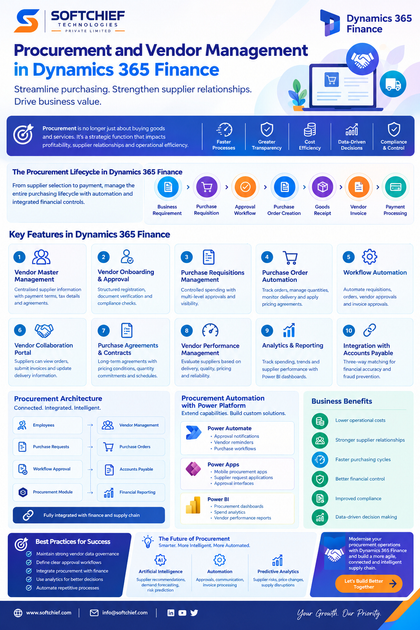
Procurement and Vendor Management in Dynamics 365 Finance: A Complete Enterprise Guide
Meta Title: Procurement and Vendor Management in Dynamics 365 Finance | Best Practices Guide
Meta Description: Learn how Dynamics 365 Finance improves procurement and vendor management through automation, supplier collaboration, purchasing workflows, analytics and enterprise best practices.
SEO Keywords: Dynamics 365 Finance Procurement, Vendor Management in Dynamics 365, Dynamics 365 Supply Chain Management, Microsoft Dynamics Procurement Process, Supplier Management ERP, Purchase Order Automation, Dynamics 365 Finance Features
Procurement and Vendor Management in Dynamics 365 Finance: Transforming Enterprise Purchasing Operations
Procurement is no longer just about purchasing goods and services. In modern enterprises, procurement has become a strategic business function that directly impacts profitability, supplier relationships, operational efficiency and customer satisfaction.
Organisations today need procurement processes that are:
- Faster
- More transparent
- Cost-efficient
- Data-driven
- Compliant
- Integrated with finance and supply chain operations
Traditional procurement processes often involve manual approvals, disconnected supplier information, spreadsheet-based tracking and limited visibility into purchasing performance.
Microsoft Dynamics 365 Finance provides a comprehensive procurement and vendor management framework that enables organisations to streamline purchasing processes, automate approvals, improve supplier collaboration and gain better control over spending.
With Dynamics 365 Finance and Dynamics 365 Supply Chain Management capabilities, businesses can create an intelligent procurement ecosystem that connects:
- Suppliers
- Purchasing teams
- Finance departments
- Inventory operations
- Business stakeholders
This article explores how Procurement and Vendor Management in Dynamics 365 Finance helps enterprises modernise purchasing operations and implement best practices for efficient supplier management.
What is Procurement and Vendor Management in Dynamics 365 Finance?
Procurement and vendor management in Dynamics 365 Finance refers to the processes and capabilities used to manage the complete purchasing lifecycle, from supplier selection to invoice payment.
The procurement lifecycle typically includes:
Business Requirement

        ↓

Purchase Requisition

        ↓

Approval Workflow

        ↓

Purchase Order Creation

        ↓

Goods Receipt

        ↓

Vendor Invoice

        ↓

Payment Processing
Dynamics 365 Finance helps organisations manage each stage through automation, workflows and integrated financial controls.
Why Procurement Management is Important for Enterprises
Procurement directly affects:
- Operational costs
- Supplier performance
- Product availability
- Cash flow
- Business continuity
Poor procurement processes can lead to:
- Duplicate purchases
- Delayed approvals
- Higher costs
- Supplier disputes
- Compliance issues
An effective procurement strategy enables businesses to:
Reduce Operational Costs
Organisations can negotiate better supplier agreements and optimise purchasing decisions.
Improve Supplier Relationships
Centralised vendor information helps businesses collaborate more effectively with suppliers.
Increase Process Efficiency
Automation reduces manual activities and speeds up procurement cycles.
Improve Financial Control
Integrated procurement and finance processes provide better visibility into spending.
Overview of Procurement Architecture in Dynamics 365 Finance
A typical enterprise procurement architecture:
Employees

   |

Purchase Requests

   |

Workflow Approval

   |

Procurement Module

   |

Vendor Management

   |

Purchase Orders

   |

Accounts Payable

   |

Financial Reporting
Dynamics 365 Finance connects procurement activities directly with financial operations.
Key Procurement Features in Dynamics 365 Finance
1. Vendor Master Management
Vendor management begins with maintaining accurate supplier information.
Dynamics 365 Finance provides a centralised vendor master record containing:
- Vendor details
- Contact information
- Payment terms
- Tax information
- Banking details
- Purchase agreements
- Vendor classifications
Example:
A manufacturing company may manage hundreds of suppliers:
- Raw material suppliers
- Packaging vendors
- Logistics providers
- Service contractors
A central vendor repository ensures consistency and better governance.
2. Vendor Onboarding and Approval Process
Enterprise organisations require structured vendor onboarding processes.
Dynamics 365 Finance supports workflows for:
- Vendor registration
- Supplier approval
- Documentation verification
- Compliance checks
Example process:
Supplier Registration

        ↓

Procurement Review

        ↓

Finance Validation

        ↓

Vendor Activation
Benefits:
- Improved compliance
- Reduced supplier risks
- Better supplier governance
3. Purchase Requisitions Management
A purchase requisition allows employees to request products or services before creating a purchase order.
Example:
An employee requires:
- Laptop equipment
- Software subscription
- Office supplies
Process:
Employee Creates Request

        ↓

Manager Approval

        ↓

Procurement Team Reviews

        ↓

Purchase Order Created
Benefits:
- Controlled spending
- Better approval visibility
- Reduced unnecessary purchases
4. Purchase Order Automation
Purchase orders are essential documents that define purchasing agreements between organisations and vendors.
Dynamics 365 Finance enables organisations to:
- Create purchase orders
- Track order status
- Manage quantities
- Monitor delivery dates
- Handle pricing agreements
Example:
Purchase Order:
Vendor:
ABC Manufacturing

Product:
Industrial Components

Quantity:
5,000 Units

Delivery Date:
15 August 2026

Payment Terms:
30 Days
5. Procurement Workflow Automation
Manual approval processes slow down purchasing operations.
Dynamics 365 Finance provides workflow automation for:
- Purchase requisitions
- Purchase orders
- Vendor approvals
- Invoice approvals
Example:
High-value purchase:
Purchase Request

       ↓

Manager Approval

       ↓

Finance Approval

       ↓

Procurement Approval

       ↓

Order Released
Benefits:
- Faster decision-making
- Improved compliance
- Better audit tracking
6. Vendor Collaboration Portal
Supplier collaboration is critical for modern supply chains.
Dynamics 365 enables vendor collaboration capabilities where suppliers can:
- View purchase orders
- Confirm orders
- Submit invoices
- Update delivery information
Benefits:
- Improved communication
- Reduced manual emails
- Faster supplier response
7. Purchase Agreements and Contracts
Large organisations often negotiate long-term supplier agreements.
Dynamics 365 Finance supports:
- Purchase agreements
- Pricing conditions
- Quantity commitments
- Delivery schedules
Example:
A retailer signs an annual agreement with a supplier:
Contract:
- 100,000 units
- Fixed pricing
- Monthly delivery schedule
The system ensures purchasing follows agreed terms.
8. Vendor Performance Management
Choosing the right suppliers is essential for business success.
Dynamics 365 Finance helps organisations evaluate vendors based on:
- Delivery performance
- Product quality
- Pricing
- Response time
- Reliability
Example Vendor Scorecard:
| Performance AreaRating | |
|---|---|
| On-time Delivery | Excellent |
| Product Quality | Good |
| Pricing | Competitive |
| Support | Excellent |
9. Procurement Analytics and Reporting
Data-driven procurement decisions improve business outcomes.
Dynamics 365 Finance provides insights into:
- Purchasing trends
- Vendor spending
- Purchase volume
- Cost analysis
- Supplier performance
Example dashboard:
Procurement Overview

Total Spend:
£5 Million

Active Vendors:
250

Purchase Orders:
3,500

Top Supplier:
ABC Limited
Integration with Power BI enables advanced analytics.
10. Integration with Accounts Payable
Procurement does not operate independently.
Dynamics 365 Finance connects purchasing with accounts payable.
Complete process:
Purchase Order

       ↓

Goods Receipt

       ↓

Vendor Invoice

       ↓

Three-Way Matching

       ↓

Payment
Three-Way Matching in Dynamics 365 Finance
Three-way matching ensures financial accuracy.
It compares:
- Purchase Order
- Product Receipt
- Vendor Invoice
Example:
Purchase Order:
100 units orderedReceipt:
100 units receivedInvoice:
100 units billedIf all match, payment can proceed.
Benefits:
- Prevents overpayment
- Reduces fraud
- Improves financial control
Procurement Automation with Power Platform
Dynamics 365 Finance integrates with Microsoft Power Platform to extend procurement capabilities.
Examples:
Power Automate
Automate:
- Approval notifications
- Vendor reminders
- Purchase workflows
Power Apps
Build:
- Mobile procurement apps
- Supplier request applications
- Approval interfaces
Power BI
Create:
- Procurement dashboards
- Spend analytics
- Vendor performance reports
Real-World Example: Manufacturing Company Procurement Transformation
Business Challenge
A global manufacturing company faced:
- Manual purchase approvals
- Poor supplier visibility
- Delayed invoice processing
- Lack of spending insights
Solution Using Dynamics 365 Finance
Implemented:
Vendor Management
Central supplier database with approval workflows.
Procurement Automation
Automated purchase requisitions and approvals.
Supplier Collaboration
Enabled vendors to access purchase information.
Analytics
Built Power BI dashboards for procurement insights.
Business Benefits
- Faster purchasing cycles
- Better supplier relationships
- Reduced procurement costs
- Improved financial accuracy
Best Practices for Procurement Implementation in Dynamics 365 Finance
1. Create a Strong Vendor Data Governance Strategy
Maintain:
- Accurate vendor records
- Standard naming conventions
- Duplicate prevention
2. Define Clear Approval Workflows
Approval processes should align with:
- Purchase value
- Department
- Business rules
3. Integrate Procurement with Finance
Ensure:
- Accurate accounting
- Proper budget controls
- Invoice matching
4. Use Analytics for Decision Making
Monitor:
- Supplier performance
- Spending patterns
- Cost-saving opportunities
5. Automate Repetitive Processes
Use:
- Workflow automation
- Power Automate
- Business events
Common Procurement Challenges and Solutions
| ChallengeDynamics 365 Solution | |
|---|---|
| Manual approvals | Workflow automation |
| Supplier data issues | Vendor master management |
| Poor visibility | Analytics dashboards |
| Invoice errors | Three-way matching |
| Supplier communication gaps | Vendor collaboration |
Future of Procurement with Dynamics 365 Finance
Procurement is becoming increasingly intelligent through:
Artificial Intelligence
AI can help with:
- Supplier recommendations
- Demand forecasting
- Risk prediction
Automation
More procurement activities will become automated:
- Approvals
- Vendor communication
- Invoice processing
Predictive Analytics
Businesses will use data to predict:
- Supplier risks
- Price changes
- Supply disruptions
Conclusion
Procurement and vendor management are critical components of successful enterprise operations.
Microsoft Dynamics 365 Finance provides organisations with a powerful platform to manage the complete procurement lifecycle, from vendor onboarding and purchasing to invoice processing and supplier performance analysis.
By implementing Dynamics 365 procurement capabilities, businesses can achieve:
- Greater operational efficiency
- Improved supplier relationships
- Better financial control
- Reduced procurement costs
- Data-driven decision-making
For Dynamics 365 Finance consultants, functional specialists and enterprise architects, understanding procurement and vendor management capabilities is essential for designing successful ERP transformation projects.
A well-designed procurement strategy powered by Dynamics 365 Finance enables organisations to move from traditional purchasing processes to intelligent, automated and strategic procurement operations.









