
How to Present a Microsoft Technology Project in an Interview

Introduction
A slow approval process, a hard-to-find report, or repeated data entry can cost a team time and frustrate users. When presenting a Microsoft technology project in an interview, start with the need you addressed and why it mattered. Clear stakes help the interviewer understand the work without inflating its impact.
Then name the Microsoft tools, your role, and the result in a few sentences. For example: “Our team needed a safer way to review requests. I built a Power Apps workflow connected to SharePoint, and we reduced manual handoffs.” Use this kind of hook only when it reflects your actual project and evidence.
Build the rest of your explanation around the problem, your solution, key decisions, and outcome. Keep the first version brief, then add technical detail when the interviewer asks. Any figures you share should be accurate and easy to support.
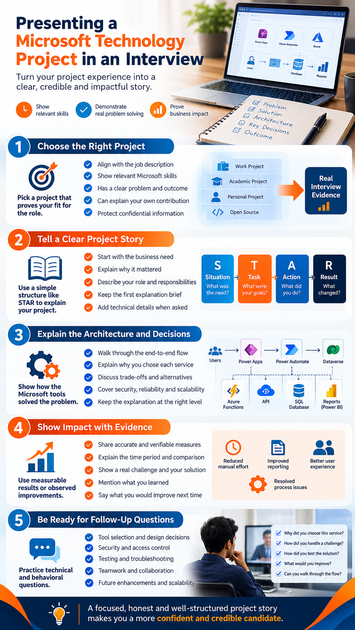
Choose a Microsoft project that proves your fit for the role
The best project is one that makes your relevant skills and judgment easy to assess. It may come from work, school, a personal build, or an open-source contribution. What matters is that you can explain the need, the choices, and your own contribution.
Match the project to the job description
Read the job description and note the skills it stresses. An Azure role may call for cloud design, identity, or monitoring; a .NET role may focus on APIs, testing, or application code. A Microsoft 365, Power Platform, or data engineering role may ask for different skills, so pick an example that gives you room to show them.
Connect each skill to something you did. If the role asks for automation, explain the process you automated and the service or tool you used. Naming several Microsoft products without showing how they solved a need won’t make your fit clear.
Pick a project with a clear problem and outcome
Choose a project with a defined user need, a real constraint, and a result you can explain. A project that improved a report, fixed a slow process, or added a useful feature can make a strong example. You don’t need a high-profile launch to show sound technical judgment.
For team work, draw a clear line between your tasks and the team’s results. Say which parts you designed, built, tested, or supported, and where others led. This lets the interviewer judge your work without taking credit away from your teammates.
Protect confidential details and describe experience honestly
Follow your employer’s or client’s rules before sharing project details. You can change names and remove sensitive data while keeping the technical problem clear. Don’t show private code, customer records, internal diagrams, or credentials.
If you lack a suitable work project, use a personal, academic, or open-source example. Be direct about its scope: a prototype is not a production system. Honest limits make your account more credible.
Presenting a Microsoft Technology Project in an Interview as a clear story
A simple story helps interviewers follow your project without a full technical walkthrough. The STAR method—situation, task, action, and result—can help you organize the details. Keep the wording natural, and focus on the decisions that show how you work.
Set the context before naming the technology
Begin with who needed what, or what was failing. For example, a team may have spent too long checking requests by hand, or users may have struggled to find current information. Explain the effect in plain terms before naming a Microsoft service.
Then say why the platform fit the need. You might have used Power Automate because the task involved repeatable steps across existing tools, or .NET because the team needed a custom service. Tie the tool to a project requirement instead of reciting a product list.
Clarify your role and responsibilities
State what you owned and where you worked with others. You might have designed a component, configured an Azure service, written and tested code, or coordinated a release. Give enough detail for the interviewer to see what you did, not just what the team delivered.
Be clear about decisions you influenced. If a teammate chose the database, explain your part in evaluating or using it. This distinction helps you answer follow-up questions with confidence and accuracy.
Keep the first explanation brief and expandable
Prepare a short summary that gives the interviewer room to ask questions. In about a minute, you can cover the need, your role, the main solution, and the result. Avoid memorizing a speech; practice the key points so you can adapt to the conversation.
Keep deeper details ready if the interviewer asks about code, testing, or design. Explain technical terms when needed, especially if the person interviewing you may not work in that area. Clear answers matter more than jargon.
Make the Microsoft architecture and decisions easy to understand
Explain how the parts connect, then show why you chose them. This demonstrates more than product knowledge: it shows how you matched a design to a real need. A simple diagram can help if the interview format allows it.
Describe the flow from request to result
Walk through the main path: what the user or system sends, which app or service handles it, where data goes, and what happens next. For a web app, that might mean a user submits a form, an API checks the request, data is saved, and the app shows a result. Adjust the flow to match your project.
Keep the explanation at the right level. Name the key components, but don’t list every setting unless it matters to a decision or outcome. If you bring a diagram, make sure it uses sanitized labels and shows only the parts you can discuss.
Explain why you selected each service
Connect each Microsoft service to a requirement, such as access control, integration with existing tools, expected demand, or ease of support. Explain what mattered most in your case and why the chosen service met that need. Avoid suggesting the choice was best for every project.
If Azure design was part of your work, Microsoft’s Azure Well-Architected Framework offers useful terms for discussing reliability, security, cost, operations, and performance. Refer to it when it informed your choices, not as proof that your project met every guideline.
Discuss trade-offs, security, and reliability
Be ready to explain what alternatives you considered and why you chose one. Perhaps a simpler design met the need, or an existing company tool made a new service unnecessary. A thoughtful trade-off shows how you balanced project needs against time, cost, or support limits.
Describe only safeguards your project used. These might include role-based access, protected data, monitoring, backups, or error handling. If an area was out of scope, say so and explain what you would review before a production release.
Demonstrate impact with evidence and lessons learned
A credible result can be a measured change or an observable improvement. Use figures only when you can explain where they came from and what they measure. If the team didn’t track results, describe what changed without inventing a number or claiming the project caused more than it did.
Support outcomes with accurate measures
Useful measures depend on the project. You might discuss processing time, error rates, number of manual steps, or user adoption if the team recorded them. State the time period and comparison point when you know them, so the figure has context.
No reliable metric? Describe a concrete result, such as a report that became available through a shared tool or a process that no longer required duplicate entry. Don’t turn an estimate into a fact. A precise, modest claim carries more weight than a dramatic one you can’t verify.
Explain a challenge and how you responded
Pick a real obstacle, such as unclear requirements, a test that exposed a data issue, or an integration that behaved differently than expected. Describe how you investigated it and what you personally changed. Include the result or the remaining limit.
Share what you learned without disguising a setback as a win. If the issue led to better tests or clearer requirements, explain the change. This gives the interviewer a useful view of your problem-solving approach.
Say what you would improve next time
Name one practical improvement and explain why it would help. You might add tests earlier, improve monitoring, or confirm user needs before building. Keep the change tied to something you observed, not a list of imagined upgrades.
Say what evidence would guide the improvement. For example, user feedback could show where a workflow causes confusion, while error logs could point to a service that needs attention. That makes your reflection specific and useful.
Prepare for follow-up questions and a confident project walkthrough
Interviewers may ask about architecture, tool selection, security, testing, teamwork, or results. Practice answers that return to your role and evidence, but leave room to adapt. Your goal is a clear conversation, not a recited script.
Rehearse likely technical and behavioral questions
Practice explaining why you chose a service, what you tested, how you handled a challenge, and what you would change. For each answer, state the decision or action, then give the reason and result. Keep the details relevant to the question.
Prepare for questions about teamwork, too. Explain how you gathered input, shared progress, or resolved a difference in approach. Use a real example and make your part clear.
Use a demo or portfolio item only when it helps
A short demo, sanitized code sample, or simple architecture diagram can make a project easier to understand. Bring one only when it fits the role and the interview format permits it. Test access in advance, and remove credentials, private data, and proprietary code.
A demo should support your explanation, not replace it. Be ready to describe the project even if the file, network, or screen share fails. The work and your reasoning matter more than the presentation materials.
End with a clear takeaway
Close by restating the need, your contribution, and the most meaningful result or lesson. Keep the summary short, then invite a question about a part of the project. This leaves room for the interviewer to explore the details that matter to the role.
Conclusion: Leave the interviewer with a credible project story
Choose a Microsoft project that fits the job, explain the user or business need before the technology, and make your own work easy to identify. Show how the design addressed real requirements, and support results with evidence you can stand behind. A focused, honest walkthrough is more persuasive than a long list of features. Rehearse your story, then bring that clarity into the interview.









