
50 Real Dynamics 365 CE Interview Questions Asked by Top Companies with Expert Answers (2026 Edition)
Introduction
Microsoft Dynamics 365 Customer Engagement (CE), formerly known as Dynamics CRM, has become one of the most sought-after enterprise business application platforms in the world. Organizations across banking, healthcare, manufacturing, retail, insurance, logistics, education, and government rely on Dynamics 365 CE to manage customer relationships, automate business processes, and improve operational efficiency.
As adoption continues to grow, companies are actively hiring Dynamics 365 Developers, Technical Consultants, Functional Consultants, Solution Architects, and Power Platform Developers with strong Dynamics 365 expertise.
Whether you’re a fresher preparing for your first interview or an experienced developer aiming for a better opportunity, understanding the questions employers actually ask can significantly improve your confidence and performance.
In this expert guide, we’ve compiled 50 real Dynamics 365 CE interview questions, inspired by common interview patterns at Microsoft partners, consulting firms, product companies, and enterprise organizations.
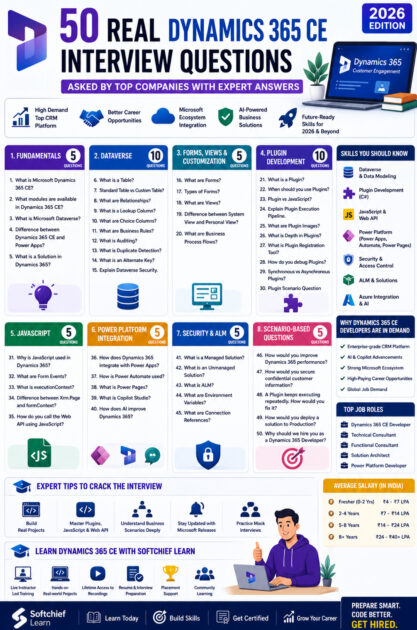
Why Dynamics 365 CE Developers Are in High Demand
Organizations prefer Dynamics 365 CE because it helps them:
- Manage customer relationships efficiently
- Improve sales productivity
- Automate business processes
- Integrate with Microsoft 365, Azure, and Power Platform
- Build AI-powered business applications
- Reduce manual work using automation
This growing adoption has created strong demand for professionals who can customize, extend, and integrate Dynamics 365 CE solutions.
Section 1: Dynamics 365 Fundamentals
1. What is Microsoft Dynamics 365 CE?
Expert Answer:
Dynamics 365 Customer Engagement (CE) is Microsoft’s cloud-based Customer Relationship Management (CRM) platform that helps organizations manage sales, customer service, marketing, field service, and customer engagement. It is built on Microsoft Dataverse and integrates seamlessly with Power Platform, Microsoft 365, Azure, and AI services.
2. What modules are available in Dynamics 365 CE?
Expert Answer:
Common modules include:
- Sales
- Customer Service
- Field Service
- Customer Insights
- Marketing (Customer Insights – Journeys)
- Project Operations
3. What is Microsoft Dataverse?
Expert Answer:
Dataverse is Microsoft’s secure cloud-based data platform that stores business data for Dynamics 365 and Power Platform. It provides tables, relationships, security, auditing, business rules, and APIs for enterprise applications.
4. Difference between Dynamics 365 CE and Power Apps?
Expert Answer:
Dynamics 365 CE is a business application built on Dataverse with preconfigured functionality for CRM processes.
Power Apps is a low-code platform used to build custom business applications. Dynamics 365 applications themselves are built on Power Platform technologies.
5. What is a Solution in Dynamics 365?
Expert Answer:
A Solution is a package that groups components such as tables, forms, views, plugins, Power Automate flows, web resources, and security settings for deployment between environments.
Section 2: Dataverse Questions
6. What is a Table?
A table stores business records in Dataverse.
7. Difference between Standard Table and Custom Table?
Answer:
Standard tables are provided by Microsoft.
Custom tables are created to meet specific business requirements.
8. What are Relationships?
Answer:
Relationships connect records between tables.
Types include:
- One-to-Many
- Many-to-One
- Many-to-Many
9. What is a Lookup Column?
Answer:
A Lookup creates a reference from one table to another, enabling related records.
10. What are Choice Columns?
Answer:
Choice columns store predefined values from a selectable list, ensuring consistent data entry.
11. What are Business Rules?
Answer:
Business Rules allow validation and business logic without writing code. They can show or hide fields, set values, enforce required fields, and validate data.
12. What is Auditing?
Answer:
Auditing tracks changes made to records, including who changed the data and when.
13. What is Duplicate Detection?
Answer:
Duplicate Detection identifies records with similar values to prevent duplicate data.
14. What is an Alternate Key?
Answer:
An Alternate Key uniquely identifies records using one or more business fields instead of the system-generated GUID.
15. Explain Dataverse Security.
Answer:
Security is managed using:
- Security Roles
- Business Units
- Teams
- Field Security Profiles
- Column-level security
- Record ownership
Section 3: Forms, Views & Customization
16. What are Forms?
Forms provide the user interface for viewing and editing records.
17. Types of Forms?
Answer:
- Main Form
- Quick Create Form
- Quick View Form
- Card Form
18. What are Views?
Views display filtered lists of records based on defined criteria.
19. Difference between System View and Personal View?
Answer:
System Views are available to all users with appropriate permissions.
Personal Views are created and managed by individual users.
20. What are Business Process Flows?
Answer:
Business Process Flows guide users through standardized business stages such as Lead → Opportunity → Quote → Order.
Section 4: Plugin Development
21. What is a Plugin?
Expert Answer:
A Plugin is a custom C# class that executes server-side business logic in response to Dataverse events.
22. When should you use Plugins?
Answer:
Use Plugins when business logic must execute securely on the server, regardless of how data is created or updated.
23. Difference between Plugin and JavaScript?
Answer:
| Plugin | JavaScript |
|---|---|
| Server-side | Client-side |
| Runs on Dataverse | Runs in browser |
| More secure | UI-focused |
| Executes for all channels | Executes only in forms |
24. Explain Plugin Execution Pipeline.
Answer:
Stages include:
- Pre-validation
- Pre-operation
- Main Operation
- Post-operation
Choosing the correct stage depends on the business requirement.
25. What are Plugin Images?
Answer:
Plugin Images provide snapshots of record data before or after an operation, reducing additional database calls.
26. What is Depth in Plugins?
Answer:
Depth indicates how many times a plugin has been triggered recursively. It helps prevent infinite loops.
27. What is Plugin Registration Tool?
Answer:
It is used to register, update, and manage plugins in Dataverse.
28. How do you debug Plugins?
Answer:
Using:
- Plugin Trace Logs
- Tracing Service
- Remote debugging (where supported)
- Unit testing
29. Difference between Synchronous and Asynchronous Plugins?
Answer:
Synchronous plugins execute immediately within the transaction.
Asynchronous plugins execute later as background operations.
30. Common Plugin Interview Scenario
Question:
A customer wants the Total Amount updated automatically whenever Order Lines change.
Answer:
Implement a plugin on Create, Update, and Delete events for Order Line records to recalculate the parent Order Total.
Section 5: JavaScript Interview Questions
31. Why is JavaScript used in Dynamics 365?
Answer:
JavaScript customizes form behavior, validates data, calls Web APIs, and improves user experience.
32. What are Form Events?
Answer:
Common events include:
- OnLoad
- OnSave
- OnChange
33. What is executionContext?
Answer:
executionContext provides access to the current form context and event information.
34. Difference between Xrm.Page and formContext?
Answer:
Xrm.Page is deprecated.
formContext is the recommended API for accessing form elements.
35. How do you call the Web API using JavaScript?
Answer:
Use the Xrm.WebApi methods such as retrieveRecord, retrieveMultipleRecords, createRecord, updateRecord, and deleteRecord.
Section 6: Power Platform Integration
36. How does Dynamics 365 integrate with Power Apps?
Answer:
Dynamics 365 uses Model-driven Apps built on Dataverse. Developers can also build Canvas Apps that interact with Dynamics 365 data.
37. How is Power Automate used?
Answer:
Power Automate automates approvals, notifications, integrations, scheduled jobs, and business processes.
38. What is Power Pages?
Answer:
Power Pages is Microsoft’s low-code platform for building secure external-facing business websites connected to Dataverse.
39. What is Copilot Studio?
Answer:
Copilot Studio enables organizations to build AI-powered conversational agents that integrate with Dynamics 365 and Power Platform.
40. How does AI improve Dynamics 365?
Answer:
AI can assist with lead scoring, email drafting, customer insights, forecasting, knowledge search, and conversational assistance through Copilot experiences.
Section 7: Security & ALM
41. What is a Managed Solution?
Answer:
A Managed Solution is a deployable package intended for production environments where components cannot be directly modified.
42. What is an Unmanaged Solution?
Answer:
An Unmanaged Solution is used during development and allows customization.
43. What is ALM?
Answer:
Application Lifecycle Management (ALM) is the process of managing development, testing, deployment, version control, and maintenance of applications.
44. What are Environment Variables?
Answer:
Environment Variables store configurable values, allowing the same solution to work across Development, Test, and Production environments.
45. What are Connection References?
Answer:
Connection References simplify deployment by separating Power Automate connectors from individual flows.
Section 8: Scenario-Based Questions
46. How would you improve Dynamics 365 performance?
Expert Answer:
I would optimize plugins, minimize unnecessary JavaScript, use efficient queries, avoid excessive synchronous processing, enable delegation where applicable, reduce network calls, and monitor performance using platform diagnostics.
47. How would you secure confidential customer information?
Expert Answer:
Implement Security Roles, Field Security Profiles, Business Units, Teams, Microsoft Entra ID authentication, auditing, and Data Loss Prevention (DLP) policies where appropriate.
48. A Plugin keeps executing repeatedly. How would you fix it?
Expert Answer:
Check the plugin execution depth, review update logic to avoid unnecessary writes, and ensure the plugin does not trigger itself recursively.
49. How would you deploy a solution to Production?
Expert Answer:
Validate the solution in a test environment, export it as a Managed Solution, verify dependencies, configure environment variables and connection references, then import and validate functionality in Production.
50. Why should we hire you as a Dynamics 365 Developer?
Expert Answer:
“I have a solid understanding of Dynamics 365 CE, Dataverse, Power Platform, JavaScript, C#, plugins, Web APIs, and ALM. Beyond technical knowledge, I enjoy understanding business requirements and building solutions that improve productivity and deliver measurable business value. I’m committed to continuous learning and staying current with Microsoft’s latest technologies.”
Expert Tips to Crack a Dynamics 365 CE Interview
1. Build Real Projects
Employers value practical experience over memorized answers.
Projects to build:
- Lead Management System
- Complaint Management Portal
- Leave Management App
- Sales Automation Solution
- Customer Support Portal
2. Learn the Entire Microsoft Ecosystem
Modern Dynamics developers should understand:
- Power Apps
- Power Automate
- Dataverse
- Power Pages
- Copilot Studio
- Azure Functions
- REST APIs
- Microsoft Entra ID
3. Master Plugins and JavaScript
Most technical interviews include questions on:
- Plugin Pipeline
- Images
- Tracing
- JavaScript Events
- Web API
- Form Context
4. Practice Scenario-Based Questions
Instead of memorizing definitions, explain how you would solve real business problems using Dynamics 365.
5. Stay Updated
Review the latest Microsoft Release Wave updates, AI capabilities, Copilot enhancements, and Dataverse improvements before your interview.
Common Mistakes Candidates Make
Avoid these common interview mistakes:
- Explaining only theory without discussing practical implementations.
- Ignoring Power Platform integration.
- Not understanding Dataverse fundamentals.
- Confusing client-side and server-side customizations.
- Skipping ALM and deployment concepts.
- Failing to explain business value alongside technical implementation.
- Not preparing examples from personal projects.
Why Learn Dynamics 365 CE with Softchief Learn?
At Softchief Learn, we focus on practical, enterprise-ready training designed to prepare learners for real Dynamics 365 implementation projects.
Our Training Includes
- Live instructor-led sessions
- Lifetime access to recordings
- Hands-on Dynamics 365 CE projects
- Plugin and JavaScript development
- Dataverse and Power Platform integration
- Resume building assistance
- Mock technical interviews
- Placement support
- Community learning
- Updated curriculum covering AI, Copilot, and the latest Microsoft Release Wave features
Our goal is to help you build the confidence and practical expertise needed to succeed in enterprise Dynamics 365 roles.
Conclusion
Dynamics 365 CE remains one of the most valuable enterprise platforms within the Microsoft ecosystem, offering exciting career opportunities for developers, consultants, and solution architects. However, success in interviews requires more than memorizing definitions—it demands a strong understanding of business processes, practical customization experience, and the ability to explain how your solutions solve real-world problems.
Use these 50 interview questions as a starting point, but go beyond them by building projects, practicing scenario-based answers, and exploring the broader Microsoft ecosystem, including Power Platform, Azure, and AI capabilities.
With consistent preparation, hands-on learning, and a problem-solving mindset, you’ll be well-equipped to secure your next Dynamics 365 CE opportunity.









