
How to Start a Power Platform Career in 2026 Without a Coding Background
Introduction
One of the most common questions asked by students, graduates, and career changers is:
“Can I build a career in IT without learning programming?”
The answer is Yes—but with an important clarification.
You don’t need to be an expert software developer to begin your journey with Microsoft Power Platform. The platform was designed to help people build business applications, automate workflows, create reports, and develop enterprise solutions using a low-code/no-code approach.
However, as your career grows, learning some programming concepts will help you build more advanced solutions and unlock higher-paying opportunities.
If you’re an MCA, B.Tech, BCA, MBA, Commerce graduate, or working professional looking to enter the IT industry, Microsoft Power Platform is one of the best technologies to start with in 2026.
This guide explains everything you need to know—from learning your first app to becoming a successful Microsoft Power Platform professional.
What Is Microsoft Power Platform?
Microsoft Power Platform is a suite of business application tools that enables organizations to create applications, automate processes, analyze data, and build AI-powered solutions with minimal coding.
The platform includes:
- Power Apps
- Power Automate
- Power BI
- Power Pages
- Microsoft Dataverse
- Copilot Studio
- AI Builder
Together, these tools allow businesses to digitize operations, reduce manual work, and improve productivity.
Why Is Power Platform So Popular?
Organizations across industries are rapidly adopting Microsoft Power Platform because it helps them:
- Build applications faster
- Reduce software development costs
- Automate repetitive tasks
- Integrate Microsoft 365 and Dynamics 365
- Improve productivity
- Create AI-powered business solutions
- Accelerate digital transformation
According to Microsoft’s ongoing investment in low-code technologies and AI, Power Platform continues to be one of the fastest-growing enterprise platforms.
Can You Really Learn Power Platform Without Coding?
Yes.
Many successful professionals begin with no programming experience.
Power Platform allows beginners to:
- Design apps using drag-and-drop interfaces
- Create workflows visually
- Connect to data sources
- Generate reports
- Build business portals
- Automate approvals
- Use AI capabilities
You can build your first applications without writing traditional code.
However, learning basic programming concepts later—such as JavaScript, C#, SQL, and APIs—can significantly expand your career opportunities.
Who Should Learn Microsoft Power Platform?
Power Platform is suitable for:
- MCA Students
- B.Tech Graduates
- BCA Graduates
- MBA Professionals
- Commerce Graduates
- Business Analysts
- Manual Testers
- Support Engineers
- Career Switchers
- Freshers
- Working Professionals
The platform welcomes both technical and non-technical learners.
Career Opportunities in Microsoft Power Platform
After developing your skills, you can pursue roles such as:
- Power Platform Developer
- Power Apps Developer
- Power Automate Developer
- Power Platform Functional Consultant
- Dynamics 365 Consultant
- Business Applications Consultant
- Solution Consultant
- Automation Consultant
- Low-Code Developer
- Microsoft Consultant
Many of these roles combine business understanding with technical implementation.
Skills You Need (Even Without Coding)
To start your career, focus on these essential skills:
Power Apps
Learn to create:
- Canvas Apps
- Model-Driven Apps
- Mobile applications
- Business forms
Power Automate
Learn to automate:
- Approval workflows
- Email notifications
- Document processing
- Business processes
Power BI
Understand:
- Dashboards
- Reports
- Data visualization
- Basic analytics
Power Pages
Learn to build secure business websites and self-service portals.
Dataverse
Understand:
- Tables
- Relationships
- Business rules
- Security
- Data modeling
These foundational skills prepare you for real-world projects.
Do You Need Programming?
Not initially—but eventually, yes.
As you progress, learning the following technologies will help you move into advanced development roles:
- JavaScript
- C#
- SQL
- REST APIs
- JSON
- HTML
- CSS
- Git
These skills enable advanced customization, integrations, and enterprise solution development.
Think of programming as the next step, not the first step.
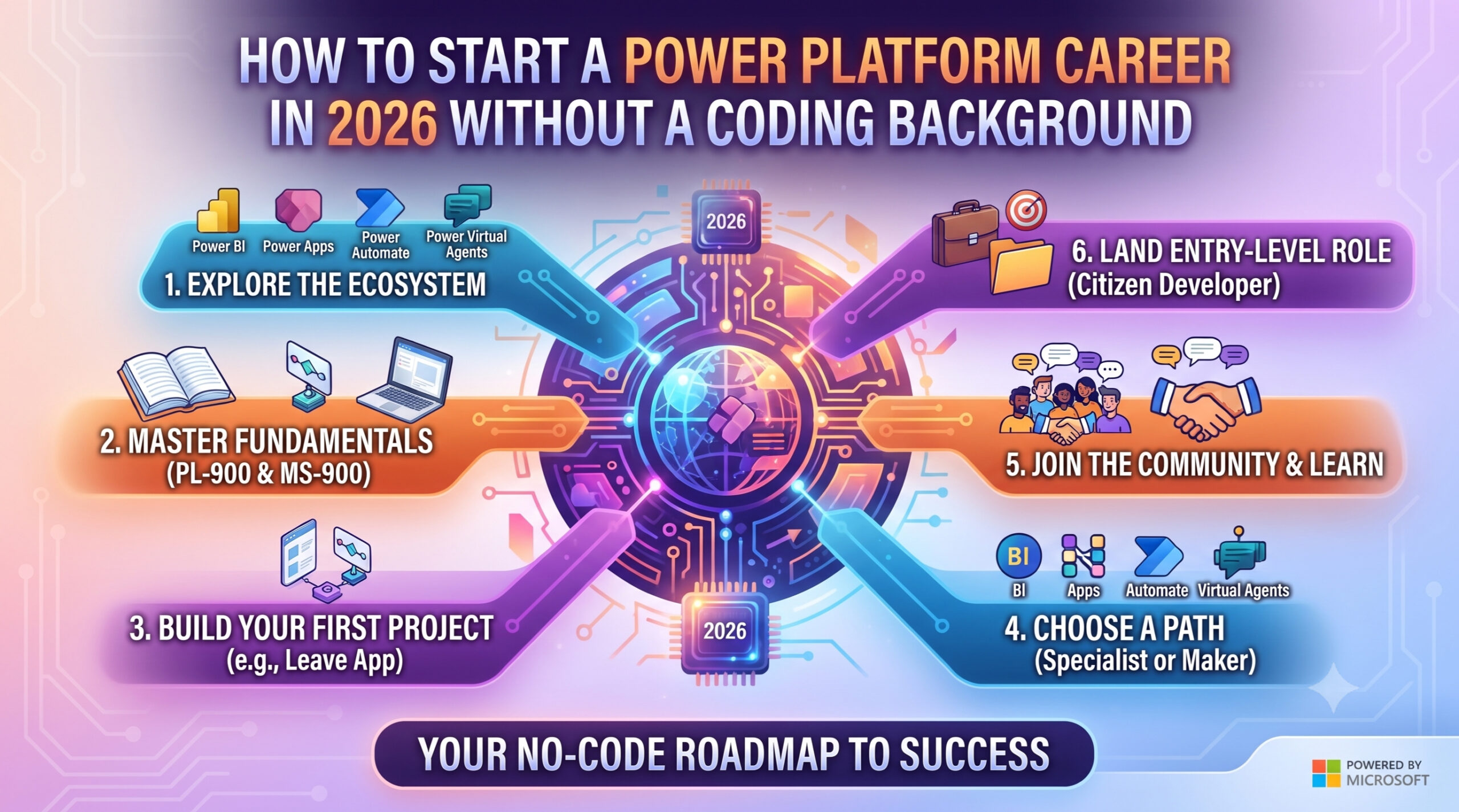
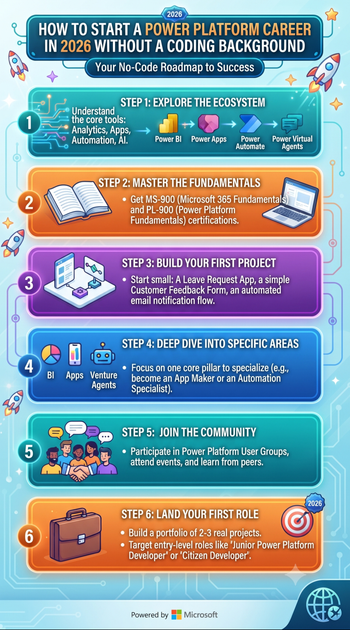
Step-by-Step Learning Roadmap
Step 1: Understand Power Platform Fundamentals
Learn:
- What Power Platform is
- Business applications
- Low-code development
- Microsoft ecosystem
- Dataverse basics
Time: 1–2 weeks
Step 2: Learn Power Apps
Practice building:
- Employee Directory
- Leave Management App
- Expense Tracker
- Attendance System
- Student Portal
Focus on solving simple business problems.
Step 3: Learn Power Automate
Build workflows for:
- Leave approvals
- Email alerts
- File uploads
- Notifications
- Task automation
Automation skills are highly valued by employers.
Step 4: Learn Dataverse
Understand:
- Tables
- Relationships
- Choice columns
- Business Rules
- Security Roles
Dataverse is the foundation of most enterprise Power Platform solutions.
Step 5: Learn Power Pages
Create:
- Customer portals
- Registration websites
- Support portals
- Partner portals
Portal development expands your skill set beyond internal applications.
Step 6: Learn AI Features
Explore:
- AI Builder
- Copilot Studio
- Microsoft Copilot
- Prompt Engineering
- Azure OpenAI basics
AI knowledge is becoming an increasingly valuable differentiator.
Step 7: Learn Basic Programming
Once you’re comfortable with Power Platform, begin learning:
- JavaScript
- SQL
- REST APIs
- C#
These skills unlock advanced development opportunities.
Build Real Projects
Projects help employers evaluate your practical skills.
Ideas include:
- Employee Leave Management
- Visitor Management System
- HR Recruitment Portal
- Expense Management App
- Help Desk System
- Inventory Tracker
- Customer Feedback Portal
- Sales Dashboard
- Event Registration Portal
- Asset Management System
Document your projects with screenshots, business scenarios, and GitHub repositories where applicable.
Certifications to Pursue
A structured certification roadmap can strengthen your profile.
Beginner
- PL-900 – Microsoft Power Platform Fundamentals
Intermediate
- PL-400 – Microsoft Power Platform Developer Associate
- PL-200 – Power Platform Functional Consultant
Advanced
Continue learning through Microsoft Learn, real-world projects, and advanced Power Platform capabilities such as ALM, custom connectors, and AI integrations.
Remember, certifications support your learning—they don’t replace practical experience.
Career Growth Path
A typical progression may look like this:
| Experience | Role |
|---|---|
| Beginner | Power Platform Trainee |
| 1–2 Years | Power Apps Developer |
| 2–4 Years | Power Platform Developer |
| 4–6 Years | Dynamics 365 Technical Consultant |
| 6–8 Years | Solution Consultant |
| 8+ Years | Solution Architect / Practice Lead |
Career growth depends on continuous learning, project experience, and business knowledge.
Salary Expectations in India (2026)
Approximate salary ranges vary by employer, location, and expertise.
| Experience | Expected Salary |
|---|---|
| Fresher | ₹4 – ₹7 LPA |
| 2 Years | ₹7 – ₹12 LPA |
| 4 Years | ₹12 – ₹20 LPA |
| 6+ Years | ₹20 – ₹35+ LPA |
Professionals with expertise in AI, Azure, Dynamics 365, and integrations often command higher salaries.
Common Mistakes Beginners Should Avoid
Many learners slow their progress by:
- Trying to learn every Microsoft product at once
- Ignoring Dataverse fundamentals
- Relying only on videos without hands-on practice
- Skipping real-world projects
- Avoiding basic programming forever
- Ignoring GitHub and LinkedIn
- Preparing only for certifications without building solutions
Consistent practice is the fastest path to success.
How AI Is Expanding Power Platform Careers
Microsoft is integrating AI deeply into Power Platform.
Modern developers are expected to understand:
- Microsoft Copilot
- Copilot Studio
- AI Builder
- Azure OpenAI
- Intelligent document processing
- AI-powered automation
- Natural language experiences
Learning AI alongside Power Platform can make your profile more competitive.
Why Employers Prefer Power Platform Professionals
Organizations appreciate Power Platform professionals because they can:
- Deliver solutions quickly
- Reduce development costs
- Automate business processes
- Integrate Microsoft services
- Improve operational efficiency
- Build scalable enterprise applications
The combination of business understanding and technical implementation makes these professionals highly valuable.
Frequently Asked Questions (FAQs)
1. Can I become a Power Platform Developer without coding?
Yes. You can begin your journey without programming knowledge by learning Power Apps, Power Automate, Power BI, Power Pages, and Dataverse. As your career progresses, learning basic coding skills will help you take on more advanced roles.
2. Is Power Platform suitable for freshers?
Absolutely. It is one of the most beginner-friendly Microsoft technologies and offers excellent opportunities for students, graduates, and career switchers.
3. Which certification should I start with?
PL-900 (Microsoft Power Platform Fundamentals) is the ideal starting point for beginners because it introduces the platform and its capabilities without requiring development experience.
4. Can non-IT graduates learn Power Platform?
Yes. Professionals from commerce, management, finance, operations, and other non-technical backgrounds can learn Power Platform and transition into technology-focused roles.
5. Does learning Power Platform eliminate the need to learn coding?
Not entirely. While many solutions can be built using low-code tools, learning JavaScript, SQL, APIs, and C# over time will broaden your career options and help you build more advanced enterprise applications.
Final Thoughts
A lack of coding experience should never stop you from starting a career in Microsoft Power Platform. The platform was designed to make application development more accessible while still offering room for growth into advanced technical roles.
Begin by mastering the fundamentals, build practical projects, earn relevant certifications, and gradually expand your knowledge with programming, Azure, and AI technologies. The professionals who combine low-code expertise with continuous learning are likely to be the ones who thrive in the years ahead.
Why Learn Microsoft Power Platform with Softchief Learn?
At Softchief Learn, we help students, freshers, and working professionals build successful careers in Microsoft technologies through practical, industry-oriented training.
Our programs include:
- Microsoft Power Platform
- Power Apps
- Power Automate
- Power Pages
- Microsoft Dataverse
- Microsoft Dynamics 365 CE
- Microsoft Azure
- AI & Copilot Integration
- Real-Time Industry Projects
- Resume Building
- Mock Interviews
- Placement Assistance
- Lifetime Access to Learning Resources
Our expert-led training focuses on practical implementation so that learners become job-ready—not just certification-ready.
Conclusion
Microsoft Power Platform has opened the doors of software development to people from diverse educational and professional backgrounds. Whether you’re a fresher, a career changer, or someone with no coding experience, you can begin building real business applications and gradually grow into advanced Microsoft development roles.
The key is to follow a structured learning roadmap, practice consistently, build meaningful projects, and continue expanding your skills with AI, Azure, and programming fundamentals. With dedication and the right guidance, a successful career in Microsoft Power Platform is well within your reach.
Tags: Microsoft Power Platform, Power Platform Career, Power Apps, Power Automate, Power Pages, Dataverse, PL-900, PL-400, Low-Code Development, No Coding Career, Microsoft Careers, Power Platform Developer, Freshers IT Jobs, Career Switch, AI Builder, Copilot Studio, Dynamics 365, Azure, Microsoft Certifications, Softchief Learn
Meta Title: No Coding Background? Start a Successful Career in Microsoft Power Platform (2026 Guide)
Meta Description: No coding experience? Learn how to start a successful career in Microsoft Power Platform. Discover the complete roadmap, required skills, certifications, salary, job roles, projects, and career opportunities for beginners in 2026.
Focus Keyword: Microsoft Power Platform Career Without Coding
SEO Keywords: Microsoft Power Platform career, Power Platform for beginners, no coding career, Power Apps beginner guide, Power Automate career, PL-900 certification, Power Platform roadmap, low-code development, Microsoft Power Platform jobs, Power Platform salary, career in Microsoft technologies, Power Platform Developer
No Coding Background? Here’s How to Start a Career in Microsoft Power Platform Successfully
One of the most common questions asked by students, graduates, and career changers is:
“Can I build a career in IT without learning programming?”
The answer is Yes—but with an important clarification.
You don’t need to be an expert software developer to begin your journey with Microsoft Power Platform. The platform was designed to help people build business applications, automate workflows, create reports, and develop enterprise solutions using a low-code/no-code approach.
However, as your career grows, learning some programming concepts will help you build more advanced solutions and unlock higher-paying opportunities.
If you’re an MCA, B.Tech, BCA, MBA, Commerce graduate, or working professional looking to enter the IT industry, Microsoft Power Platform is one of the best technologies to start with in 2026.
This guide explains everything you need to know—from learning your first app to becoming a successful Microsoft Power Platform professional.
What Is Microsoft Power Platform?
Microsoft Power Platform is a suite of business application tools that enables organizations to create applications, automate processes, analyze data, and build AI-powered solutions with minimal coding.
The platform includes:
- Power Apps
- Power Automate
- Power BI
- Power Pages
- Microsoft Dataverse
- Copilot Studio
- AI Builder
Together, these tools allow businesses to digitize operations, reduce manual work, and improve productivity.
Why Is Power Platform So Popular?
Organizations across industries are rapidly adopting Microsoft Power Platform because it helps them:
- Build applications faster
- Reduce software development costs
- Automate repetitive tasks
- Integrate Microsoft 365 and Dynamics 365
- Improve productivity
- Create AI-powered business solutions
- Accelerate digital transformation
According to Microsoft’s ongoing investment in low-code technologies and AI, Power Platform continues to be one of the fastest-growing enterprise platforms.
Can You Really Learn Power Platform Without Coding?
Yes.
Many successful professionals begin with no programming experience.
Power Platform allows beginners to:
- Design apps using drag-and-drop interfaces
- Create workflows visually
- Connect to data sources
- Generate reports
- Build business portals
- Automate approvals
- Use AI capabilities
You can build your first applications without writing traditional code.
However, learning basic programming concepts later—such as JavaScript, C#, SQL, and APIs—can significantly expand your career opportunities.
Who Should Learn Microsoft Power Platform?
Power Platform is suitable for:
- MCA Students
- B.Tech Graduates
- BCA Graduates
- MBA Professionals
- Commerce Graduates
- Business Analysts
- Manual Testers
- Support Engineers
- Career Switchers
- Freshers
- Working Professionals
The platform welcomes both technical and non-technical learners.
Career Opportunities in Microsoft Power Platform
After developing your skills, you can pursue roles such as:
- Power Platform Developer
- Power Apps Developer
- Power Automate Developer
- Power Platform Functional Consultant
- Dynamics 365 Consultant
- Business Applications Consultant
- Solution Consultant
- Automation Consultant
- Low-Code Developer
- Microsoft Consultant
Many of these roles combine business understanding with technical implementation.
Skills You Need (Even Without Coding)
To start your career, focus on these essential skills:
Power Apps
Learn to create:
- Canvas Apps
- Model-Driven Apps
- Mobile applications
- Business forms
Power Automate
Learn to automate:
- Approval workflows
- Email notifications
- Document processing
- Business processes
Power BI
Understand:
- Dashboards
- Reports
- Data visualization
- Basic analytics
Power Pages
Learn to build secure business websites and self-service portals.
Dataverse
Understand:
- Tables
- Relationships
- Business rules
- Security
- Data modeling
These foundational skills prepare you for real-world projects.
Do You Need Programming?
Not initially—but eventually, yes.
As you progress, learning the following technologies will help you move into advanced development roles:
- JavaScript
- C#
- SQL
- REST APIs
- JSON
- HTML
- CSS
- Git
These skills enable advanced customization, integrations, and enterprise solution development.
Think of programming as the next step, not the first step.
Step-by-Step Learning Roadmap
Step 1: Understand Power Platform Fundamentals
Learn:
- What Power Platform is
- Business applications
- Low-code development
- Microsoft ecosystem
- Dataverse basics
Time: 1–2 weeks
Step 2: Learn Power Apps
Practice building:
- Employee Directory
- Leave Management App
- Expense Tracker
- Attendance System
- Student Portal
Focus on solving simple business problems.
Step 3: Learn Power Automate
Build workflows for:
- Leave approvals
- Email alerts
- File uploads
- Notifications
- Task automation
Automation skills are highly valued by employers.
Step 4: Learn Dataverse
Understand:
- Tables
- Relationships
- Choice columns
- Business Rules
- Security Roles
Dataverse is the foundation of most enterprise Power Platform solutions.
Step 5: Learn Power Pages
Create:
- Customer portals
- Registration websites
- Support portals
- Partner portals
Portal development expands your skill set beyond internal applications.
Step 6: Learn AI Features
Explore:
- AI Builder
- Copilot Studio
- Microsoft Copilot
- Prompt Engineering
- Azure OpenAI basics
AI knowledge is becoming an increasingly valuable differentiator.
Step 7: Learn Basic Programming
Once you’re comfortable with Power Platform, begin learning:
- JavaScript
- SQL
- REST APIs
- C#
These skills unlock advanced development opportunities.
Build Real Projects
Projects help employers evaluate your practical skills.
Ideas include:
- Employee Leave Management
- Visitor Management System
- HR Recruitment Portal
- Expense Management App
- Help Desk System
- Inventory Tracker
- Customer Feedback Portal
- Sales Dashboard
- Event Registration Portal
- Asset Management System
Document your projects with screenshots, business scenarios, and GitHub repositories where applicable.
Certifications to Pursue
A structured certification roadmap can strengthen your profile.
Beginner
- PL-900 – Microsoft Power Platform Fundamentals
Intermediate
- PL-400 – Microsoft Power Platform Developer Associate
- PL-200 – Power Platform Functional Consultant
Advanced
Continue learning through Microsoft Learn, real-world projects, and advanced Power Platform capabilities such as ALM, custom connectors, and AI integrations.
Remember, certifications support your learning—they don’t replace practical experience.
Career Growth Path
A typical progression may look like this:
| Experience | Role |
|---|---|
| Beginner | Power Platform Trainee |
| 1–2 Years | Power Apps Developer |
| 2–4 Years | Power Platform Developer |
| 4–6 Years | Dynamics 365 Technical Consultant |
| 6–8 Years | Solution Consultant |
| 8+ Years | Solution Architect / Practice Lead |
Career growth depends on continuous learning, project experience, and business knowledge.
Salary Expectations in India (2026)
Approximate salary ranges vary by employer, location, and expertise.
| Experience | Expected Salary |
|---|---|
| Fresher | ₹4 – ₹7 LPA |
| 2 Years | ₹7 – ₹12 LPA |
| 4 Years | ₹12 – ₹20 LPA |
| 6+ Years | ₹20 – ₹35+ LPA |
Professionals with expertise in AI, Azure, Dynamics 365, and integrations often command higher salaries.
Common Mistakes Beginners Should Avoid
Many learners slow their progress by:
- Trying to learn every Microsoft product at once
- Ignoring Dataverse fundamentals
- Relying only on videos without hands-on practice
- Skipping real-world projects
- Avoiding basic programming forever
- Ignoring GitHub and LinkedIn
- Preparing only for certifications without building solutions
Consistent practice is the fastest path to success.
How AI Is Expanding Power Platform Careers
Microsoft is integrating AI deeply into Power Platform.
Modern developers are expected to understand:
- Microsoft Copilot
- Copilot Studio
- AI Builder
- Azure OpenAI
- Intelligent document processing
- AI-powered automation
- Natural language experiences
Learning AI alongside Power Platform can make your profile more competitive.
Why Employers Prefer Power Platform Professionals
Organizations appreciate Power Platform professionals because they can:
- Deliver solutions quickly
- Reduce development costs
- Automate business processes
- Integrate Microsoft services
- Improve operational efficiency
- Build scalable enterprise applications
The combination of business understanding and technical implementation makes these professionals highly valuable.
Frequently Asked Questions (FAQs)
1. Can I become a Power Platform Developer without coding?
Yes. You can begin your journey without programming knowledge by learning Power Apps, Power Automate, Power BI, Power Pages, and Dataverse. As your career progresses, learning basic coding skills will help you take on more advanced roles.
2. Is Power Platform suitable for freshers?
Absolutely. It is one of the most beginner-friendly Microsoft technologies and offers excellent opportunities for students, graduates, and career switchers.
3. Which certification should I start with?
PL-900 (Microsoft Power Platform Fundamentals) is the ideal starting point for beginners because it introduces the platform and its capabilities without requiring development experience.
4. Can non-IT graduates learn Power Platform?
Yes. Professionals from commerce, management, finance, operations, and other non-technical backgrounds can learn Power Platform and transition into technology-focused roles.
5. Does learning Power Platform eliminate the need to learn coding?
Not entirely. While many solutions can be built using low-code tools, learning JavaScript, SQL, APIs, and C# over time will broaden your career options and help you build more advanced enterprise applications.
Final Thoughts
A lack of coding experience should never stop you from starting a career in Microsoft Power Platform. The platform was designed to make application development more accessible while still offering room for growth into advanced technical roles.
Begin by mastering the fundamentals, build practical projects, earn relevant certifications, and gradually expand your knowledge with programming, Azure, and AI technologies. The professionals who combine low-code expertise with continuous learning are likely to be the ones who thrive in the years ahead.
Why Learn Microsoft Power Platform with Softchief Learn?
At Softchief Learn, we help students, freshers, and working professionals build successful careers in Microsoft technologies through practical, industry-oriented training.
Our programs include:
- Microsoft Power Platform
- Power Apps
- Power Automate
- Power Pages
- Microsoft Dataverse
- Microsoft Dynamics 365 CE
- Microsoft Azure
- AI & Copilot Integration
- Real-Time Industry Projects
- Resume Building
- Mock Interviews
- Placement Assistance
- Lifetime Access to Learning Resources
Our expert-led training focuses on practical implementation so that learners become job-ready—not just certification-ready.
Conclusion
Microsoft Power Platform has opened the doors of software development to people from diverse educational and professional backgrounds. Whether you’re a fresher, a career changer, or someone with no coding experience, you can begin building real business applications and gradually grow into advanced Microsoft development roles.
The key is to follow a structured learning roadmap, practice consistently, build meaningful projects, and continue expanding your skills with AI, Azure, and programming fundamentals. With dedication and the right guidance, a successful career in Microsoft Power Platform is well within your reach.
Tags: Microsoft Power Platform, Power Platform Career, Power Apps, Power Automate, Power Pages, Dataverse, PL-900, PL-400, Low-Code Development, No Coding Career, Microsoft Careers, Power Platform Developer, Freshers IT Jobs, Career Switch, AI Builder, Copilot Studio, Dynamics 365, Azure, Microsoft Certifications, Softchief Learn
Meta Title: No Coding Background? Start a Successful Career in Microsoft Power Platform (2026 Guide)
Meta Description: No coding experience? Learn how to start a successful career in Microsoft Power Platform. Discover the complete roadmap, required skills, certifications, salary, job roles, projects, and career opportunities for beginners in 2026.
Focus Keyword: Microsoft Power Platform Career Without Coding
SEO Keywords: Microsoft Power Platform career, Power Platform for beginners, no coding career, Power Apps beginner guide, Power Automate career, PL-900 certification, Power Platform roadmap, low-code development, Microsoft Power Platform jobs, Power Platform salary, career in Microsoft technologies, Power Platform Developer
No Coding Background? Here’s How to Start a Career in Microsoft Power Platform Successfully
One of the most common questions asked by students, graduates, and career changers is:
“Can I build a career in IT without learning programming?”
The answer is Yes—but with an important clarification.
You don’t need to be an expert software developer to begin your journey with Microsoft Power Platform. The platform was designed to help people build business applications, automate workflows, create reports, and develop enterprise solutions using a low-code/no-code approach.
However, as your career grows, learning some programming concepts will help you build more advanced solutions and unlock higher-paying opportunities.
If you’re an MCA, B.Tech, BCA, MBA, Commerce graduate, or working professional looking to enter the IT industry, Microsoft Power Platform is one of the best technologies to start with in 2026.
This guide explains everything you need to know—from learning your first app to becoming a successful Microsoft Power Platform professional.
What Is Microsoft Power Platform?
Microsoft Power Platform is a suite of business application tools that enables organizations to create applications, automate processes, analyze data, and build AI-powered solutions with minimal coding.
The platform includes:
- Power Apps
- Power Automate
- Power BI
- Power Pages
- Microsoft Dataverse
- Copilot Studio
- AI Builder
Together, these tools allow businesses to digitize operations, reduce manual work, and improve productivity.
Why Is Power Platform So Popular?
Organizations across industries are rapidly adopting Microsoft Power Platform because it helps them:
- Build applications faster
- Reduce software development costs
- Automate repetitive tasks
- Integrate Microsoft 365 and Dynamics 365
- Improve productivity
- Create AI-powered business solutions
- Accelerate digital transformation
According to Microsoft’s ongoing investment in low-code technologies and AI, Power Platform continues to be one of the fastest-growing enterprise platforms.
Can You Really Learn Power Platform Without Coding?
Yes.
Many successful professionals begin with no programming experience.
Power Platform allows beginners to:
- Design apps using drag-and-drop interfaces
- Create workflows visually
- Connect to data sources
- Generate reports
- Build business portals
- Automate approvals
- Use AI capabilities
You can build your first applications without writing traditional code.
However, learning basic programming concepts later—such as JavaScript, C#, SQL, and APIs—can significantly expand your career opportunities.
Who Should Learn Microsoft Power Platform?
Power Platform is suitable for:
- MCA Students
- B.Tech Graduates
- BCA Graduates
- MBA Professionals
- Commerce Graduates
- Business Analysts
- Manual Testers
- Support Engineers
- Career Switchers
- Freshers
- Working Professionals
The platform welcomes both technical and non-technical learners.
Career Opportunities in Microsoft Power Platform
After developing your skills, you can pursue roles such as:
- Power Platform Developer
- Power Apps Developer
- Power Automate Developer
- Power Platform Functional Consultant
- Dynamics 365 Consultant
- Business Applications Consultant
- Solution Consultant
- Automation Consultant
- Low-Code Developer
- Microsoft Consultant
Many of these roles combine business understanding with technical implementation.
Skills You Need (Even Without Coding)
To start your career, focus on these essential skills:
Power Apps
Learn to create:
- Canvas Apps
- Model-Driven Apps
- Mobile applications
- Business forms
Power Automate
Learn to automate:
- Approval workflows
- Email notifications
- Document processing
- Business processes
Power BI
Understand:
- Dashboards
- Reports
- Data visualization
- Basic analytics
Power Pages
Learn to build secure business websites and self-service portals.
Dataverse
Understand:
- Tables
- Relationships
- Business rules
- Security
- Data modeling
These foundational skills prepare you for real-world projects.
Do You Need Programming?
Not initially—but eventually, yes.
As you progress, learning the following technologies will help you move into advanced development roles:
- JavaScript
- C#
- SQL
- REST APIs
- JSON
- HTML
- CSS
- Git
These skills enable advanced customization, integrations, and enterprise solution development.
Think of programming as the next step, not the first step.
Step-by-Step Learning Roadmap
Step 1: Understand Power Platform Fundamentals
Learn:
- What Power Platform is
- Business applications
- Low-code development
- Microsoft ecosystem
- Dataverse basics
Time: 1–2 weeks
Step 2: Learn Power Apps
Practice building:
- Employee Directory
- Leave Management App
- Expense Tracker
- Attendance System
- Student Portal
Focus on solving simple business problems.
Step 3: Learn Power Automate
Build workflows for:
- Leave approvals
- Email alerts
- File uploads
- Notifications
- Task automation
Automation skills are highly valued by employers.
Step 4: Learn Dataverse
Understand:
- Tables
- Relationships
- Choice columns
- Business Rules
- Security Roles
Dataverse is the foundation of most enterprise Power Platform solutions.
Step 5: Learn Power Pages
Create:
- Customer portals
- Registration websites
- Support portals
- Partner portals
Portal development expands your skill set beyond internal applications.
Step 6: Learn AI Features
Explore:
- AI Builder
- Copilot Studio
- Microsoft Copilot
- Prompt Engineering
- Azure OpenAI basics
AI knowledge is becoming an increasingly valuable differentiator.
Step 7: Learn Basic Programming
Once you’re comfortable with Power Platform, begin learning:
- JavaScript
- SQL
- REST APIs
- C#
These skills unlock advanced development opportunities.
Build Real Projects
Projects help employers evaluate your practical skills.
Ideas include:
- Employee Leave Management
- Visitor Management System
- HR Recruitment Portal
- Expense Management App
- Help Desk System
- Inventory Tracker
- Customer Feedback Portal
- Sales Dashboard
- Event Registration Portal
- Asset Management System
Document your projects with screenshots, business scenarios, and GitHub repositories where applicable.
Certifications to Pursue
A structured certification roadmap can strengthen your profile.
Beginner
- PL-900 – Microsoft Power Platform Fundamentals
Intermediate
- PL-400 – Microsoft Power Platform Developer Associate
- PL-200 – Power Platform Functional Consultant
Advanced
Continue learning through Microsoft Learn, real-world projects, and advanced Power Platform capabilities such as ALM, custom connectors, and AI integrations.
Remember, certifications support your learning—they don’t replace practical experience.
Career Growth Path
A typical progression may look like this:
| Experience | Role |
|---|---|
| Beginner | Power Platform Trainee |
| 1–2 Years | Power Apps Developer |
| 2–4 Years | Power Platform Developer |
| 4–6 Years | Dynamics 365 Technical Consultant |
| 6–8 Years | Solution Consultant |
| 8+ Years | Solution Architect / Practice Lead |
Career growth depends on continuous learning, project experience, and business knowledge.
Salary Expectations in India (2026)
Approximate salary ranges vary by employer, location, and expertise.
| Experience | Expected Salary |
|---|---|
| Fresher | ₹4 – ₹7 LPA |
| 2 Years | ₹7 – ₹12 LPA |
| 4 Years | ₹12 – ₹20 LPA |
| 6+ Years | ₹20 – ₹35+ LPA |
Professionals with expertise in AI, Azure, Dynamics 365, and integrations often command higher salaries.
Common Mistakes Beginners Should Avoid
Many learners slow their progress by:
- Trying to learn every Microsoft product at once
- Ignoring Dataverse fundamentals
- Relying only on videos without hands-on practice
- Skipping real-world projects
- Avoiding basic programming forever
- Ignoring GitHub and LinkedIn
- Preparing only for certifications without building solutions
Consistent practice is the fastest path to success.
How AI Is Expanding Power Platform Careers
Microsoft is integrating AI deeply into Power Platform.
Modern developers are expected to understand:
- Microsoft Copilot
- Copilot Studio
- AI Builder
- Azure OpenAI
- Intelligent document processing
- AI-powered automation
- Natural language experiences
Learning AI alongside Power Platform can make your profile more competitive.
Why Employers Prefer Power Platform Professionals
Organizations appreciate Power Platform professionals because they can:
- Deliver solutions quickly
- Reduce development costs
- Automate business processes
- Integrate Microsoft services
- Improve operational efficiency
- Build scalable enterprise applications
The combination of business understanding and technical implementation makes these professionals highly valuable.
Final Thoughts
A lack of coding experience should never stop you from starting a career in Microsoft Power Platform. The platform was designed to make application development more accessible while still offering room for growth into advanced technical roles.
Begin by mastering the fundamentals, build practical projects, earn relevant certifications, and gradually expand your knowledge with programming, Azure, and AI technologies. The professionals who combine low-code expertise with continuous learning are likely to be the ones who thrive in the years ahead.
Why Learn Microsoft Power Platform with Softchief Learn?
At Softchief Learn, we help students, freshers, and working professionals build successful careers in Microsoft technologies through practical, industry-oriented training.
Our programs include:
- Microsoft Power Platform
- Power Apps
- Power Automate
- Power Pages
- Microsoft Dataverse
- Microsoft Dynamics 365 CE
- Microsoft Azure
- AI & Copilot Integration
- Real-Time Industry Projects
- Resume Building
- Mock Interviews
- Placement Assistance
- Lifetime Access to Learning Resources
Our expert-led training focuses on practical implementation so that learners become job-ready—not just certification-ready.
Conclusion
Microsoft Power Platform has opened the doors of software development to people from diverse educational and professional backgrounds. Whether you’re a fresher, a career changer, or someone with no coding experience, you can begin building real business applications and gradually grow into advanced Microsoft development roles.
The key is to follow a structured learning roadmap, practice consistently, build meaningful projects, and continue expanding your skills with AI, Azure, and programming fundamentals. With dedication and the right guidance, a successful career in Microsoft Power Platform is well within your reach.









