

How to Design Scalable Enterprise Applications with Microsoft Dataverse
Introduction
Modern organisations require applications that can manage complex business processes, integrate with multiple systems and provide secure access to business data across departments.
Traditional application development often requires organisations to build everything from scratch:
- Database design
- Security framework
- User management
- Business logic
- Integration layers
- Reporting infrastructure
This approach can increase development time, maintenance costs and complexity.
Microsoft Dataverse changes this approach by providing a secure, scalable and enterprise-ready data platform that allows organisations to build business applications faster using the Microsoft Power Platform.
With Dataverse, organisations can create applications that support:
- Customer management
- Sales operations
- Service processes
- Employee workflows
- Financial operations
- Industry-specific business solutions
However, designing enterprise applications with Dataverse requires more than simply creating tables and forms. Architects and developers must understand data modelling, security, governance, integrations and scalability principles.
In this article, we will explore how to design enterprise applications using Microsoft Dataverse and discuss architecture best practices followed by professional Power Platform architects.
What is Microsoft Dataverse?
Microsoft Dataverse is a cloud-based data platform that securely stores and manages business data used by Microsoft Power Platform applications.
It provides a structured environment for:
- Data storage
- Business logic
- Security management
- Application development
- Automation
- Integration
Dataverse is the foundation behind many Microsoft solutions including:
- Power Apps
- Power Automate
- Dynamics 365 applications
- Power Pages
- Copilot Studio
Why Use Dataverse for Enterprise Applications?
Enterprise applications require more than just data storage.
They need:
- Security
- Scalability
- Governance
- Integration
- Business rules
- Automation
Dataverse provides these capabilities as a managed platform.
Key Benefits of Building Enterprise Apps with Dataverse
1. Enterprise-Grade Security
Dataverse provides a powerful security model including:
- Users
- Teams
- Business units
- Security roles
- Field-level security
- Row-level access control
Example:
A sales organisation may require:
Sales Representatives:
- View their own customers
Sales Managers:
- View team customers
Executives:
- View all customer data
Dataverse security can handle these scenarios without complex custom development.
2. Low-Code Application Development
Dataverse works seamlessly with Power Apps.
Developers and business teams can build:
- Canvas Apps
- Model-Driven Apps
- Portal applications
This enables organisations to deliver solutions faster.
3. Built-In Business Logic
Dataverse supports:
- Business rules
- Workflows
- Power Automate flows
- Custom APIs
- Plugins
This allows organisations to implement complex business processes.
4. Seamless Microsoft Ecosystem Integration
Dataverse integrates with:
- Microsoft 365
- Dynamics 365
- Azure
- Power BI
- Teams
- SharePoint
This creates a connected enterprise ecosystem.
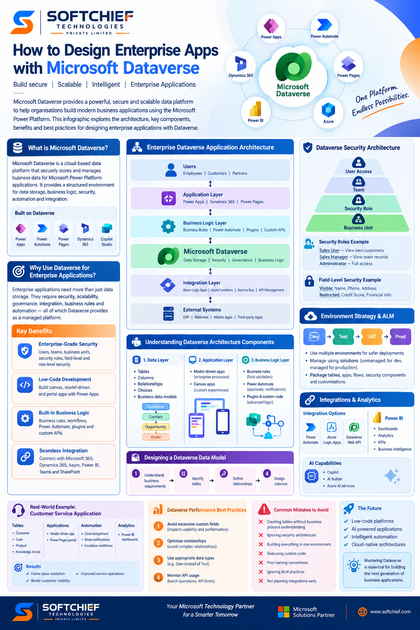
Enterprise Dataverse Application Architecture
A well-designed Dataverse solution typically follows a layered architecture.
Example:
Users

 |

Power Apps / Dynamics 365 / Power Pages

 |

Business Logic Layer

 |

Microsoft Dataverse

 |

Integration Layer

 |

External Systems
Understanding Dataverse Architecture Components
1. Data Layer
The data layer defines how business information is stored.
Key components:
- Tables
- Columns
- Relationships
- Choices
- Business data models
Example:
Customer Management Application:
Tables:
Customer

 |
 |
Contact

 |
 |
Opportunity

 |
 |
Order
A strong data model is the foundation of a successful enterprise application.
2. Application Layer
The application layer provides user interaction.
Examples:
Model-Driven Apps
Best for:
- Enterprise processes
- Data-intensive applications
- CRM-style solutions
Examples:
- Customer service application
- Sales management system
- Employee management system
Canvas Apps
Best for:
- Custom user experiences
- Mobile applications
- Task-based applications
Examples:
- Field inspection app
- Expense submission app
- Inventory counting app
3. Business Logic Layer
Business logic controls how applications behave.
Dataverse supports:
Business Rules
Used for:
- Field validation
- Conditional logic
- Simple automation
Example:
If customer status is “Inactive”:
Hide renewal fields.
Power Automate
Used for:
- Approval processes
- Notifications
- Integrations
- Background automation
Example:
When a sales opportunity reaches “Won”:
Automatically:
- Create order
- Notify finance team
- Send customer confirmation
Plugins and Custom Code
For complex scenarios, developers can use:
- C# plugins
- Custom APIs
- Azure Functions integration
Example:
Advanced pricing calculation:
Order Created

↓

Plugin Executes

↓

Calculate Discount

↓

Update Order Value
Designing a Dataverse Data Model
Data modelling is one of the most important skills for Dataverse architects.
A poor data model can create:
- Performance issues
- Reporting problems
- Security challenges
- Difficult maintenance
Step 1: Understand Business Requirements
Before creating tables, understand:
- Business processes
- User roles
- Data relationships
- Reporting requirements
Example:
A recruitment application may require:
Tables:
- Candidate
- Job Position
- Interview
- Offer
- Employee
Step 2: Identify Tables
Tables represent business entities.
Examples:
Standard tables:
- Account
- Contact
- Lead
- Opportunity
Custom tables:
- Project
- Contract
- Asset
- Application
Step 3: Define Relationships
Dataverse supports:
One-to-Many Relationship
Example:
One customer can have many orders.
Customer

   |

   |---- Order 1

   |---- Order 2

   |---- Order 3
Many-to-Many Relationship
Example:
Employees can participate in multiple projects.
Projects can have multiple employees.
Step 4: Design Columns Carefully
Avoid unnecessary fields.
Good practice:
Use meaningful names:
Instead of:
Field1
Field2
Field3
Use:
CustomerType
RegistrationDate
CreditLimit
Dataverse Security Architecture
Security design should be planned before application development.
A typical enterprise security model:
Business Unit

       |

Security Role

       |

Team

       |

User Access
Security Roles
Security roles define permissions.
Examples:
Sales User:
- Read customer records
- Create opportunities
Sales Manager:
- Approve opportunities
- View team records
Administrator:
- Configure system
Field-Level Security
Some data requires additional protection.
Example:
Customer table:
Visible to sales team:
- Name
- Phone
- Address
Restricted:
- Credit score
- Financial information
Field-level security protects sensitive information.
Environment Strategy for Enterprise Dataverse Solutions
Enterprise organisations should use multiple environments.
Recommended approach:
Development Environment

        ↓

Testing Environment

        ↓

UAT Environment

        ↓

Production Environment
Benefits:
- Safer deployments
- Better governance
- Reduced production issues
Solutions and Application Lifecycle Management (ALM)
Dataverse applications should be managed using solutions.
Solutions package:
- Tables
- Apps
- Flows
- Security components
- Customisations
Types:
Unmanaged Solutions
Used for:
- Development
Managed Solutions
Used for:
- Production deployment
Integrating Dataverse with External Systems
Enterprise applications rarely work alone.
Common integrations include:
- ERP systems
- Websites
- Mobile applications
- Azure services
- Third-party applications
Integration Options
Power Automate
Best for:
- Business workflows
- Simple integrations
Example:
Dataverse record created:
↓
Send Teams notification
Azure Integration Services
Best for:
- Enterprise integrations
Includes:
- Azure Logic Apps
- Azure Functions
- Service Bus
- API Management
Dataverse Web API
Used for:
- Custom applications
- External systems
- Developer integrations
Example:
Mobile application:
Mobile App

↓

Dataverse Web API

↓

Business Data
Using Power BI with Dataverse
Dataverse provides excellent reporting capabilities.
Power BI can connect to Dataverse for:
- Dashboards
- Analytics
- KPIs
- Business intelligence
Example:
Sales Dashboard:
- Revenue trends
- Sales pipeline
- Customer performance
- Regional analysis
AI Capabilities with Dataverse
Modern enterprise applications increasingly use AI.
Dataverse supports AI-powered scenarios through:
- Copilot
- AI Builder
- Azure AI services
Examples:
Customer service application:
AI can:
- Summarise cases
- Suggest responses
- Classify requests
Sales application:
AI can:
- Predict opportunities
- Recommend actions
Real-World Enterprise Example: Customer Service Application
A global organisation wants to improve customer support.
Challenges:
- Customer information stored across systems
- Manual case management
- Slow response times
Solution:
Built using Dataverse:
Tables:
- Customer
- Case
- Product
- Knowledge Article
Applications:
- Customer service model-driven app
- Power Pages customer portal
Automation:
- Case assignment
- Email notifications
- Escalation workflows
Analytics:
- Power BI dashboards
Results:
- Faster issue resolution
- Better customer visibility
- Improved service operations
Dataverse Performance Best Practices
Enterprise applications must be designed for scale.
Best practices:
1. Avoid Excessive Custom Fields
Too many fields impact usability and performance.
2. Optimise Relationships
Avoid unnecessary complex relationships.
3. Use Appropriate Data Types
Choose correct column types.
Example:
Use:
Date field
instead of:
Text field storing dates.
4. Monitor API Usage
Large integrations should consider:
- API limits
- Batch operations
- Azure integration patterns
Common Mistakes When Designing Dataverse Applications
Avoid:
❌ Creating tables without understanding business processes
❌ Ignoring security architecture
❌ Building everything in one environment
❌ Overusing custom code
❌ Poor naming conventions
❌ Ignoring ALM practices
❌ Not planning integrations early
Future of Enterprise Application Development with Dataverse
The future of business application development is moving towards:
- Low-code platforms
- AI-powered applications
- Intelligent automation
- Cloud-native architectures
Microsoft Dataverse is becoming a central platform for organisations looking to build scalable enterprise solutions faster.
Professionals who understand Dataverse architecture, security, integration and governance will play a critical role in modern digital transformation projects.
Conclusion
Microsoft Dataverse provides a powerful foundation for building secure, scalable and intelligent enterprise applications.
However, successful Dataverse solutions require more than creating tables and applications. Architects must carefully design:
- Data models
- Security frameworks
- Application architecture
- Integration strategies
- Deployment processes
When designed correctly, Dataverse enables organisations to build enterprise-grade applications that improve productivity, automate processes and deliver better business outcomes.
For Power Platform developers, Dynamics 365 consultants and solution architects, mastering Dataverse architecture is an essential skill for building the next generation of business applications.









