
How to Secure Azure Resources Using Microsoft Defender for Cloud
Introduction
Cloud adoption is accelerating at an unprecedented pace. Organizations are migrating applications, databases, virtual machines, containers and entire business processes to Microsoft Azure to gain scalability, flexibility and cost efficiency. However, with this rapid growth comes an equally significant challenge—cloud security.
Cybercriminals no longer focus solely on traditional data centres. Modern attacks target cloud identities, misconfigured storage accounts, vulnerable virtual machines, Kubernetes clusters, APIs and workloads running across hybrid and multi-cloud environments.
A single misconfiguration can expose sensitive customer data, disrupt business operations and result in significant financial and reputational damage.
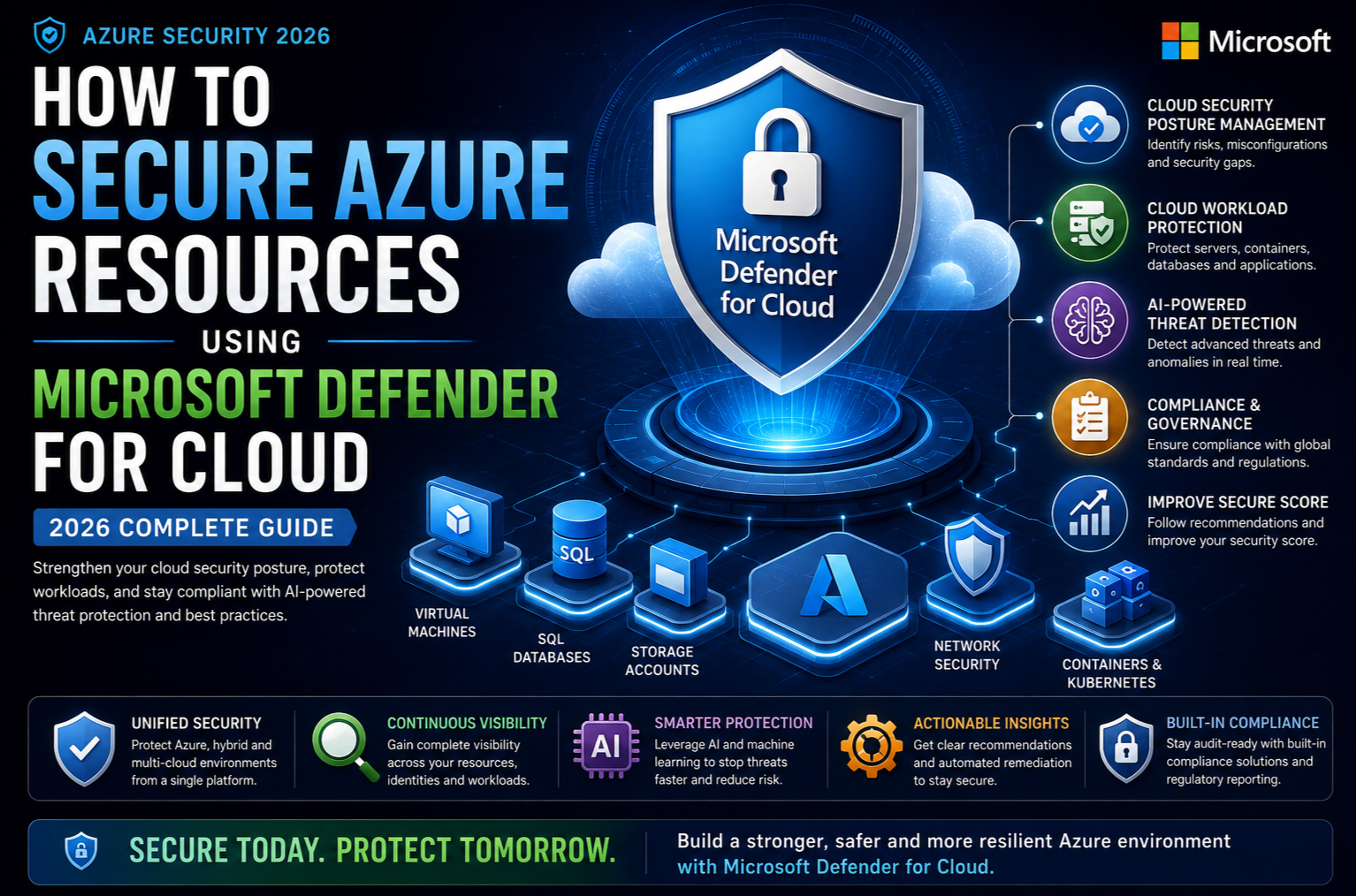
This is where Microsoft Defender for Cloud becomes a game-changing security solution. More than just a security monitoring tool, it is Microsoft’s unified Cloud-Native Application Protection Platform (CNAPP) that combines Cloud Security Posture Management (CSPM), Cloud Workload Protection (CWPP), AI-driven threat detection and compliance management into one intelligent platform.
In this comprehensive guide, you’ll learn how to secure Azure resources using Microsoft Defender for Cloud, understand its latest AI-powered capabilities in 2026 and discover best practices that every Azure professional should follow.
Why Azure Security Matters More Than Ever
Organizations today manage thousands of cloud resources, including:
- Virtual Machines
- Azure Storage Accounts
- Azure SQL Databases
- Azure Kubernetes Service (AKS)
- Azure App Services
- Azure Key Vault
- Azure Networking
- Azure Functions
- Azure AI Services
- Microsoft Fabric
- Azure OpenAI workloads
Each of these services introduces potential security risks if not properly configured.
Common cloud security challenges include:
- Publicly exposed storage accounts
- Weak authentication methods
- Unpatched virtual machines
- Excessive user permissions
- Insecure APIs
- Container vulnerabilities
- Misconfigured networking
- Secrets stored in application code
- Shadow IT resources
- Compliance violations
Traditional security tools often lack visibility into cloud environments, making proactive protection difficult.
Microsoft Defender for Cloud addresses these challenges by continuously assessing your environment, identifying risks and recommending actionable improvements.
What Is Microsoft Defender for Cloud?
Microsoft Defender for Cloud is Microsoft’s unified cloud security platform designed to protect Azure, on-premises and multi-cloud environments such as AWS and Google Cloud.
It provides continuous security monitoring throughout the lifecycle of your cloud resources—from development and deployment to runtime protection and governance.
Its core capabilities include:
- Cloud Security Posture Management (CSPM)
- Cloud Workload Protection (CWPP)
- AI-powered threat detection
- Vulnerability assessment
- Compliance monitoring
- Regulatory reporting
- Attack path analysis
- Security recommendations
- DevSecOps integration
- Hybrid and multi-cloud security
Instead of reacting to security incidents after they occur, Defender for Cloud helps organizations proactively identify weaknesses and reduce their overall attack surface.
Key Components of Microsoft Defender for Cloud
1. Cloud Security Posture Management (CSPM)
CSPM continuously evaluates Azure resources against Microsoft’s security best practices.
It identifies:
- Misconfigured virtual machines
- Unsecured storage accounts
- Missing encryption
- Weak authentication
- Public IP exposure
- Network vulnerabilities
- Identity risks
Each recommendation includes clear remediation guidance, enabling security teams to quickly resolve issues before they become vulnerabilities.
2. Cloud Workload Protection (CWPP)
CWPP protects workloads running across cloud environments.
Supported workloads include:
- Virtual Machines
- Containers
- Kubernetes
- SQL Databases
- Storage Accounts
- App Services
- APIs
- Key Vault
- Azure Resource Manager
The platform continuously monitors workload behaviour and detects suspicious activity in real time.
3. Microsoft Secure Score
One of the most valuable features of Defender for Cloud is the Secure Score.
Secure Score measures your organization’s overall security posture based on Microsoft security recommendations.
Examples include:
- Enable Multi-Factor Authentication
- Encrypt disks
- Enable endpoint protection
- Restrict public access
- Configure network security groups
- Apply system updates
- Enable Defender plans
As recommendations are implemented, the Secure Score improves, providing a measurable way to track security maturity over time.
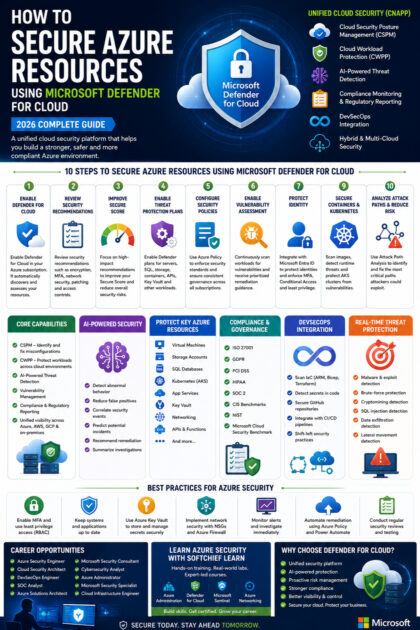
Step-by-Step: How to Secure Azure Resources Using Microsoft Defender for Cloud
Step 1 – Enable Microsoft Defender for Cloud
Begin by enabling Defender for Cloud in your Azure subscription.
Once enabled, the platform automatically starts discovering resources and assessing their security posture.
Resources monitored include:
- Compute
- Networking
- Storage
- Databases
- Containers
- Identity services
- Applications
Within minutes, you’ll receive an overview of your security status.
Step 2 – Review Security Recommendations
Navigate to the Recommendations dashboard.
Typical recommendations include:
- Enable MFA
- Install endpoint protection
- Close unnecessary ports
- Enable Just-In-Time VM access
- Encrypt storage accounts
- Configure Azure Backup
- Enable Microsoft Defender plans
- Enable vulnerability assessment
Prioritize recommendations based on severity and business impact.
Step 3 – Improve Secure Score
Rather than attempting to fix every issue simultaneously, focus on recommendations that significantly improve your Secure Score.
Examples include:
- Restrict management ports
- Enable Microsoft Entra ID security features
- Implement least-privilege access
- Enable disk encryption
- Remove inactive accounts
This structured approach provides measurable improvements while reducing critical risks.
Step 4 – Enable Threat Protection Plans
Microsoft Defender offers specialized protection plans for various Azure services.
Examples include:
- Defender for Servers
- Defender for SQL
- Defender for Storage
- Defender for Containers
- Defender for App Service
- Defender for APIs
- Defender for Key Vault
- Defender for DNS
- Defender for Resource Manager
- Defender for Databases
Each plan provides advanced threat detection tailored to the specific workload.
Step 5 – Configure Security Policies
Organizations should establish consistent security policies using Azure Policy and Defender for Cloud.
Examples include:
- Mandatory encryption
- Required tagging
- Region restrictions
- Approved VM sizes
- Storage access controls
- Network segmentation
Policy enforcement ensures governance across all Azure subscriptions.
Step 6 – Enable Vulnerability Assessment
Defender for Cloud continuously scans workloads for known vulnerabilities.
It detects:
- Missing operating system updates
- Weak passwords
- Insecure software versions
- Outdated libraries
- High-risk CVEs
- Unsupported operating systems
Security teams receive prioritized remediation guidance based on risk severity.
Step 7 – Protect Identity
Identity remains one of the most common attack vectors.
Integrate Microsoft Defender for Cloud with Microsoft Entra ID to:
- Detect suspicious sign-ins
- Monitor risky users
- Enforce Conditional Access
- Require MFA
- Identify privilege escalation attempts
- Monitor administrative activities
Strong identity protection significantly reduces the likelihood of account compromise.
Step 8 – Secure Containers and Kubernetes
Modern applications increasingly rely on containers.
Defender for Cloud secures Kubernetes environments by:
- Scanning container images
- Detecting vulnerable packages
- Monitoring runtime behaviour
- Identifying privilege escalation
- Detecting malicious containers
- Protecting Kubernetes clusters
This enables organizations to embrace cloud-native development without compromising security.
Step 9 – Protect Storage Accounts
Storage accounts often contain sensitive customer and business information.
Recommended protections include:
- Disable anonymous access
- Enable encryption
- Configure private endpoints
- Enable Defender for Storage
- Enable soft delete
- Restrict network access
- Monitor suspicious downloads
- Enable immutable storage where required
These measures significantly reduce the risk of data exposure.
Step 10 – Monitor Security Alerts
The Security Alerts dashboard provides real-time visibility into threats such as:
- Brute-force attacks
- Malware detection
- Cryptomining attempts
- SQL injection
- Remote code execution
- Suspicious authentication
- Data exfiltration
- Lateral movement
Each alert includes recommended investigation and response steps, helping security teams act quickly.
AI-Powered Security in Microsoft Defender for Cloud
One of the most significant advancements in 2026 is the integration of AI into cloud security.
Microsoft Defender for Cloud now leverages AI to:
- Detect abnormal workload behaviour
- Identify hidden attack paths
- Correlate security events across services
- Reduce false positives
- Prioritize high-risk alerts
- Recommend remediation actions
- Predict potential security incidents
- Summarize complex investigations
AI enables security teams to focus on genuine threats rather than manually reviewing thousands of alerts.
Attack Path Analysis
Traditional security tools identify individual vulnerabilities but often fail to show how attackers could combine them.
Attack Path Analysis addresses this challenge by mapping relationships between:
- Identities
- Virtual machines
- Storage accounts
- Networking
- Databases
- Applications
- Permissions
- Secrets
Security teams can visualize how an attacker might move through the environment and remediate the most critical attack paths first.
DevSecOps Integration
Security should begin during application development rather than after deployment.
Defender for Cloud integrates with DevOps workflows to:
- Scan Infrastructure as Code (IaC)
- Validate ARM templates
- Review Bicep templates
- Analyze Terraform configurations
- Detect secrets in code
- Scan GitHub repositories
- Identify vulnerable dependencies
This “shift-left” approach helps developers build secure applications from the outset.
Regulatory Compliance Dashboard
Organizations operating in regulated industries must comply with standards such as:
- ISO 27001
- GDPR
- PCI DSS
- HIPAA
- SOC 2
- CIS Benchmarks
- NIST
- Microsoft Cloud Security Benchmark
Defender for Cloud continuously evaluates your environment against these frameworks and generates compliance reports to support audits and governance initiatives.
Real-World Example
Imagine an e-commerce company hosting its website on Azure.
Its environment includes:
- Azure App Service
- Azure SQL Database
- Azure Storage
- Azure Kubernetes Service
- Azure Key Vault
- Azure Virtual Machines
After enabling Microsoft Defender for Cloud, the organization discovers:
- An exposed management port on a virtual machine
- An outdated container image
- A storage account allowing public access
- Weak identity permissions
- Missing disk encryption
Using Defender for Cloud’s recommendations, the company addresses these issues, improves its Secure Score and strengthens its overall security posture—reducing the risk of data breaches and service disruption.
Best Practices for Securing Azure Resources
To maximize the value of Microsoft Defender for Cloud:
- Enable Microsoft Defender plans for critical workloads.
- Review security recommendations regularly.
- Improve Secure Score continuously.
- Enforce Multi-Factor Authentication for all privileged users.
- Apply the principle of least privilege using Role-Based Access Control (RBAC).
- Keep operating systems and applications updated.
- Use Azure Key Vault to store secrets securely.
- Implement network segmentation with Network Security Groups (NSGs) and Azure Firewall.
- Enable Microsoft Sentinel integration for advanced Security Information and Event Management (SIEM) and Security Orchestration, Automation and Response (SOAR).
- Monitor security alerts and investigate high-severity incidents promptly.
- Scan Infrastructure as Code before deployment.
- Protect containers and Kubernetes clusters with runtime security.
- Conduct regular security reviews and penetration testing.
- Automate remediation wherever possible using Azure Policy and Power Automate.
Career Opportunities in Azure Cloud Security
As organizations continue to invest in cloud technologies, professionals with expertise in Azure security are in high demand.
Learning Microsoft Defender for Cloud can open doors to roles such as:
- Azure Security Engineer
- Cloud Security Architect
- Azure Administrator
- DevSecOps Engineer
- SOC Analyst
- Microsoft Security Consultant
- Cloud Infrastructure Engineer
- Cybersecurity Analyst
- Azure Solutions Architect
- Microsoft Security Specialist
Combining skills in Microsoft Defender for Cloud, Microsoft Sentinel, Azure Policy, Microsoft Entra ID and Azure networking provides a strong foundation for a successful career in cloud security.
Learn Azure Security with Softchief Learn
At Softchief Learn, we believe that mastering cloud security requires more than theoretical knowledge. Our expert-led training programs are designed to help learners gain practical, job-ready skills through hands-on labs and real-world scenarios.
Our Azure training covers:
- Microsoft Azure Administration
- Microsoft Defender for Cloud
- Microsoft Sentinel
- Azure Networking
- Azure Identity and Access Management
- Azure Virtual Machines
- Azure Kubernetes Service (AKS)
- Azure Security Best Practices
- Microsoft Entra ID
- Azure DevSecOps
Whether you’re a beginner exploring Azure or an experienced IT professional aiming to become a certified Azure Security Engineer, our structured learning paths, live projects and expert mentorship will help you build confidence and accelerate your career.
Conclusion
Securing cloud environments is no longer optional—it’s a critical business requirement. As Azure environments become more complex, organizations need intelligent security solutions that provide continuous visibility, proactive threat detection and actionable recommendations.
Microsoft Defender for Cloud delivers exactly that. By combining Cloud Security Posture Management, Cloud Workload Protection, AI-driven analytics, compliance monitoring and DevSecOps integration, it enables businesses to secure Azure resources throughout their lifecycle.
For IT professionals and organizations alike, understanding how to implement and optimize Microsoft Defender for Cloud is an essential skill in today’s cloud-first world. Investing in these capabilities not only strengthens security but also builds resilience, supports regulatory compliance and prepares your organization for the evolving cybersecurity landscape.









