
How to Mask Dataverse Field values in Microsoft Power Platform using Masking Rules

Introduction
In modern business applications, protecting sensitive data is no longer optional. Organizations using Microsoft Dataverse often store confidential information such as:
- Customer phone numbers
- Email addresses
- Employee salary details
- PAN/Aadhaar numbers
- Bank account information
- Medical records
While Microsoft Dataverse provides strong security through roles and permissions, there are many situations where users should only see partial information instead of complete values.
Watch the video to learn more or scroll to read the article.
This is where Dataverse Field Masking Rules become extremely valuable.
Field masking allows organizations to hide sensitive data dynamically while still enabling users to work efficiently with records.
In this blog, we’ll explore:
- What Dataverse field masking is
- Why it matters
- How it works
- Real-world use cases
- Step-by-step configuration
- Security considerations
- Best practices
- Limitations
What is Dataverse Field Masking?
A Field Masking Rule in Microsoft Dataverse is a feature that partially hides sensitive information from users who do not have permission to view the complete value.
Instead of exposing the original data, Dataverse displays a masked version.
Example
| Original Value | Masked Value |
|---|---|
| 9876543210 | ******3210 |
| john.doe@gmail.com | jo********@gmail.com |
| 1234-5678-9012-3456 | ************3456 |
The actual data remains securely stored in Dataverse, but unauthorized users only see the masked representation.
Why Field Masking is Important
Organizations deal with highly sensitive information every day.
Without masking:
- Confidential information may leak
- Insider threats increase
- Compliance risks become higher
- Data misuse becomes easier
- Customer trust can be affected
Field masking helps organizations achieve:
- Better data privacy
- Stronger governance
- Safer customer handling
- Reduced exposure of confidential information
- Compliance with regulations
Compliance Benefits
Dataverse field masking supports compliance initiatives for:
- GDPR
- HIPAA
- PCI-DSS
- ISO 27001
- Internal security policies
By masking sensitive fields, organizations reduce the risk of exposing personal or regulated data.
Real-World Business Scenarios
1. Customer Support Application
Support agents need to identify customers using phone numbers but should not see the entire number.
Visible to Support Agent
******4587
Visible to Manager
9876544587
2. HR Management System
HR executives can view complete salary information, while department managers see masked values.
Manager View
₹******00
HR View
₹125000
3. Healthcare Application
Reception staff can identify patients without viewing full medical identifiers.
4. Banking & Finance
Customer service representatives may only see the last 4 digits of account numbers.
How Dataverse Field Masking Works
Field masking works dynamically at the column level.
Process Flow
- Sensitive data is stored normally in Dataverse.
- A masking rule is applied to the column.
- Users with appropriate permissions see the full value.
- Other users see a masked version.
- The original data remains unchanged in storage.
This means masking only affects data visibility, not the actual stored value.
Difference Between Field Security and Field Masking
| Feature | Field Security | Field Masking |
|---|---|---|
| Purpose | Restrict access completely | Partially hide data |
| User Visibility | No access | Partial visibility |
| Data Exposure | Hidden entirely | Limited exposure |
| Typical Usage | Highly restricted fields | Sensitive but identifiable fields |
Common Fields That Should Be Masked
| Field Type | Example |
|---|---|
| Mobile Numbers | Customer phone |
| Email IDs | Personal emails |
| Financial Data | Account numbers |
| Identity Numbers | PAN, Aadhaar |
| Salary Details | Payroll information |
| Medical Information | Patient IDs |
| Credit Card Numbers | Payment details |
Step-by-Step: Configure Field Masking in Dataverse
Step 1: Open Power Apps
Navigate to:
Step 2: Select the Environment
Choose the environment containing your Dataverse tables.
Step 3: Open Dataverse solution, Table, columns masked rule
Go to:
Dataverse → Solutions -> Select your solution
add a new component Secured masking Rule
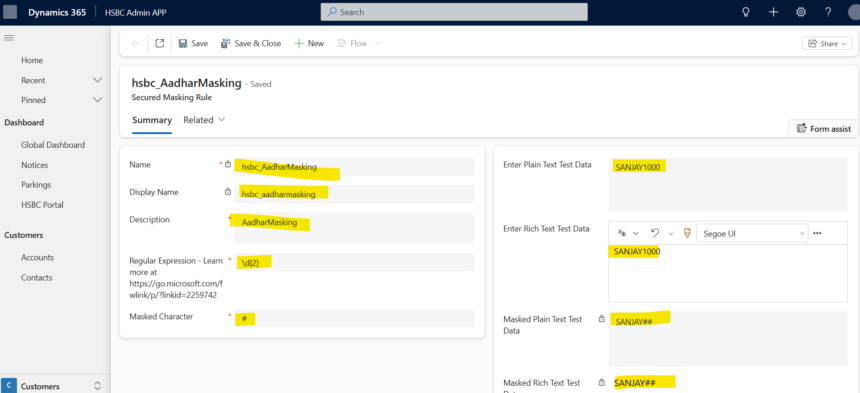
Select your table-> column and in advanced property select the rule in column security.
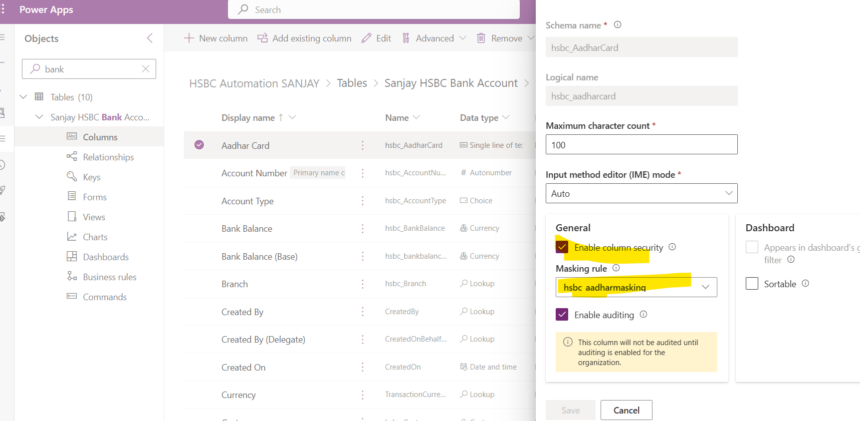
Step 4: Select the Sensitive Column
Open the required column.
Example:
- Phone Number
- Email Address
- Account Number
Step 5: Enable Field Masking
Inside the column settings:
- Enable masking
- Choose masking behavior
- Save changes
Step 6: Configure Security Roles
Decide which users:
- Can see full values
- Can only see masked values
This is typically controlled using:
- Security Roles
- Column Security Profiles
Example: Phone Number Masking
Original Value
9876543210
Masked Display
******3210
Users can still identify the customer using the last digits while protecting the full number.
Example: Email Address Masking
Original Value
Masked Value
jo********@gmail.com
This keeps the domain visible while hiding sensitive details.
Best Practices for Dataverse Field Masking
1. Mask Only Sensitive Fields
Avoid masking fields unnecessarily.
Focus on:
- Personal data
- Financial data
- Confidential business data
2. Use Role-Based Access
Combine masking with proper security roles.
3. Apply Least Privilege Principle
Only authorized users should view complete values.
4. Audit Sensitive Access
Monitor who accesses unmasked information.
5. Test User Scenarios
Always validate:
- Admin experience
- End-user visibility
- Security role behavior
Limitations of Field Masking
While powerful, field masking has some considerations.
1. Not a Replacement for Security
Masking should complement security, not replace it.
2. API Access Considerations
Users with elevated privileges or API access may still retrieve actual values depending on permissions.
3. Business Logic Dependencies
Plugins, Power Automate flows, and integrations may still process original values.
4. Reporting Scenarios
Reports and exports should also be secured properly.
Field Masking vs Encryption
| Feature | Field Masking | Encryption |
|---|---|---|
| Purpose | Hide display value | Protect stored data |
| Data Storage | Original data stored normally | Data stored encrypted |
| User Visibility | Partial visibility | Requires decryption |
| Main Goal | Privacy | Data protection |
Both features serve different purposes and often work together.
Security Architecture Recommendation
A strong Dataverse security design should include:
- Security Roles
- Column Security
- Field Masking
- Auditing
- Environment Security
- DLP Policies
- Conditional Access
- Encryption
Field masking should be part of a broader security strategy.
Advantages of Dataverse Field Masking
Enhanced Privacy
Protects confidential information from unnecessary exposure.
Better User Experience
Users can still identify records without viewing full data.
Compliance Ready
Supports enterprise compliance initiatives.
Reduced Insider Threat
Limits misuse of sensitive information.
Centralized Security
Managed directly within Dataverse.
Conclusion
Dataverse Field Masking is an essential feature for organizations handling sensitive information in Microsoft Power Platform.
It provides a balance between:
- Security
- Usability
- Compliance
- Operational efficiency
By implementing field masking correctly, organizations can significantly reduce the risk of exposing confidential data while maintaining a seamless user experience.
As businesses continue adopting Power Platform solutions at scale, field masking becomes an important component of enterprise-grade security architecture.








